OMRON connect
Dikemas kini
Versi Semasa
7.22.0
Ditawarkan Oleh

Berhentilah bimbang dengan bayaran berlebihan semasa menggunakan OMRON connect di telefon bimbit anda, bebaskan diri anda dari layar kecil dan nikmati penggunaan aplikasi pada paparan yang jauh lebih besar. Mulai sekarang, dapatkan pengalaman skrin penuh aplikasi anda dengan papan kekunci dan tetikus. MEmu Play semua ciri mengejutkan yang anda harapkan: pemasangan cepat dan penyediaan mudah, kawalan intuitif, tidak ada batasan bateri, data mudah alih, dan panggilan yang mengganggu. MEmu 9 yang baru adalah pilihan terbaik untuk menggunakan OMRON connect di komputer anda. Dikodkan dengan penyerapan kami, pengurus multi-instance menjadikan pembukaan 2 atau lebih akaun pada masa yang sama mungkin. Dan yang paling penting, mesin emulasi eksklusif kami dapat melepaskan potensi penuh PC anda, menjadikan semuanya lancar dan menyeronokkan.
Tunjukkan Lagi
Download OMRON connect on PC with MEmu Android Emulator. Enjoy playing on big screen. The OMRON connect app is an important part of our Going for Zero mission to eliminate heart attacks and strokes.
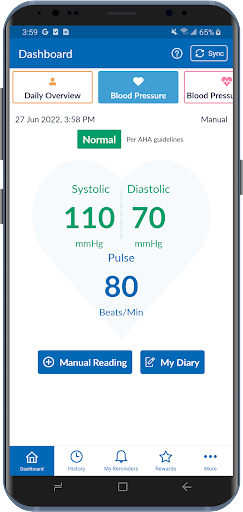
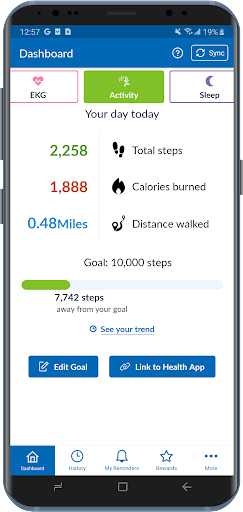
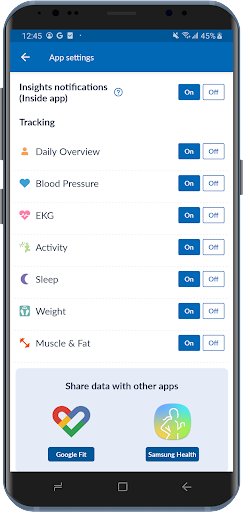
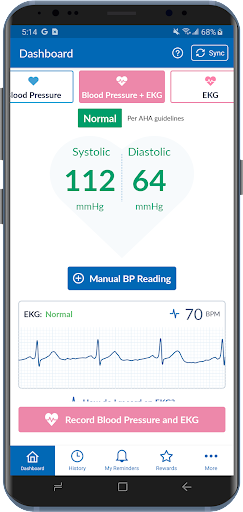
The OMRON connect app is an important part of our Going for Zero mission to eliminate heart attacks and strokes. Monitoring your blood pressure everyday can help make this vision a reality. The app makes it easy to view your health metrics anytime, anywhere. Syncing wirelessly to your smartphone or tablet, the OMRON connect app tracks your readings and daily measurements, giving you a more clear view of your overall health.
Learn more at goingforzero.com
The OMRON connect app provides a lot of free features for you to manage your heart health (some feature availability depends on device type)
• Easily sync your readings to your smartphone via Bluetooth®
• Email readings to family, physicians, or other health care professionals and share your progress
• Keep track of your health history by storing and saving unlimited readings
• Get a complete view of your blood pressure with systolic, diastolic and pulse readings
• Receive alerts when notable changes in blood pressure are detected
• Set physical activity goals and track your progress
• Monitor the length and quality of your sleep
• Monitor your weight and BMI (body mass index)
• Access additional historical health data around sleep, weight, EKG, activity and more
• Directly send readings to Google Fit
In addition, the app provides the following premium features:
• Gain insights into how the combination of your blood pressure, activity, sleep and weight may be affecting your heart health
• Earn rewards for tracking your vitals and managing your health
• Generate premium reports with more detailed information on vitals
• Track medication to help rest assured that you will never miss a dose
Never diagnose or treat yourself based on this system. ALWAYS consult with your physician.
Note: The app will require SMS and Call Log permissions only for users of the HeartGuide™ device for messaging related notifications to work properly.
The following OMRON Blood Pressure Monitors can connect to this app:
Complete™ Upper Arm Blood Pressure Monitor + EKG: BP 7900
Evolv® Upper Arm: BP7000
HeartGuide™: BP8000-M, BP8000-L
10 Series
Upper Arm: BP786, BP786N, BP786CAN, BP786CANN, BP7450, BP7450CAN
Wrist: BP653
7 Series
Upper Arm: BP761, BP761N, BP761CAN, BP761CANN, BP7350, BP7350CAN
Wrist: BP654, BP6350
5 Series
Upper Arm: BP7250, BP7250CAN
Platinum
Upper Arm: BP5450
Gold
Upper Arm: BP5350
Wrist: BP4350
Silver
Upper Arm: BP5250
Miscellaneous
BP769CAN BP Monitor
BP300 (ReliOn)
The following OMRON Body Composition Monitor will connect to this app:
BCM-500
For a full list of compatible devices, visit OmronHealthcare.com/connected
Please visit https://s3-us-west-2.amazonaws.com/ofs-terms-production-us/OCM/en-us/eula.html to view terms of use.
Tunjukkan Lagi

1. Muat turun pemasang MEmu dan selesaikan persediaan

2. Mulakan MEnu kemudian buka Google Play di desktop

3. Cari OMRON connect di Google Play
Install
4. Muat turun dan Pasang OMRON connect
5. Apabila selesai pemasangan, menekan ikon itu untuk memulakan

6. Gunakan MENu untuk mengalami OMRON connect pada komputer anda
MEmu Play ialah emulator Android terbaik, dengan lebih 100 juta pengguna mengalami pengalaman aplikasi Android yang unggul. Teknologi virtualisasi MEmu membolehkan anda menjalankan beribu-ribu aplikasi Android dengan lancar pada komputer anda, walaupun yang paling mencabar.
Skrin lebih besar dengan grafik yang lebih baik; Tempoh yang panjang, tanpa had bateri atau data mudah alih.
Sokongan Keymapping penuh untuk kawalan tepat papan kekunci dan tetikus atau gamepad.
Pelbagai akaun permainan atau tugas pada satu PC sekaligus dengan pengurus pelbagai contoh.
Use OMRON connect on PC by following steps: