OMRON connect
更新日期
目前版本
7.21.1
提供者

想體驗OMRON connect,可是手機熒幕太小,一載軟體就變燙,怎麼辦?透過逍遙模擬器,在電腦的大熒幕上暢快體驗!用鍵鼠操作更精準流暢,逍遙模擬器滿足您的所有期待。在電腦上下載安裝OMRON connect,不用擔心電池當掉,想體驗多久就多久,順暢跑一天~全新的逍遙模擬器9,絕對是您體驗OMRON connect電腦版的最佳選擇。完美的按鍵映射系統讓OMRON connect如PC軟體般順手;強大的多開功能可同時執行多個任務;獨家虛擬化技術更能徹底釋放電腦效能,保障長時間穩定運作。我們致力於不讓設備限制您的體驗,助您輕鬆高效,暢快無比!
更多
透過逍遙模擬器,在電腦上下載OMRON connect,享受大熒幕的暢快體驗。 The OMRON connect app is an important part of our Going for Zero mission to eliminate heart attacks and strokes.
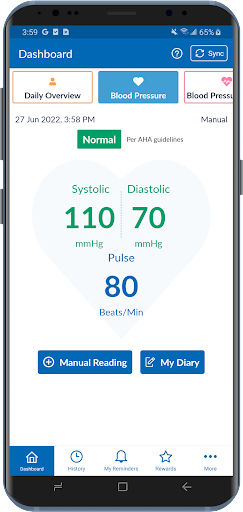
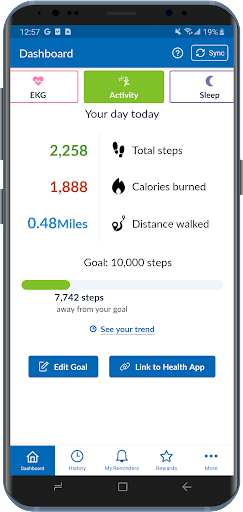
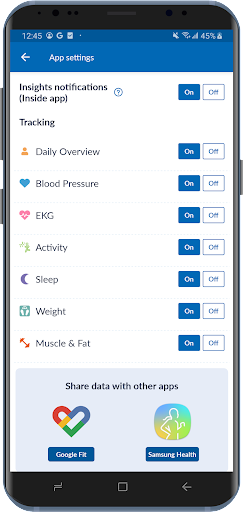
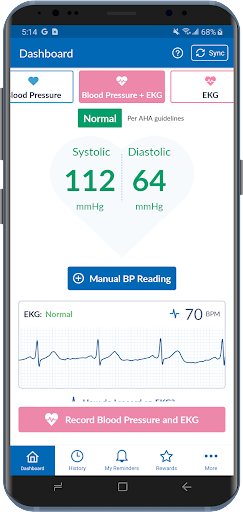
The OMRON connect app is an important part of our Going for Zero mission to eliminate heart attacks and strokes. Monitoring your blood pressure everyday can help make this vision a reality. The app makes it easy to view your health metrics anytime, anywhere. Syncing wirelessly to your smartphone or tablet, the OMRON connect app tracks your readings and daily measurements, giving you a more clear view of your overall health.
Learn more at goingforzero.com
The OMRON connect app provides a lot of free features for you to manage your heart health (some feature availability depends on device type)
• Easily sync your readings to your smartphone via Bluetooth®
• Email readings to family, physicians, or other health care professionals and share your progress
• Keep track of your health history by storing and saving unlimited readings
• Get a complete view of your blood pressure with systolic, diastolic and pulse readings
• Receive alerts when notable changes in blood pressure are detected
• Set physical activity goals and track your progress
• Monitor the length and quality of your sleep
• Monitor your weight and BMI (body mass index)
• Access additional historical health data around sleep, weight, EKG, activity and more
• Directly send readings to Google Fit
In addition, the app provides the following premium features:
• Gain insights into how the combination of your blood pressure, activity, sleep and weight may be affecting your heart health
• Earn rewards for tracking your vitals and managing your health
• Generate premium reports with more detailed information on vitals
• Track medication to help rest assured that you will never miss a dose
Never diagnose or treat yourself based on this system. ALWAYS consult with your physician.
Note: The app will require SMS and Call Log permissions only for users of the HeartGuide™ device for messaging related notifications to work properly.
The following OMRON Blood Pressure Monitors can connect to this app:
Complete™ Upper Arm Blood Pressure Monitor + EKG: BP 7900
Evolv® Upper Arm: BP7000
HeartGuide™: BP8000-M, BP8000-L
10 Series
Upper Arm: BP786, BP786N, BP786CAN, BP786CANN, BP7450, BP7450CAN
Wrist: BP653
7 Series
Upper Arm: BP761, BP761N, BP761CAN, BP761CANN, BP7350, BP7350CAN
Wrist: BP654, BP6350
5 Series
Upper Arm: BP7250, BP7250CAN
Platinum
Upper Arm: BP5450
Gold
Upper Arm: BP5350
Wrist: BP4350
Silver
Upper Arm: BP5250
Miscellaneous
BP769CAN BP Monitor
BP300 (ReliOn)
The following OMRON Body Composition Monitor will connect to this app:
BCM-500
For a full list of compatible devices, visit OmronHealthcare.com/connected
Please visit https://s3-us-west-2.amazonaws.com/ofs-terms-production-us/OCM/en-us/eula.html to view terms of use.
更多

1. 下載逍遙安裝器並完成設置

2. 啟動逍遙後打開位於桌面上的谷歌商店

3. 在谷歌商店中搜尋OMRON connect
Install
4. 下載並安裝OMRON connect
5. 下載完成後點擊圖標來啟動

6. 透過逍遙享受在電腦上體驗OMRON connect
逍遙安卓是優秀的安卓模擬器,全球超過5000萬用戶的優先選擇。逍遙安卓以虛擬化技術為核心,為用户打造突破手機配備局限的應用平台!
大屏精細展示;無限待機,超越電池和流量限制
鍵鼠,手把操作全面支持,操作更精準
用逍遙多開同時運行多個遊戲、應用。
Use OMRON connect on PC by following steps: