OMRON connect
更新日
現在のバージョン
7.22.0
提供元

スマートフォンは不要!パソコンと同じようにキーボードとマウスで操作できます。MEmu Playは、あなたが待ち望んでいたすべての楽しみをお届けします。バッテリー残量や小さな画面を気にすることなく、OMRON connectをご利用ください。最新のMEmu 9は、OMRON connectをPCで体験するのに最適です!完璧なキーマッピングシステムにより、PCのようなスムーズな操作性を実現します。マルチインスタンス機能により、複数のアプリケーションを同時に実行できます。独自の仮想化エンジンがPCのパフォーマンスを最大限に引き出します。アプリを使用するだけでなく、高品質な体験を得ることができます。
もっと見る
OMRON connectをPCでダウンロード!大画面でより楽しむ。電源が落ちてしまうとか通信料が足りないとかの問題を心配する必要がなく、PCの大画面でより快適にゲームを楽しましょう! The OMRON connect app is an important part of our Going for Zero mission to eliminate heart attacks and strokes.
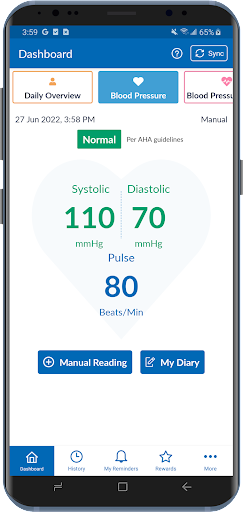
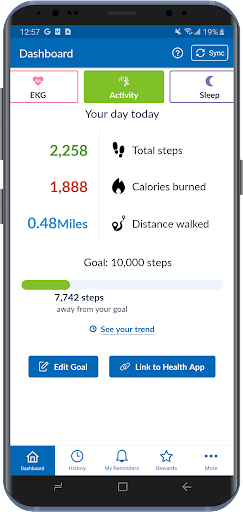
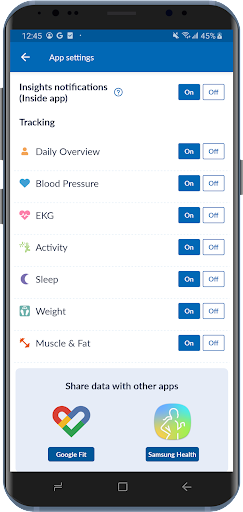
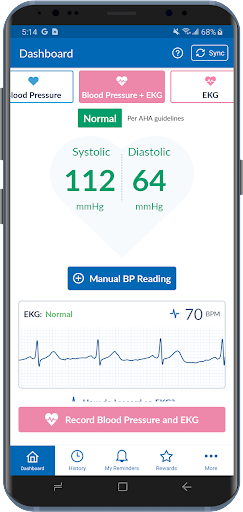
The OMRON connect app is an important part of our Going for Zero mission to eliminate heart attacks and strokes. Monitoring your blood pressure everyday can help make this vision a reality. The app makes it easy to view your health metrics anytime, anywhere. Syncing wirelessly to your smartphone or tablet, the OMRON connect app tracks your readings and daily measurements, giving you a more clear view of your overall health.
Learn more at goingforzero.com
The OMRON connect app provides a lot of free features for you to manage your heart health (some feature availability depends on device type)
• Easily sync your readings to your smartphone via Bluetooth®
• Email readings to family, physicians, or other health care professionals and share your progress
• Keep track of your health history by storing and saving unlimited readings
• Get a complete view of your blood pressure with systolic, diastolic and pulse readings
• Receive alerts when notable changes in blood pressure are detected
• Set physical activity goals and track your progress
• Monitor the length and quality of your sleep
• Monitor your weight and BMI (body mass index)
• Access additional historical health data around sleep, weight, EKG, activity and more
• Directly send readings to Google Fit
In addition, the app provides the following premium features:
• Gain insights into how the combination of your blood pressure, activity, sleep and weight may be affecting your heart health
• Earn rewards for tracking your vitals and managing your health
• Generate premium reports with more detailed information on vitals
• Track medication to help rest assured that you will never miss a dose
Never diagnose or treat yourself based on this system. ALWAYS consult with your physician.
Note: The app will require SMS and Call Log permissions only for users of the HeartGuide™ device for messaging related notifications to work properly.
The following OMRON Blood Pressure Monitors can connect to this app:
Complete™ Upper Arm Blood Pressure Monitor + EKG: BP 7900
Evolv® Upper Arm: BP7000
HeartGuide™: BP8000-M, BP8000-L
10 Series
Upper Arm: BP786, BP786N, BP786CAN, BP786CANN, BP7450, BP7450CAN
Wrist: BP653
7 Series
Upper Arm: BP761, BP761N, BP761CAN, BP761CANN, BP7350, BP7350CAN
Wrist: BP654, BP6350
5 Series
Upper Arm: BP7250, BP7250CAN
Platinum
Upper Arm: BP5450
Gold
Upper Arm: BP5350
Wrist: BP4350
Silver
Upper Arm: BP5250
Miscellaneous
BP769CAN BP Monitor
BP300 (ReliOn)
The following OMRON Body Composition Monitor will connect to this app:
BCM-500
For a full list of compatible devices, visit OmronHealthcare.com/connected
Please visit https://s3-us-west-2.amazonaws.com/ofs-terms-production-us/OCM/en-us/eula.html to view terms of use.
もっと見る

1. MEmuインストーラーをダウンロードしてセットアップを完了する

2. MEmuを起動し、デスクトップでのPlayストアを開く

3. PlayストアでOMRON connectを検索する
Install
4. OMRON connectをダウンロードしてインストールする
5. インストールが完了したら、アイコンをクリックしてスタート

6. MEmuを使ってパソコンでOMRON connectを体験する
MEmu Playは現在、最高の無料Androidエミュレーターであり、5,000万人のユーザーが優れたAndroidアプリ体験を楽しんでいます。MEmuの仮想化テクノロジーにより、数千ものAndroidアプリをコンピューターでスムーズに実行できます。
大画面でより精細;無限の待機、電池とドラフィックの極限を超え
キーボード・マウス・コントローラーを全力でサポート、より快適
マルチインスタンスで複数のゲームを同時に実行
Use OMRON connect on PC by following steps: