Baby Panda's Discovery Games
Bijgewerkt
Huidige Versie
8.75.01.01
Aangeboden door

Met al je passie voor het spelen van Baby Panda's Discovery Games, zouden je handen niet beperkt moeten zijn tot een klein scherm van je telefoon. Speel als een professional en krijg volledige controle over je spel met toetsenbord en muis. MEmu biedt je alles wat je verwacht. Download en speel Baby Panda's Discovery Games op PC. Speel zo lang als je wilt, geen beperkingen meer van batterij, mobiele data en storende oproepen. De gloednieuwe MEmu 9 is de beste keuze om Baby Panda's Discovery Games op PC te spelen. Voorbereid met onze expertise, maakt het uitmuntende vooraf ingestelde keymapping systeem van Baby Panda's Discovery Games een echt PC-spel. MEmu multi-instance manager maakt het spelen van 2 of meer accounts op hetzelfde apparaat mogelijk. En het belangrijkste, onze exclusieve emulatie-engine kan het volledige potentieel van je PC benutten, waardoor alles soepel verloopt.
Meer tonen
Download Baby Panda's Discovery Games op je pc met de MEmu Android-emulator. Geniet van spelen op een groot scherm. BabyBus's first immersive 3D science game is here!
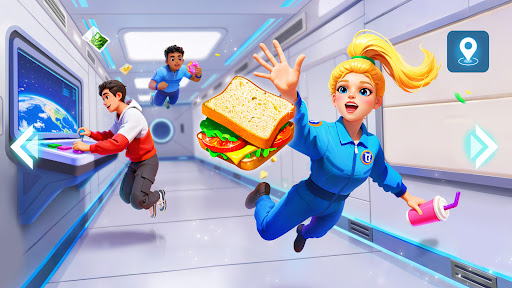
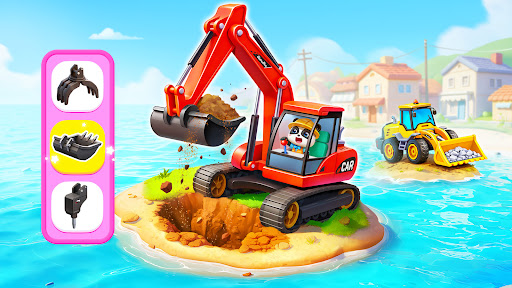
BabyBus's first immersive 3D science game is here!
This is a fun learning game for kids and families, bringing play, exploration, and hands-on activities together in one exciting world. Kids can explore the human body, space, construction vehicles, and more while doing fun science experiments in a relaxed and safe environment.
EXPLORE THE SECRETS OF THE HUMAN BODY
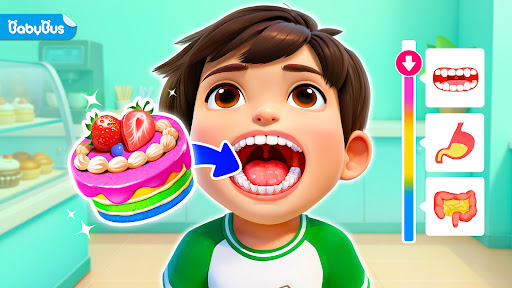
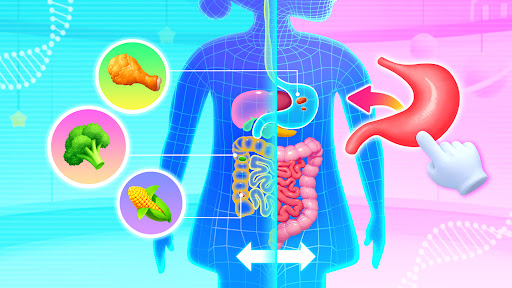
Complete a human body puzzle to start a food digestion adventure! Choose a boy or girl and place organs like the mouth, stomach, and small intestine in the right places to learn about the body. Put different foods into the character’s mouth and follow their journey through the body. Learn about the whole digestion process in a fun and visual way.
EXPERIENCE LIFE IN SPACE
Step into a mysterious space station and explore different modules like the core cabin, manned spacecraft, and cargo spacecraft. Float in zero gravity and experience daily life with astronauts. Learn how they eat, exercise, sleep, and work in space while exploring their special floating home and enjoying a unique space adventure.
BUILD A POWERFUL WORLD
Drive different construction vehicles and start a world-building journey. Use an excavator to remove unsafe buildings, operate a bulldozer to clear rocks and dirt, and control a crane to move building materials. Through simulations, kids can learn the unique roles of large construction vehicles, and enjoy the fun of driving and building games.
PLAY WITH SCIENCE EXPERIMENTS
Hamburgers, fried chicken, broccoli... do different foods digest the same way in the body? What happens if you eat while running? Will water float like bubbles and join together inside a space station? By doing simple science experiments and observing what happens, kids can find the answers to these questions.
Learn, play, and build while exploring how the world works! This immersive 3D game sparks kids' curiosity, creativity, and hands-on thinking while helping them connect science with everyday life. Let your kids begin a science adventure today!
FEATURES:
- A kids’ game for both boys and girls;
- Fun and lively 3D gaming experience;
- Science exploration with learning, experiences, and experiments;
- Encourages kids' curiosity and creativity;
- Easy-to-use controls;
- A safe and kid-friendly gaming environment;
- Supports offline play;
- Regular updates.
Meer tonen

1. Download de MEmu-installatie en voltooi de setup

2. Start MEmu en open vervolgens Google Play op het bureaublad

3. Zoek Baby Panda's Discovery Games in Google Play
Install
4. Download en installeer Baby Panda's Discovery Games
5. Klik op het icoon om te starten na het voltooien van de installatie

6. Geniet van het spelen van Baby Panda's Discovery Games op PC met MEmu
MEmu Play is de beste Android Emulator en 100 miljoen mensen genieten al van de superieure Android-game-ervaring. De virtualisatietechnologie van MEmu stelt je in staat om duizenden Android-spellen soepel op je PC te spelen, zelfs de meest grafisch intensieve.
Groter scherm met betere graphics; Lange duur, zonder beperking van batterij of mobiele data.
Volledige Keymapping-ondersteuning voor nauwkeurige besturing van toetsenbord en muis of gamepad.
Meerdere game-accounts of taken op één PC tegelijk met Multi-Instance manager.
Speel Baby Panda's Discovery Games op PC door de volgende stappen te volgen: