Baby Panda's Discovery Games
Updated
Current Version
8.75.01.01
Offered By

With your passion for Baby Panda's Discovery Games, you shouldn’t have to limit yourself to the small screen of a phone. Play like a pro and take full control of the game using a keyboard and mouse. MEmu gives you everything you’re looking for. Download and play Baby Panda's Discovery Games on PC. Play as long as you want — no more worries about battery life, mobile data, or unexpected calls. The all-new MEmu 9 is the best way to play Baby Panda's Discovery Games on PC. With our expertly designed keymapping system, Baby Panda's Discovery Games feels just like a real PC game. The MEmu multi-instance manager lets you run two or more accounts on the same device at the same time. Most importantly, our exclusive emulation engine unlocks your PC’s full potential, delivering smooth and seamless performance.
Show more
Download Baby Panda's Discovery Games on PC with MEmu Android Emulator. Enjoy playing on big screen. BabyBus's first immersive 3D science game is here!

BabyBus's first immersive 3D science game is here!
This is a fun learning game for kids and families, bringing play, exploration, and hands-on activities together in one exciting world. Kids can explore the human body, space, construction vehicles, and more while doing fun science experiments in a relaxed and safe environment.
EXPLORE THE SECRETS OF THE HUMAN BODY
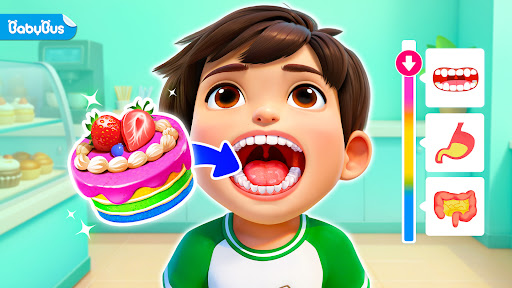
Complete a human body puzzle to start a food digestion adventure! Choose a boy or girl and place organs like the mouth, stomach, and small intestine in the right places to learn about the body. Put different foods into the character’s mouth and follow their journey through the body. Learn about the whole digestion process in a fun and visual way.
EXPERIENCE LIFE IN SPACE
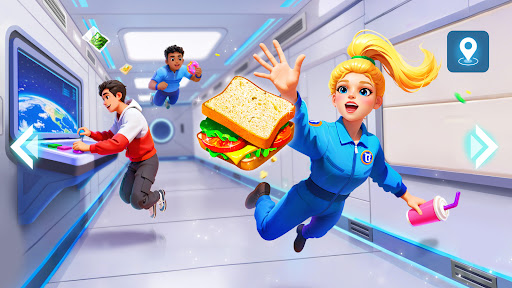
Step into a mysterious space station and explore different modules like the core cabin, manned spacecraft, and cargo spacecraft. Float in zero gravity and experience daily life with astronauts. Learn how they eat, exercise, sleep, and work in space while exploring their special floating home and enjoying a unique space adventure.
BUILD A POWERFUL WORLD
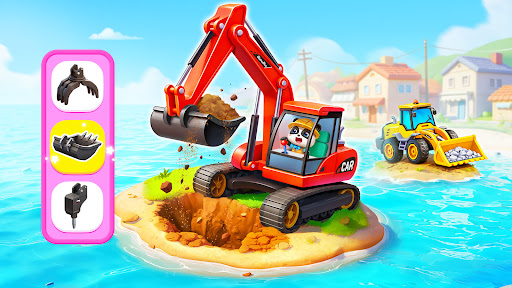
Drive different construction vehicles and start a world-building journey. Use an excavator to remove unsafe buildings, operate a bulldozer to clear rocks and dirt, and control a crane to move building materials. Through simulations, kids can learn the unique roles of large construction vehicles, and enjoy the fun of driving and building games.
PLAY WITH SCIENCE EXPERIMENTS
Hamburgers, fried chicken, broccoli... do different foods digest the same way in the body? What happens if you eat while running? Will water float like bubbles and join together inside a space station? By doing simple science experiments and observing what happens, kids can find the answers to these questions.
Learn, play, and build while exploring how the world works! This immersive 3D game sparks kids' curiosity, creativity, and hands-on thinking while helping them connect science with everyday life. Let your kids begin a science adventure today!
FEATURES:
- A kids’ game for both boys and girls;
- Fun and lively 3D gaming experience;
- Science exploration with learning, experiences, and experiments;
- Encourages kids' curiosity and creativity;
- Easy-to-use controls;
- A safe and kid-friendly gaming environment;
- Supports offline play;
- Regular updates.
Show more

1. Download MEmu installer and finish the setup

2. Start MEmu then open Google Play on the desktop

3. Search Baby Panda's Discovery Games in Google Play
Install
4. Download and Install Baby Panda's Discovery Games
5. On install completion click the icon to start

6. Enjoy playing Baby Panda's Discovery Games on PC with MEmu
MEmu Play is the best Android emulator and 100 million people already enjoy its superb Android gaming experience. The MEmu virtualization technology empowers you to play thousands of Android games smoothly on your PC, even the most graphic-intensive ones.
Bigger screen with better graphics; Long duration, without limitation of battery or mobile data.
Full Keymapping support for precise control of keyboard and mouse or gamepad.
Multiple game accounts or tasks on single PC at one time with Multi-Instance manager.
Play Baby Panda's Discovery Games on PC by following steps: