
EXPANSION EXPLORER
Bijgewerkt
Huidige Versie
1.0.0
Aangeboden door

Maak je geen zorgen meer over extra kosten bij het gebruik van EXPANSION EXPLORER op je mobiele telefoon, bevrijd jezelf van het kleine scherm en geniet van het gebruik van de app op een veel groter display. Vanaf nu, krijg een volledige schermervaring van je app met toetsenbord en muis. MEmu biedt je alle verrassende functies die je verwachtte: snelle installatie en eenvoudige configuratie, intuïtieve besturing, geen beperkingen meer van batterij, mobiele data en storende oproepen. De gloednieuwe MEmu 9 is de beste keuze voor het gebruik van EXPANSION EXPLORER op je computer. MEmu multi-instance manager maakt het mogelijk om tegelijkertijd 2 of meer accounts te openen. En het belangrijkste, onze exclusieve emulatiemotor kan het volledige potentieel van je PC benutten, waardoor alles soepel en plezierig wordt.
Meer tonen
Download EXPANSION EXPLORER on PC with MEmu Android Emulator. Enjoy playing on big screen. ・What is Expansion Content?
・What is Expansion Content?
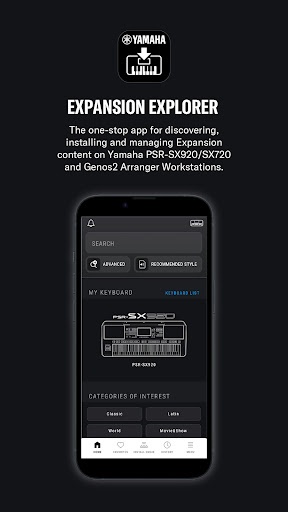
Expansion Content includes free additional Voices, Styles, Multi Pads, and more for you to install and enjoy on your Arranger Workstation. A growing library of Expansion Content is already available, featuring a diverse range of instruments and Styles from around the world.
・Search
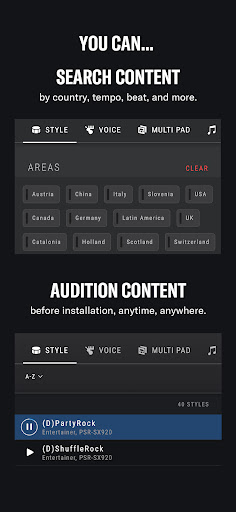
Search for content directly from the app's Home screen and use the advanced search options to filter results by country, tempo, beat, and more.
・Style Recommendations
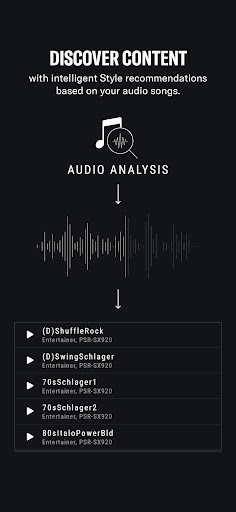
If you have an audio file of the song you want to play, Expansion Explorer can analyze it and recommend the most suitable Style from the Expansion Content library for your performance.
・PRE-LISTEN
Content can be auditioned in the app before installation. You can listen to the auditions anytime, even without being connected to your instrument.
・INSTALL
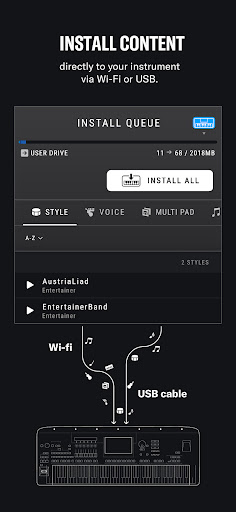
The app installs your chosen content directly to your instrument. Depending on your instrument’s specification, this is done wirelessly or via a USB cable.
・CONVENIENT FEATURES
Create a list of your favorite content, view your preview and installation history, and switch between light and dark modes in the app.
----
CAUTIONS :
Contents already installed by Yamaha Expansion Manager into the Expansion area of your keyboard, including pre-installed content in PSR-SX920 and 720, will be removed when installing new content from Yamaha EXPANSION EXPLORER.
About pre-installed content in PSR-SX920 and 720, you will be able to reinstall them through the EXPANSION EXPLORER app, if desired.
Meer tonen

1. Download de MEmu-installatie en voltooi de setup

2. Start MEmu en open vervolgens Google Play op het bureaublad

3. Zoek EXPANSION EXPLORER in Google Play
Install
4. Download en installeer EXPANSION EXPLORER
5. Klik op het icoon om te starten na het voltooien van de installatie

6. Ervaar EXPANSION EXPLORER op pc met MEmu
MEmu Play is de beste Android-emulator, met meer dan 100 miljoen gebruikers die genieten van de superieure Android-app-ervaring. Dankzij de virtualisatietechnologie van MEmu kun je duizenden Android-apps soepel op je computer draaien, zelfs de meest veeleisende.
Groter scherm met betere graphics; Lange duur, zonder beperking van batterij of mobiele data.
Volledige Keymapping-ondersteuning voor nauwkeurige besturing van toetsenbord en muis of gamepad.
Meerdere game-accounts of taken op één PC tegelijk met Multi-Instance manager.
Gebruik EXPANSION EXPLORER op PC door de volgende stappen te volgen: