Logistics1 GO
Bijgewerkt
Huidige Versie
11.0.0.23
Aangeboden door

Maak je geen zorgen meer over extra kosten bij het gebruik van Logistics1 GO op je mobiele telefoon, bevrijd jezelf van het kleine scherm en geniet van het gebruik van de app op een veel groter display. Vanaf nu, krijg een volledige schermervaring van je app met toetsenbord en muis. MEmu biedt je alle verrassende functies die je verwachtte: snelle installatie en eenvoudige configuratie, intuïtieve besturing, geen beperkingen meer van batterij, mobiele data en storende oproepen. De gloednieuwe MEmu 9 is de beste keuze voor het gebruik van Logistics1 GO op je computer. MEmu multi-instance manager maakt het mogelijk om tegelijkertijd 2 of meer accounts te openen. En het belangrijkste, onze exclusieve emulatiemotor kan het volledige potentieel van je PC benutten, waardoor alles soepel en plezierig wordt.
Meer tonen
Geniet van een fantastische ervaring met Logistics1 GO op je pc met MEmu Play. Het is een krachtige gratis Android-emulator die je duizenden Android-apps biedt voor de desktopversie. Geniet van contact met vrienden en verbeter je werk met hogere efficiëntie! The user-friendly, flexible and multilingual Logistics1 software presents, registers and communicates all relevant information to and from your drivers.
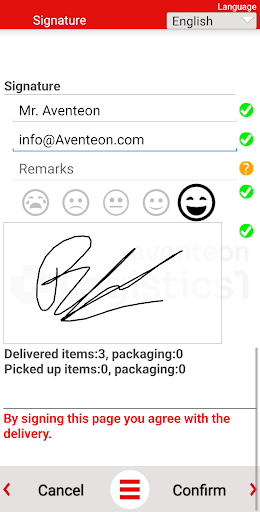
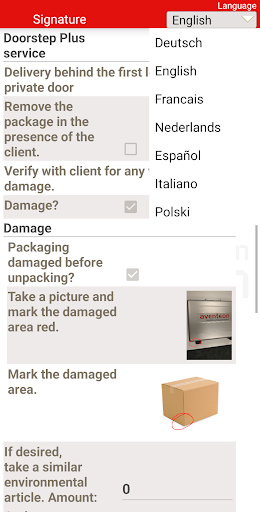
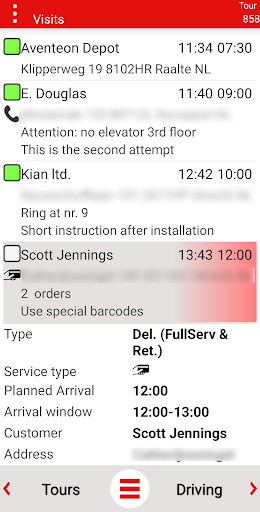
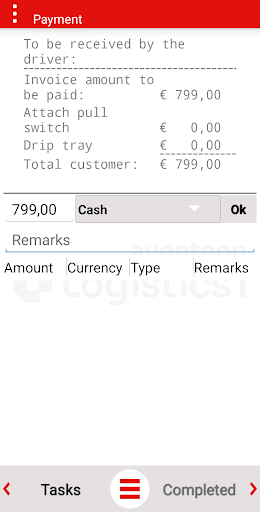
The user-friendly, flexible and multilingual Logistics1 software presents, registers and communicates all relevant information to and from your drivers.
Excellent Last Mile support, knowing the exact location of your shipments, uniform processes, highest percentage successful first deliveries, save time and money on communication, Management By Exception, process optimization, going ahead of competition, "Always On", knowing what happens outside your vehicles and make the delivery-man your principal's business card are various objectives which are realized by using the Logistics1 software.
The Logistics1 solution guarantees proven, highly effective functionalities which are currently operational at customer sites of successful companies successfully active within markets such as Package Delivery, Web-store Delivery, Wholesale, Retail Distribution, Two Man Handling and fine-meshed distribution.
Some example usage scenarios;
-Taking pictures of the goods and location and marking damages.
-Calling the consignee 30 minutes before the estimated time of arrival.
-Barcode scanning of delivered and picked up goods.
-Guiding the user in goods placement and installation.
Logistics1 GO may collect the following information;
GPS location
The location of the device is shared only when Logistics1 is active, in the foreground or background. This location will be shared with the Logistics1 server. Depending on the used centralized modules and external systems by the Logistics1 Customer (The Logistics service provider), this information can be shared with the planning department and customer service.
The device location is also used for automated generation and analysis of your working hours.
Phone calls
If correctly configured, telephone call duration to and from phone numbers listed in the active tour can be registered.
This information is helpful in monitoring customer contact by the user.
Camera
If correctly configured, Logistics1 can use the camera for taking pictures of goods and or delivery- or pickup locations and other objects surrounding the user.
Storage
Logistics1 requires the storage permission only for specific Logistics1 support and installation purposes and will not read or collect non-Logistics1 data via this permission.
Logistics1 is a business to business application. If you have questions about Logistics1, please contact your employer or contractor.
If you have got a fantastic idea about for improving our product, you can always sent an email to AndroidSupport@Aventeon.com.
Meer tonen

1. Download de MEmu-installatie en voltooi de setup

2. Start MEmu en open vervolgens Google Play op het bureaublad

3. Zoek Logistics1 GO in Google Play
Install
4. Download en installeer Logistics1 GO
5. Klik op het icoon om te starten na het voltooien van de installatie

6. Ervaar Logistics1 GO op pc met MEmu
MEmu Play is de beste Android-emulator, met meer dan 100 miljoen gebruikers die genieten van de superieure Android-app-ervaring. Dankzij de virtualisatietechnologie van MEmu kun je duizenden Android-apps soepel op je computer draaien, zelfs de meest veeleisende.
Groter scherm met betere graphics; Lange duur, zonder beperking van batterij of mobiele data.
Volledige Keymapping-ondersteuning voor nauwkeurige besturing van toetsenbord en muis of gamepad.
Meerdere game-accounts of taken op één PC tegelijk met Multi-Instance manager.
Gebruik Logistics1 GO op PC door de volgende stappen te volgen: