myAudioNova
Bijgewerkt
Huidige Versie
4.4.0
Aangeboden door

Maak je geen zorgen meer over extra kosten bij het gebruik van myAudioNova op je mobiele telefoon, bevrijd jezelf van het kleine scherm en geniet van het gebruik van de app op een veel groter display. Vanaf nu, krijg een volledige schermervaring van je app met toetsenbord en muis. MEmu biedt je alle verrassende functies die je verwachtte: snelle installatie en eenvoudige configuratie, intuïtieve besturing, geen beperkingen meer van batterij, mobiele data en storende oproepen. De gloednieuwe MEmu 9 is de beste keuze voor het gebruik van myAudioNova op je computer. MEmu multi-instance manager maakt het mogelijk om tegelijkertijd 2 of meer accounts te openen. En het belangrijkste, onze exclusieve emulatiemotor kan het volledige potentieel van je PC benutten, waardoor alles soepel en plezierig wordt.
Meer tonen
Geniet van een fantastische ervaring met myAudioNova op je pc met MEmu Play. Het is een krachtige gratis Android-emulator die je duizenden Android-apps biedt voor de desktopversie. Geniet van contact met vrienden en verbeter je werk met hogere efficiëntie! The myAudioNova app provides you access to enhanced hearing controls and personalization options for your Phonak and AudioNova hearing aid(s) as well as a host of rich functionalities to tailor your myAudioNova hearing experience to your needs.
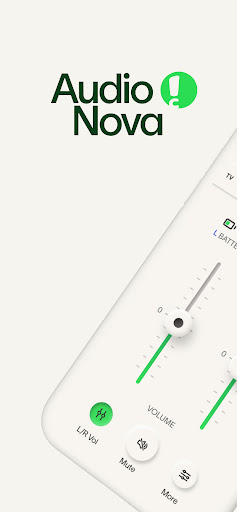
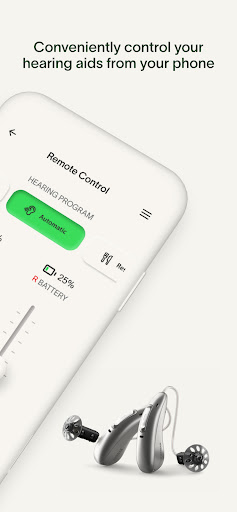
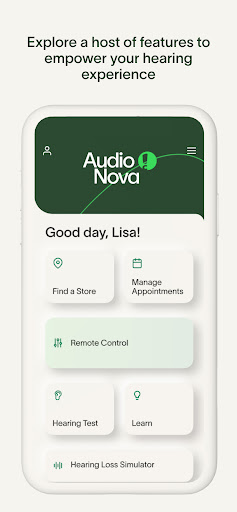
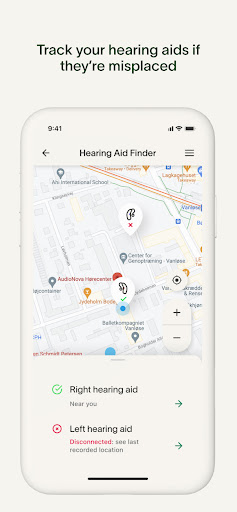
The myAudioNova app provides you access to enhanced hearing controls and personalization options for your Phonak and AudioNova hearing aid(s) as well as a host of rich functionalities to tailor your myAudioNova hearing experience to your needs.
The Remote Control enables you to easily make changes to your hearing aid(s) to suit your personal preferences for various listening situations. You can easily adjust the volume, sound and various hearing aid features (e.g., noise reduction and microphone directionality) or select pre-defined programs according to the different listening situation you are in.
The new Hearing Aid Finder helps you locate the last place your hearing aids were connected to the app, making it easier to find them if they go missing. This optional feature requires background location services to work, meaning it can track the last known location even when the app is closed or not in use.
You can conduct a Hearing Test as a self-screening to check your hearing ability and save your results by creating your personal myAudioNova Account. The Account will also empower you to book and manage your appointments and communication preferences.
The Hearing Loss Simulator replicates what it is like to have hearing loss and use a Hearing Instrument to help you and your loved ones better understand the potential benefits of using a Hearing Instrument.
Remote Support allows you to meet with your hearing care professional through a live video call and have your hearing aids adjusted remotely (by appointment). Also finding your nearest AudioNova store is available at your fingertips - getting in touch with us has never been easier.
Finally, the myAudioNova app allows setting up notifications such as cleaning reminders and provides a rich set of information about hearing health, including the in app instructions for use.
myAudioNova is compatible with Phonak and AudioNova hearing aids with Bluetooth® connectivity. Google Mobile Services (GMS) certified Android devices supporting Bluetooth 4.2 and Android OS 11.0 or newer. Phones with Bluetooth low energy (BT-LE) capability required.
Android™ is a trademark of Google, Inc.
The Bluetooth® word mark and logos are registered trademarks owned by Bluetooth SIG, Inc. and any use of such marks by Sonova AG is under license.
Meer tonen

1. Download de MEmu-installatie en voltooi de setup

2. Start MEmu en open vervolgens Google Play op het bureaublad

3. Zoek myAudioNova in Google Play
Install
4. Download en installeer myAudioNova
5. Klik op het icoon om te starten na het voltooien van de installatie

6. Ervaar myAudioNova op pc met MEmu
MEmu Play is de beste Android-emulator, met meer dan 100 miljoen gebruikers die genieten van de superieure Android-app-ervaring. Dankzij de virtualisatietechnologie van MEmu kun je duizenden Android-apps soepel op je computer draaien, zelfs de meest veeleisende.
Groter scherm met betere graphics; Lange duur, zonder beperking van batterij of mobiele data.
Volledige Keymapping-ondersteuning voor nauwkeurige besturing van toetsenbord en muis of gamepad.
Meerdere game-accounts of taken op één PC tegelijk met Multi-Instance manager.
Gebruik myAudioNova op PC door de volgende stappen te volgen: