myAudioNova
Aktualisiert
Aktuelle Version
4.4.0
Angeboten von

Machen Sie sich keine Sorgen mehr über überhöhte Gebühren, wenn Sie myAudioNova auf Ihrem Mobiltelefon verwenden, befreien Sie sich von dem winzigen Bildschirm und genießen Sie die Nutzung der App auf einem viel größeren Display. Von nun an können Sie Ihre App mit Tastatur und Maus im Vollbildmodus nutzen. MEmu bietet Ihnen all die überraschenden Funktionen, die Sie erwartet haben: schnelle Installation und einfache Einrichtung, intuitive Steuerung, keine Einschränkungen mehr durch Batterie, mobile Daten und störende Anrufe. Der brandneue MEmu 9 ist die beste Wahl für die Nutzung von myAudioNova auf Ihrem Computer. Mit unserer Absorption kodiert, ermöglicht der Multi-Instanz-Manager die Eröffnung von 2 oder mehr Konten zur gleichen Zeit. Und das Wichtigste, unsere exklusive Emulations-Engine kann das volle Potenzial Ihres PCs freisetzen und alles reibungslos und angenehm gestalten.
Mehr anzeigen
Genieße myAudioNova auf deinem PC mit MEmu Play in einer fantastischen Version. Dieser leistungsstarke, kostenlose Android-Emulator bietet dir Zugriff auf Tausende von Android-Apps für deinen Desktop. Bleib mit Freunden in Kontakt und arbeite effizienter! The myAudioNova app provides you access to enhanced hearing controls and personalization options for your Phonak and AudioNova hearing aid(s) as well as a host of rich functionalities to tailor your myAudioNova hearing experience to your needs.
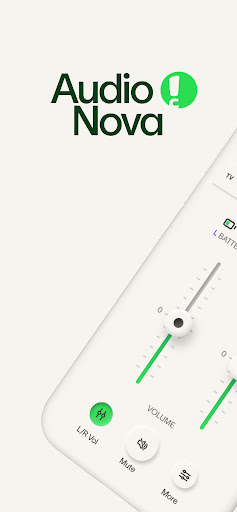
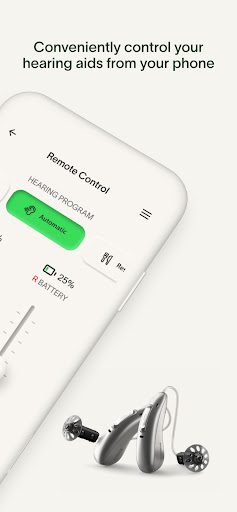
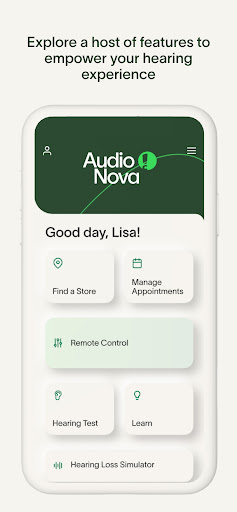
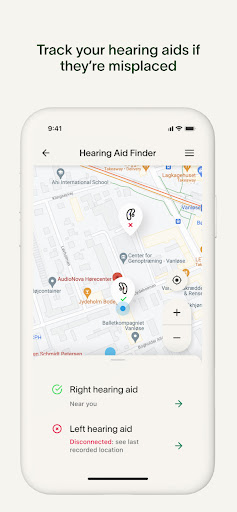
The myAudioNova app provides you access to enhanced hearing controls and personalization options for your Phonak and AudioNova hearing aid(s) as well as a host of rich functionalities to tailor your myAudioNova hearing experience to your needs.
The Remote Control enables you to easily make changes to your hearing aid(s) to suit your personal preferences for various listening situations. You can easily adjust the volume, sound and various hearing aid features (e.g., noise reduction and microphone directionality) or select pre-defined programs according to the different listening situation you are in.
The new Hearing Aid Finder helps you locate the last place your hearing aids were connected to the app, making it easier to find them if they go missing. This optional feature requires background location services to work, meaning it can track the last known location even when the app is closed or not in use.
You can conduct a Hearing Test as a self-screening to check your hearing ability and save your results by creating your personal myAudioNova Account. The Account will also empower you to book and manage your appointments and communication preferences.
The Hearing Loss Simulator replicates what it is like to have hearing loss and use a Hearing Instrument to help you and your loved ones better understand the potential benefits of using a Hearing Instrument.
Remote Support allows you to meet with your hearing care professional through a live video call and have your hearing aids adjusted remotely (by appointment). Also finding your nearest AudioNova store is available at your fingertips - getting in touch with us has never been easier.
Finally, the myAudioNova app allows setting up notifications such as cleaning reminders and provides a rich set of information about hearing health, including the in app instructions for use.
myAudioNova is compatible with Phonak and AudioNova hearing aids with Bluetooth® connectivity. Google Mobile Services (GMS) certified Android devices supporting Bluetooth 4.2 and Android OS 11.0 or newer. Phones with Bluetooth low energy (BT-LE) capability required.
Android™ is a trademark of Google, Inc.
The Bluetooth® word mark and logos are registered trademarks owned by Bluetooth SIG, Inc. and any use of such marks by Sonova AG is under license.
Mehr anzeigen

1. Laden das MEmu-Installationsprogramm herunter und beenden die Installation

2. MEmu starten und Google Play auf der Homepage öffnen

3. Suchen myAudioNova in Google Play
Install
4. Herunterladen und Installieren myAudioNova
5. Klicken nach Abschluss der Installation auf das Symbol, um es zu starten

6. Verwenden Sie MEmu, um myAudioNova auf Ihrem PC zu nutzen
MEmu Play ist aktuell der beste kostenlose Android-Emulator und bietet 50 Millionen Nutzern ein überragendes Android-App-Erlebnis. Dank der Virtualisierungstechnologie von MEmu können Sie Tausende von Android-Apps problemlos auf Ihrem Computer nutzen, selbst solche mit hohen Grafikanforderungen.
BGrößeres Bild mit besserer Grafik; Keine unterbrechungen, keine sorgen um Akku
Komplette Tastenbelegung unterstützt mit Maus und Tastatur oder Controller
Mit dem „Multi-Instance-Manager“ können Sie mehrere Spielkonten oder Spiele gleichzeitig auf einem PC ausführen.
Use myAudioNova on PC by following steps: