OpenSpace.ai Construction App
Bijgewerkt
Huidige Versie
85.1.0
Aangeboden door

Maak je geen zorgen meer over extra kosten bij het gebruik van OpenSpace.ai Construction App op je mobiele telefoon, bevrijd jezelf van het kleine scherm en geniet van het gebruik van de app op een veel groter display. Vanaf nu, krijg een volledige schermervaring van je app met toetsenbord en muis. MEmu biedt je alle verrassende functies die je verwachtte: snelle installatie en eenvoudige configuratie, intuïtieve besturing, geen beperkingen meer van batterij, mobiele data en storende oproepen. De gloednieuwe MEmu 9 is de beste keuze voor het gebruik van OpenSpace.ai Construction App op je computer. MEmu multi-instance manager maakt het mogelijk om tegelijkertijd 2 of meer accounts te openen. En het belangrijkste, onze exclusieve emulatiemotor kan het volledige potentieel van je PC benutten, waardoor alles soepel en plezierig wordt.
Meer tonen
Geniet van een fantastische ervaring met OpenSpace.ai Construction App op je pc met MEmu Play. Het is een krachtige gratis Android-emulator die je duizenden Android-apps biedt voor de desktopversie. Geniet van contact met vrienden en verbeter je werk met hogere efficiëntie! OpenSpace provides ground truth for your construction job site.
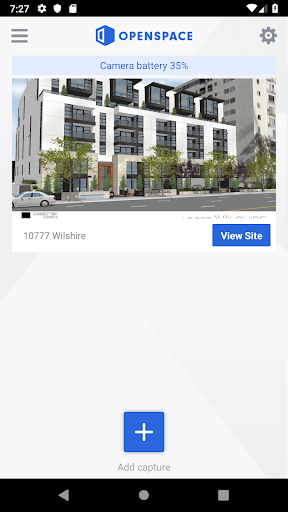
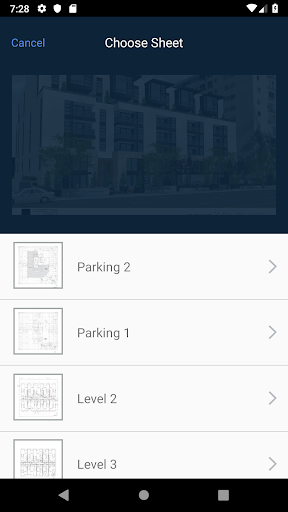
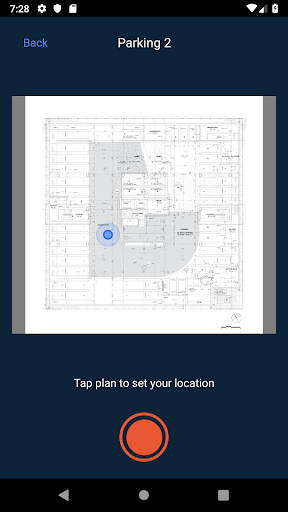
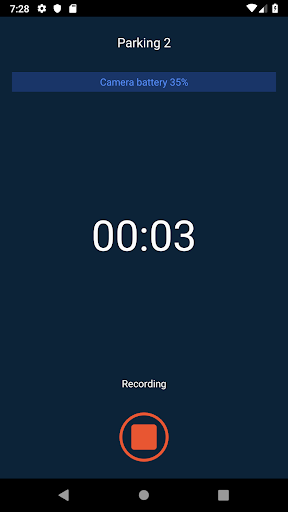
OpenSpace provides ground truth for your construction job site. While other 3D capture tools require dedicated setup and capture time, OpenSpace is special because it’s 100% labor free. Simply attach the 3D camera to the top of your hardhat with the included mount, then continue as normal - our proprietary artificial intelligence algorithm does the rest! It’s easy as wearing a Fitbit.
Think of us as a visual time machine, allowing your team to create 360 degree progress photos and visit a particular place at the job, at any moment in time. Resolve conflicts, validate WIP, add visual context to DCR’s and RFI’s and save needless travel to the site.
Why OpenSpace?
It works as you work: our advanced (and patent pending!) AI transforms the raw video data into a complete, easy-to-navigate Google Streetview style 360 degree map of your site, with no effort on your part.
Fully automated: As you move through the site, our AI automatically maps the video feed to your blueprints and creates a 360 degree record of progress. With OpenSpace, you hit record and go. We capture data while you work, so there is no labor cost. Other systems require you to assign someone a time-consuming “photo capture task” - and those labor costs adds up.
Time machine: Visit any point in time through an interactive 360 degree map of your site. Zoom and explore every detail and see progress as it happened.
What do our customers say?
Darin Peters
Vice President, Hathaway Dinwiddie
“OpenSpace solves some simple but necessary requirements of the construction process: progress photos, site documentation and workstream coordination… OpenSpace has made it easy - and easy is key - for us to have a living visual record of the jobsite progress, which has radically improved the reporting we have today. The future of what we can do with this data is exciting.”
Ready to get started? Contact us at info@openspace.ai
Meer tonen

1. Download de MEmu-installatie en voltooi de setup

2. Start MEmu en open vervolgens Google Play op het bureaublad

3. Zoek OpenSpace.ai Construction App in Google Play
Install
4. Download en installeer OpenSpace.ai Construction App
5. Klik op het icoon om te starten na het voltooien van de installatie

6. Ervaar OpenSpace.ai Construction App op pc met MEmu
MEmu Play is de beste Android-emulator, met meer dan 100 miljoen gebruikers die genieten van de superieure Android-app-ervaring. Dankzij de virtualisatietechnologie van MEmu kun je duizenden Android-apps soepel op je computer draaien, zelfs de meest veeleisende.
Groter scherm met betere graphics; Lange duur, zonder beperking van batterij of mobiele data.
Volledige Keymapping-ondersteuning voor nauwkeurige besturing van toetsenbord en muis of gamepad.
Meerdere game-accounts of taken op één PC tegelijk met Multi-Instance manager.
Gebruik OpenSpace.ai Construction App op PC door de volgende stappen te volgen: