Pregnancy App & Baby Tracker
Bijgewerkt
Huidige Versie
6.2.1
Aangeboden door

Maak je geen zorgen meer over extra kosten bij het gebruik van Pregnancy App & Baby Tracker op je mobiele telefoon, bevrijd jezelf van het kleine scherm en geniet van het gebruik van de app op een veel groter display. Vanaf nu, krijg een volledige schermervaring van je app met toetsenbord en muis. MEmu biedt je alle verrassende functies die je verwachtte: snelle installatie en eenvoudige configuratie, intuïtieve besturing, geen beperkingen meer van batterij, mobiele data en storende oproepen. De gloednieuwe MEmu 9 is de beste keuze voor het gebruik van Pregnancy App & Baby Tracker op je computer. MEmu multi-instance manager maakt het mogelijk om tegelijkertijd 2 of meer accounts te openen. En het belangrijkste, onze exclusieve emulatiemotor kan het volledige potentieel van je PC benutten, waardoor alles soepel en plezierig wordt.
Meer tonen
Download Pregnancy App & Baby Tracker on PC with MEmu Android Emulator. Enjoy playing on big screen. The Bump’s free pregnancy app is the most loved pregnancy and baby tracker for expecting and new parents, providing features you won’t find on other baby apps:.
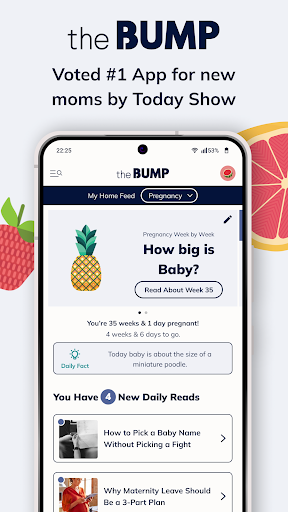
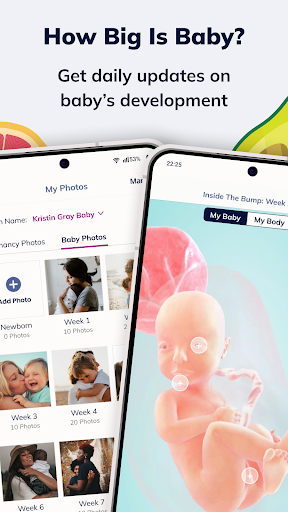
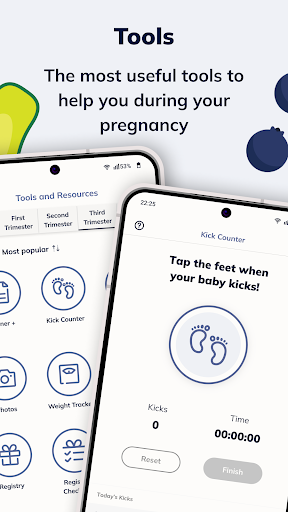
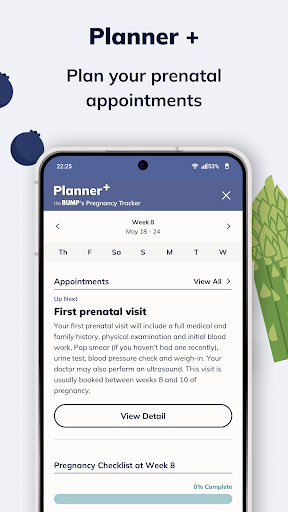
The Bump’s free pregnancy app is the most loved pregnancy and baby tracker for expecting and new parents, providing features you won’t find on other baby apps:
** FEATURES **
HOW BIG IS BABY
The Bump is the original home of the cute fruit.
Prepare to smile and look forward to each week: The Bump compares baby’s growth in utero to beautifully illustrated produce (“Baby Is As Big As a Peach”) in a way that’s fun and easy to share with friends and family.
Discover comprehensive updates about the changes and developments happening to both baby and your body while you’re pregnant, and learn how best to plan ahead.
BABY NAMES
From name length and style to country of origin and meaning, you’ll find baby’s name in one of The Bump’s specially curated lists.
INSIDE THE BUMP
See an exciting and exclusive 3D interactive visualization of baby's week-by-week growth. Interact and learn new facts about baby like never before with the next step in baby growth trackers.
DAILY ADVICE
Every day, the award-winning editorial staff of The Bump delivers fresh and relevant content for your specific week of pregnancy. The articles are timely and comprehensive: always know what’s safe and standard; find out how to ward off morning sickness; learn the best things to pack in your hospital bag; and discover the best prenatal workouts for you.
TOOLS
The Bump’s comprehensive suite of helpful tools makes it the versatile free baby app for you. Stay up to date on you and baby’s progress with invaluable tools like the pregnancy countdown tool, baby growth tracker, a due date calculator, a kick counter, a pregnancy weight gain tracker, and a contraction counter to determine when it’s time to enact your birth plan. And the Bump’s food safety tool provides nutritional guidance and helpful information throughout your pregnancy.
PLANNER+
A feature that equips every expecting mom with important information about their prenatal doctor visits. It suggests questions to ask your doctor and integrates appointments seamlessly with your mobile phone's calendar.
REGISTRY
The Bump is solving two of Baby Registry’s biggest challenges:
+ The Bump has collected the top registry products across Amazon, Target, Walmart and so much more, complete with reviews from parents who’ve been where you are. This registry has only grown over time, so you can be sure you’ll find everything you want and need.
+ The typical mom-to-be will register at two or more stores, because there are always some items that require a special, secondary registry. When it comes to managing multiple registries, the Bump has you covered. The Bump will automatically track your registries across each retailer, so you can keep tabs on what you’ve registered for, what’s been bought and what’s still waiting on your registry.
PREGNANCY AND BABY PHOTOS
Document your pregnancy by creating a weekly album of your happily growing belly. And once baby is born, the album expands to track their first amazing year in the world.
CUSTOMER SERVICE
The Bump team reads every email, answers each phone call and takes all of your reviews to heart.
Here's what our users are saying:
“My OBGYN recommended this app because it has the most accurate information regarding pregnancy.” c_nou
“I’ve loved this app throughout my pregnancy. It’s fun to keep track of development milestones by week, well written weekly summaries, and links to endless, timely additional articles and resources. My favorite feature is the 3D view of both baby and bump that points out fun facts about physical developments that week or relevant symptoms.” Allie_G
“Loved it during and post pregnancy” cwebs234
“Love the tips and progress tracking” Ki_Nap
Privacy Policy:
https://www.thebump.com/privacy-policy
Terms and Conditions:
https://www.thebump.com/terms
Do Not Sell My Info:
https://theknotww.zendesk.com/hc/en-us/requests/new?ticket_form_id=360000590371
CA Privacy:
https://www.theknotww.com/ca-collection-notice
Meer tonen

1. Download de MEmu-installatie en voltooi de setup

2. Start MEmu en open vervolgens Google Play op het bureaublad

3. Zoek Pregnancy App & Baby Tracker in Google Play
Install
4. Download en installeer Pregnancy App & Baby Tracker
5. Klik op het icoon om te starten na het voltooien van de installatie

6. Ervaar Pregnancy App & Baby Tracker op pc met MEmu
MEmu Play is de beste Android-emulator, met meer dan 100 miljoen gebruikers die genieten van de superieure Android-app-ervaring. Dankzij de virtualisatietechnologie van MEmu kun je duizenden Android-apps soepel op je computer draaien, zelfs de meest veeleisende.
Groter scherm met betere graphics; Lange duur, zonder beperking van batterij of mobiele data.
Volledige Keymapping-ondersteuning voor nauwkeurige besturing van toetsenbord en muis of gamepad.
Meerdere game-accounts of taken op één PC tegelijk met Multi-Instance manager.
Gebruik Pregnancy App & Baby Tracker op PC door de volgende stappen te volgen: