Pregnancy App & Baby Tracker
Zaktualizowano
Aktualna wersja
6.3
Sprzedawca

Przestań martwić się nadmiernymi opłatami podczas korzystania z Pregnancy App & Baby Tracker na telefonie komórkowym, uwolnij się od małego ekranu i ciesz się korzystaniem z aplikacji na znacznie większym wyświetlaczu. Od teraz korzystaj z aplikacji na pełnym ekranie za pomocą klawiatury i myszy. MEmu oferuje wszystkie zaskakujące funkcje, których się spodziewałeś: szybką instalację i łatwą konfigurację, intuicyjne sterowanie, koniec z ograniczeniami baterii, danych mobilnych i niepokojących połączeń. Zupełnie nowy MEmu 9 to najlepszy wybór do używania Pregnancy App & Baby Tracker na twoim komputerze. Zakodowany przez naszą absorpcję, menedżer wielu instancji umożliwia otwarcie 2 lub więcej kont w tym samym czasie. A co najważniejsze, nasz ekskluzywny emulator może uwolnić pełny potencjał twojego komputera, sprawić, że wszystko będzie płynne i przyjemne.
Pokaż więcej
Ciesz się wspaniałym doświadczeniem podczas grania w Pregnancy App & Baby Tracker na komputerze z aplikacją MEMU App Player. Jest to potężny darmowy emulator Androida pozwalający grać w tysiące gier na Androida. The Bump’s free pregnancy app is the most loved pregnancy and baby tracker for expecting and new parents, providing features you won’t find on other baby apps:.
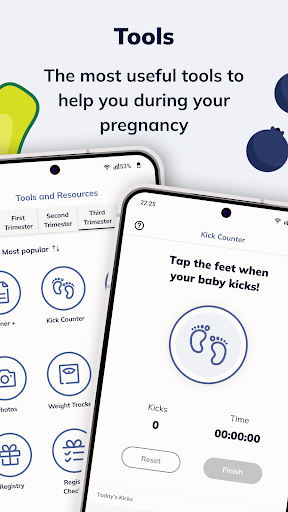
The Bump’s free pregnancy app is the most loved pregnancy and baby tracker for expecting and new parents, providing features you won’t find on other baby apps:
** FEATURES **
HOW BIG IS BABY
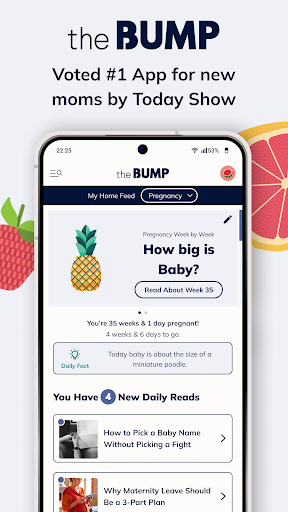
The Bump is the original home of the cute fruit.
Prepare to smile and look forward to each week: The Bump compares baby’s growth in utero to beautifully illustrated produce (“Baby Is As Big As a Peach”) in a way that’s fun and easy to share with friends and family.
Discover comprehensive updates about the changes and developments happening to both baby and your body while you’re pregnant, and learn how best to plan ahead.
BABY NAMES
From name length and style to country of origin and meaning, you’ll find baby’s name in one of The Bump’s specially curated lists.
INSIDE THE BUMP
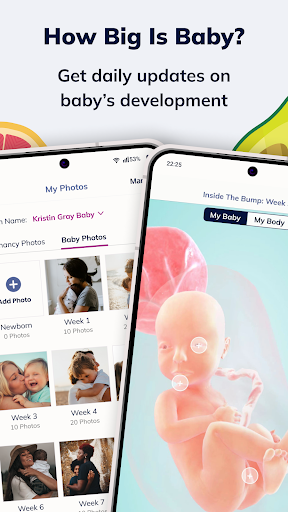
See an exciting and exclusive 3D interactive visualization of baby's week-by-week growth. Interact and learn new facts about baby like never before with the next step in baby growth trackers.
DAILY ADVICE
Every day, the award-winning editorial staff of The Bump delivers fresh and relevant content for your specific week of pregnancy. The articles are timely and comprehensive: always know what’s safe and standard; find out how to ward off morning sickness; learn the best things to pack in your hospital bag; and discover the best prenatal workouts for you.
TOOLS
The Bump’s comprehensive suite of helpful tools makes it the versatile free baby app for you. Stay up to date on you and baby’s progress with invaluable tools like the pregnancy countdown tool, baby growth tracker, a due date calculator, a kick counter, a pregnancy weight gain tracker, and a contraction counter to determine when it’s time to enact your birth plan. And the Bump’s food safety tool provides nutritional guidance and helpful information throughout your pregnancy.
PLANNER+
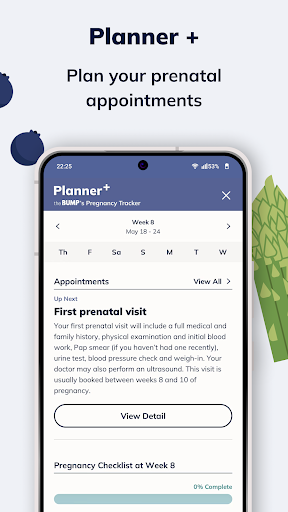
A feature that equips every expecting mom with important information about their prenatal doctor visits. It suggests questions to ask your doctor and integrates appointments seamlessly with your mobile phone's calendar.
REGISTRY
The Bump is solving two of Baby Registry’s biggest challenges:
+ The Bump has collected the top registry products across Amazon, Target, Walmart and so much more, complete with reviews from parents who’ve been where you are. This registry has only grown over time, so you can be sure you’ll find everything you want and need.
+ The typical mom-to-be will register at two or more stores, because there are always some items that require a special, secondary registry. When it comes to managing multiple registries, the Bump has you covered. The Bump will automatically track your registries across each retailer, so you can keep tabs on what you’ve registered for, what’s been bought and what’s still waiting on your registry.
PREGNANCY AND BABY PHOTOS
Document your pregnancy by creating a weekly album of your happily growing belly. And once baby is born, the album expands to track their first amazing year in the world.
CUSTOMER SERVICE
The Bump team reads every email, answers each phone call and takes all of your reviews to heart.
Here's what our users are saying:
“My OBGYN recommended this app because it has the most accurate information regarding pregnancy.” c_nou
“I’ve loved this app throughout my pregnancy. It’s fun to keep track of development milestones by week, well written weekly summaries, and links to endless, timely additional articles and resources. My favorite feature is the 3D view of both baby and bump that points out fun facts about physical developments that week or relevant symptoms.” Allie_G
“Loved it during and post pregnancy” cwebs234
“Love the tips and progress tracking” Ki_Nap
Privacy Policy:
https://www.thebump.com/privacy-policy
Terms and Conditions:
https://www.thebump.com/terms
Do Not Sell My Info:
https://theknotww.zendesk.com/hc/en-us/requests/new?ticket_form_id=360000590371
CA Privacy:
https://www.theknotww.com/ca-collection-notice
Pokaż więcej

1. Pobierz instalator MEmu i zakończ instalację

2. Uruchom MEmu, a następnie otwórz Google Play na pulpicie

3. Wyszukaj Pregnancy App & Baby Tracker w Google Play
Install
4. Pobierz i zainstaluj Pregnancy App & Baby Tracker
5. Po zakończeniu instalacji kliknij ikonę, aby rozpocząć

6. Użyj MEmu, aby doświadczyć Pregnancy App & Baby Tracker na swoim komputerze
MEmu Play to najlepszy emulator Androida, z którego korzysta ponad 100 milionów użytkowników, ciesząc się wyjątkowym doświadczeniem aplikacji na Androida. Technologia wirtualizacji MEmu pozwala na płynne uruchamianie tysięcy aplikacji Androida na komputerze, nawet tych najbardziej wymagających.
Większy ekran z lepszą grafiką; Długi czas, bez ograniczeń baterii lub danych mobilnych.
Pełna obsługa mapowania klawiszy dla precyzyjnego sterowania klawiaturą i myszą lub gamepadem.
Wiele kont gier lub zadań na jednym komputerze jednocześnie z menedżerem wielu instancji.
Use Pregnancy App & Baby Tracker on PC by following steps: