ReArty: AI Photo, Video Maker
Bijgewerkt
Huidige Versie
2.9.0
Aangeboden door

Maak je geen zorgen meer over extra kosten bij het gebruik van ReArty: AI Photo, Video Maker op je mobiele telefoon, bevrijd jezelf van het kleine scherm en geniet van het gebruik van de app op een veel groter display. Vanaf nu, krijg een volledige schermervaring van je app met toetsenbord en muis. MEmu biedt je alle verrassende functies die je verwachtte: snelle installatie en eenvoudige configuratie, intuïtieve besturing, geen beperkingen meer van batterij, mobiele data en storende oproepen. De gloednieuwe MEmu 9 is de beste keuze voor het gebruik van ReArty: AI Photo, Video Maker op je computer. MEmu multi-instance manager maakt het mogelijk om tegelijkertijd 2 of meer accounts te openen. En het belangrijkste, onze exclusieve emulatiemotor kan het volledige potentieel van je PC benutten, waardoor alles soepel en plezierig wordt.
Meer tonen
Geniet van een fantastische ervaring met ReArty: AI Photo, Video Maker op je pc met MEmu Play. Het is een krachtige gratis Android-emulator die je duizenden Android-apps biedt voor de desktopversie. Geniet van contact met vrienden en verbeter je werk met hogere efficiëntie! ReArty AI Art Image Generator is an innovative app that allows you to create stunning artwork from text and images using advanced AI technology.
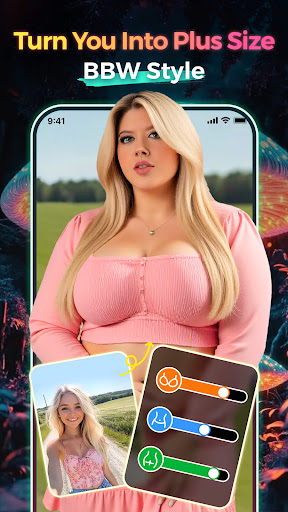
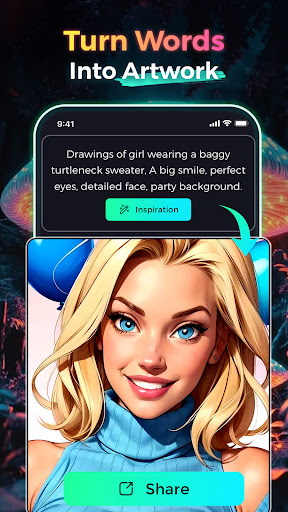
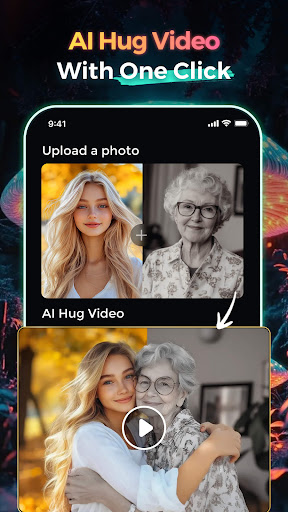
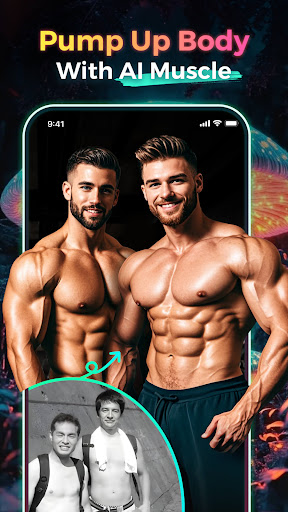
ReArty AI Art Image Generator is an innovative app that allows you to create stunning artwork from text and images using advanced AI technology. Whether you're an artist, designer, or just looking for creative expression, ReArty AI offers powerful tools to transform your ideas into visual masterpieces.
Create Art From Images
Upload any photo to the AI photo generator, and instantly watch as it is transformed into a new artistic creation. The AI image generator can reimagine your images in a wide variety of artistic styles. Whether you're looking to create digital artwork or classic styles, our AI art photo generator delivers unique, high-quality results in just a few seconds. With the AI art generator technology powering the AI image generator, your photos will come to life like never before.
Cartoon Headshot
Want to see yourself as a cartoon? With the AI art photo generator, turning your photos into fun cartoon versions of yourself is easy! This feature utilizes the advanced AI image generator to transform selfies, portraits, and photos into charming cartoon versions. The AI art generator and AI photo generator will give you a playful, personalized touch for your social media or gifts.
Enhance Your Photos
Upload your favorite selfies, and our AI art image generator will instantly enhance them to high-definition quality. The powerful AI photo generator will fix imperfections and even restore old, damaged photos with stunning clarity. This AI art technology can smoothen your face and recover pixelated, compressed, or faded images with flawless precision. The AI image generator ensures every detail is improved, no matter the condition of the original photo.
Text-To-Art
With the AI art image generator, turning your words into artwork has never been easier. Simply input any text, and the AI art photo generator will process your input to create a captivating AI-generated art image. Using state-of-the-art AI art algorithms, our AI art photo generator interprets the sentiment and meaning behind your words, delivering an image that perfectly represents your vision. This feature showcases the power of the AI image generator to create visually stunning artwork with nothing more than text.
Descratch & Restore Vintage Photos
With ReArty's AI image generator, you can remove imperfections and restore vintage photos to their original beauty. The AI photo generator technology removes scratches, tears, and stains from your cherished memories, giving them a fresh new life. Let the AI art in the AI photo generator work wonders on your old photos.
Colorize Black & White Photos
Transform your black-and-white photos into vibrant color images with just a single tap. The AI art image generator uses cutting-edge AI art algorithms to add realistic color to your nostalgic family photos. Thanks to the powerful AI photo generator, you can now relive your memories in full color, bringing the past to life with the magic of AI image generator technology.
Features Of ReArty AI
AI art image generator: At the core of ReArty AI, this advanced feature uses sophisticated AI image generator technology to create art from both images and text.
AI art photo generator: With ReArty AI, transforming any photo into a unique piece of AI art has never been easier. The AI photo generator provides unlimited creative possibilities.
Why Choose ReArty AI?
ReArty AI is for anyone looking to explore their creative potential. Our AI art image generator, AI image generator, and AI photo generator provide possibilities for creating artwork, enhancing photos, and experimenting with artistic styles. With ReArty AI, you can unlock the full potential of AI-generated art, allowing your creativity to flourish. The AI art technology behind our AI image generator and AI photo generator makes it easy to produce unique, high-quality images in a matter of seconds. Don't hesitate—use the AI art photo generator today and let your imagination run wild!
Meer tonen

1. Download de MEmu-installatie en voltooi de setup

2. Start MEmu en open vervolgens Google Play op het bureaublad

3. Zoek ReArty: AI Photo, Video Maker in Google Play
Install
4. Download en installeer ReArty: AI Photo, Video Maker
5. Klik op het icoon om te starten na het voltooien van de installatie

6. Ervaar ReArty: AI Photo, Video Maker op pc met MEmu
MEmu Play is de beste Android-emulator, met meer dan 100 miljoen gebruikers die genieten van de superieure Android-app-ervaring. Dankzij de virtualisatietechnologie van MEmu kun je duizenden Android-apps soepel op je computer draaien, zelfs de meest veeleisende.
Groter scherm met betere graphics; Lange duur, zonder beperking van batterij of mobiele data.
Volledige Keymapping-ondersteuning voor nauwkeurige besturing van toetsenbord en muis of gamepad.
Meerdere game-accounts of taken op één PC tegelijk met Multi-Instance manager.
Gebruik ReArty: AI Photo, Video Maker op PC door de volgende stappen te volgen: