TiVo
Bijgewerkt
Huidige Versie
4.9.208-1480157
Aangeboden door

Maak je geen zorgen meer over extra kosten bij het gebruik van TiVo op je mobiele telefoon, bevrijd jezelf van het kleine scherm en geniet van het gebruik van de app op een veel groter display. Vanaf nu, krijg een volledige schermervaring van je app met toetsenbord en muis. MEmu biedt je alle verrassende functies die je verwachtte: snelle installatie en eenvoudige configuratie, intuïtieve besturing, geen beperkingen meer van batterij, mobiele data en storende oproepen. De gloednieuwe MEmu 9 is de beste keuze voor het gebruik van TiVo op je computer. MEmu multi-instance manager maakt het mogelijk om tegelijkertijd 2 of meer accounts te openen. En het belangrijkste, onze exclusieve emulatiemotor kan het volledige potentieel van je PC benutten, waardoor alles soepel en plezierig wordt.
Meer tonen
Geniet van een fantastische ervaring met TiVo op je pc met MEmu Play. Het is een krachtige gratis Android-emulator die je duizenden Android-apps biedt voor de desktopversie. Geniet van contact met vrienden en verbeter je werk met hogere efficiëntie! TiVo® DVR customers that now enjoy OnePass can get the full TiVo experience on their Android device with this completely redesigned FREE TiVo App.
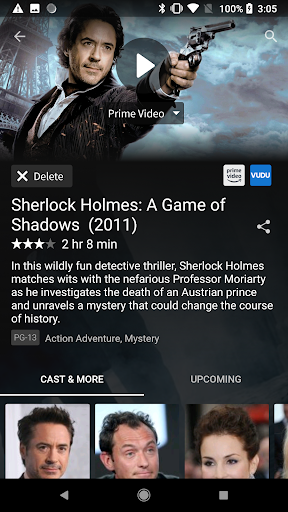
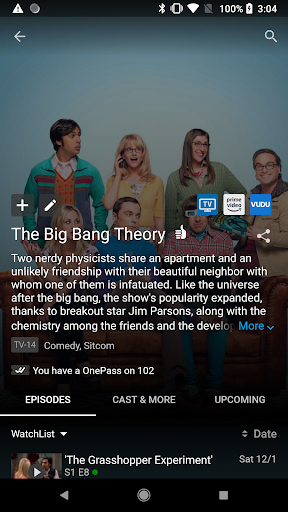
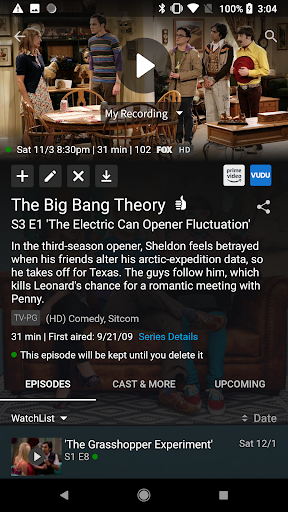
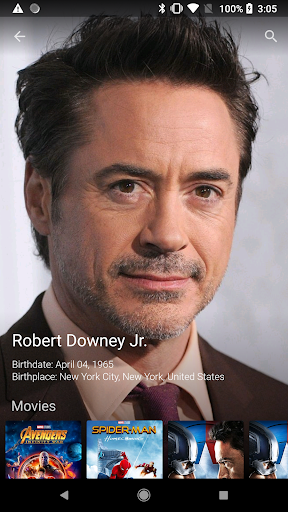
TiVo® DVR customers that now enjoy OnePass can get the full TiVo experience on their Android device with this completely redesigned FREE TiVo App.
This App brings the best of the TiVo mobile features. It turns your Android phone or tablet into command central for your TiVo DVR*. It also allows you to stream live or recorded shows to your mobile device**, so you can keep up with your favorite shows from anywhere.
This App makes it easier than ever to find great shows to watch on TV with TiVo's What To Watch feature, showcasing the best of TV available for you to tune to. Whether you are a Sports fan, Movie buff, TV addict or just looking for appropriate programs for your kids, What To Watch will show you what's on for you.
What to Watch also allows you quick access to your favorite shows available in your My Shows.
The App completes the experience with a full Guide showing you what's on and upcoming on your TV so you can plan what to watch next, or create OnePass and single recording anywhere you are.
My Shows now fully leverages TiVo's OnePass feature and helps you start watching your favorite shows in just a few taps.
Search not only finds your favorite TV Shows and Movies whether they're on TV, Netflix, Amazon or any other provider supported through your TiVo DVR, but also includes searching for cast & crew and channels.
Channel search will take you back to the guide from anywhere you are in the App and highlight the selected channel.
Already watching a show on TV? Find more about it and explore its episodes and cast & crew with the App's Info screen.
The App includes OnePass Manager and To Do List so you can manage your existing OnePasses and upcoming recordings anywhere you are.
Finally, the App adds a remote for you to control your DVR from your mobile device.
Having troubles finding or connecting to your TiVo DVR? Try one or more of these steps:
- Restart your network router by unplugging it, waiting 30 seconds, and plugging it back in
- Restart your TiVo DVR by following the instructions in the TiVo menus under Settings & Messages > Help > Restart or Reset System > Restart the TiVo Box
- Go to http://support.tivo.com/android for more troubleshooting tips
*This App supports TiVo Series 4 (TiVo Premiere series), Series 5 (TiVo Roamio series), Series 6 (TiVo Bolt series) DVRs.
**Requires Android mobile device running 5.1 or above with a non-Intel or AMD chipset (sold separately). 4-tuner TiVo Roamio requires TiVo Stream accessory (sold separately). Out-of-home streaming supports streaming to only one of your Android (or iOS) devices at a time. Not all recorded content can be streamed to an Android mobile device (due to copy protection assigned by content provider and/or other technical limitations). Some recorded content can only be streamed to your Android mobile device while you are on the same network as your TiVo Stream or TiVo Roamio Plus/Pro DVR (as applicable). Out of-home streaming may not be available for all recorded content. Visit tivo.com for additional details.
Meer tonen

1. Download de MEmu-installatie en voltooi de setup

2. Start MEmu en open vervolgens Google Play op het bureaublad

3. Zoek TiVo in Google Play
Install
4. Download en installeer TiVo
5. Klik op het icoon om te starten na het voltooien van de installatie

6. Ervaar TiVo op pc met MEmu
MEmu Play is de beste Android-emulator, met meer dan 100 miljoen gebruikers die genieten van de superieure Android-app-ervaring. Dankzij de virtualisatietechnologie van MEmu kun je duizenden Android-apps soepel op je computer draaien, zelfs de meest veeleisende.
Groter scherm met betere graphics; Lange duur, zonder beperking van batterij of mobiele data.
Volledige Keymapping-ondersteuning voor nauwkeurige besturing van toetsenbord en muis of gamepad.
Meerdere game-accounts of taken op één PC tegelijk met Multi-Instance manager.
Gebruik TiVo op PC door de volgende stappen te volgen: