Famelack
Bijgewerkt
Huidige Versie
3.6
Aangeboden door

Maak je geen zorgen meer over extra kosten bij het gebruik van Famelack op je mobiele telefoon, bevrijd jezelf van het kleine scherm en geniet van het gebruik van de app op een veel groter display. Vanaf nu, krijg een volledige schermervaring van je app met toetsenbord en muis. MEmu biedt je alle verrassende functies die je verwachtte: snelle installatie en eenvoudige configuratie, intuïtieve besturing, geen beperkingen meer van batterij, mobiele data en storende oproepen. De gloednieuwe MEmu 9 is de beste keuze voor het gebruik van Famelack op je computer. MEmu multi-instance manager maakt het mogelijk om tegelijkertijd 2 of meer accounts te openen. En het belangrijkste, onze exclusieve emulatiemotor kan het volledige potentieel van je PC benutten, waardoor alles soepel en plezierig wordt.
Meer tonen
Geniet van een fantastische ervaring met Famelack op je pc met MEmu Play. Het is een krachtige gratis Android-emulator die je duizenden Android-apps biedt voor de desktopversie. Geniet van contact met vrienden en verbeter je werk met hogere efficiëntie! Famelack – Watch Live Sports, News and TV ShowsFamelack is the hub for watching live TV, sports, and news from all around the world in regional and foreign languages.
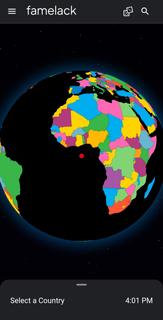
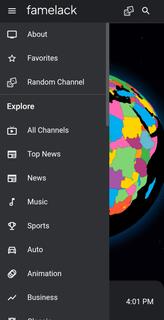
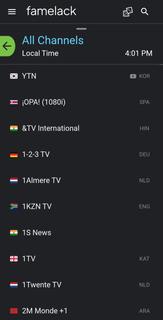
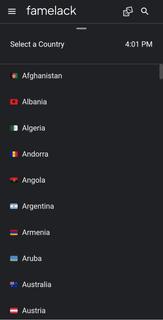
Famelack – Watch Live Sports, News and TV ShowsFamelack is the hub for watching live TV, sports, and news from all around the world in regional and foreign languages. It has a neatly organized library that contains the list of more than 1000 live TV channels in high quality, with minimal buffering or lag issues.With 130+ countries and HD TV channels, Famelack has one of the largest databases of streamable TV channels, and it draws attention to the eyes of millions of people. All you need is to install the Famelack, and you’re all set to choose your favourite TV channels from the thousands it has to offer to watch your beloved live sports or TV programs.There are various sections, such as Kids for those under 13, and adults can watch movies, sports, news, TV series, reality shows, and whatnot.Even though there are thousands of channels, it never feels complicated finding the desired one, as the app has a smart search functionality with filter options, allowing you to easily locate a TV channel simply by searching its name. A new favourite list option has been introduced in the Famelack to add the channels you watch the most, so that next time you can easily find them.Download Famelack APK for Android and enjoy 4K quality TV channels streaming across all genres with a feature-rich built-in media player!
Meer tonen

1. Download de MEmu-installatie en voltooi de setup

2. Start MEmu en open vervolgens Google Play op het bureaublad

3. Zoek Famelack in Google Play
Install
4. Download en installeer Famelack
5. Klik op het icoon om te starten na het voltooien van de installatie

6. Ervaar Famelack op pc met MEmu
MEmu Play is de beste Android-emulator, met meer dan 100 miljoen gebruikers die genieten van de superieure Android-app-ervaring. Dankzij de virtualisatietechnologie van MEmu kun je duizenden Android-apps soepel op je computer draaien, zelfs de meest veeleisende.
Groter scherm met betere graphics; Lange duur, zonder beperking van batterij of mobiele data.
Volledige Keymapping-ondersteuning voor nauwkeurige besturing van toetsenbord en muis of gamepad.
Meerdere game-accounts of taken op één PC tegelijk met Multi-Instance manager.
Gebruik Famelack op PC door de volgende stappen te volgen: