TweenCraft Cartoon Video Maker
Bijgewerkt
Huidige Versie
1.827.0
Aangeboden door

Maak je geen zorgen meer over extra kosten bij het gebruik van TweenCraft Cartoon Video Maker op je mobiele telefoon, bevrijd jezelf van het kleine scherm en geniet van het gebruik van de app op een veel groter display. Vanaf nu, krijg een volledige schermervaring van je app met toetsenbord en muis. MEmu biedt je alle verrassende functies die je verwachtte: snelle installatie en eenvoudige configuratie, intuïtieve besturing, geen beperkingen meer van batterij, mobiele data en storende oproepen. De gloednieuwe MEmu 9 is de beste keuze voor het gebruik van TweenCraft Cartoon Video Maker op je computer. MEmu multi-instance manager maakt het mogelijk om tegelijkertijd 2 of meer accounts te openen. En het belangrijkste, onze exclusieve emulatiemotor kan het volledige potentieel van je PC benutten, waardoor alles soepel en plezierig wordt.
Meer tonen
Download TweenCraft Cartoon Video Maker on PC with MEmu Android Emulator. Enjoy playing on big screen. No need to learn drawing and animation.
No need to learn drawing and animation.
To create animation videos using Tweencraft cartoon animation app, You just have to select characters and record dialogues, and animate using your finger touch movements. It's 2d Animation app. Its complete cartoon video maker editor app to create small cartoon movies.
Now you can also create comics in tweencraft. Just select character, type your dialogues and thats it.
Key points of Tweencraft:
NO DRAWING OR ANIMATING: To create a cartoon video with Tweencraft all you need is a story, idea, joke.
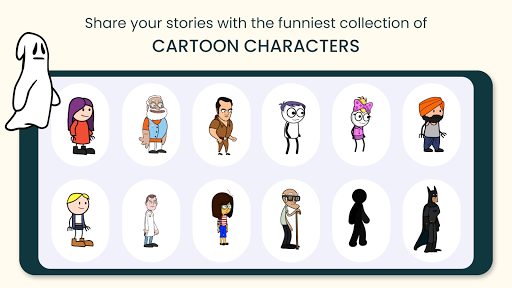
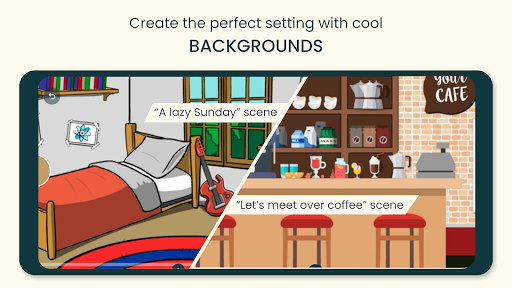
PREMADE CHARACTERS AND BACKGROUNDS: many characters, backgrounds are provided within the app. You can select any of them.
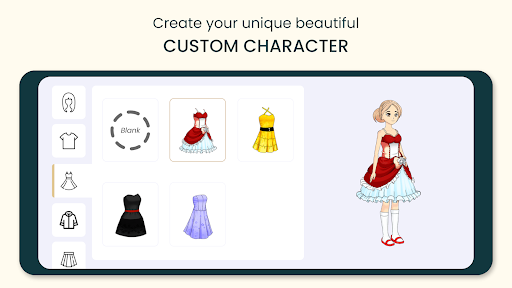
CUSTOMIZE YOUR CHARACTER: Personalize your avatar with tons of items. From trending clothing, hairstyles, and jackets to an absurd combination, express yourself in any way you can imagine.
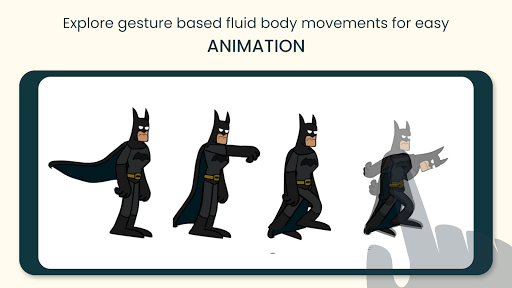
ANIMATE IT: You can change or move character's body parts, change expression, zoom, pan, change speed, and that's super easy.
RECORD YOUR DIALOGUES: You can record your own dialogue, Tweencraft animation app automatically makes your voice cartoony. You can change the voice, pitch and tempo.
ADD IMAGES AND GIFS : You can import your own images and gifs.
VFX AND AFX: Add inbuilt visual and audio effects.
COMIC BUBBLES: You can use the comic text bubble in the video.
SHARE VIDEOS TO WORLD: Once you have created your video using our cartoon video creator you can share it on youtube, tiktok , whatsapp or within Tweencraft with our Tweencraft community. Tweencraft is a vibrant community of creative people.
Unlike most cartoon video apps, you don’t need to draw anything in this app. Our unique and proprietary software allows you to choose any pre-loaded characters that have been drawn for you, and allow you to animate their movements and gestures by simply tapping and swiping your screen. To make the characters provided in Tweencraft cartoon movie maker you can use your own voice. Your voice is automatically converted to cartoonish.
As Tweencraft is a complete cartoon video maker editor app, the videos you create today can be easily edited later at any point in time, no need to create from scratch.
Tweencraft cartoon video app is also a social media community. You can share your videos on Tweencraft public feed with many like-minded users, who will appreciate your creation and also make your art spread in the world
Try this cartoon video maker editor app today, make photo captions a thing of the past by turning them into super shareable and funny cartoon video memes that can go viral online.
Become a social media celebrity. You can create small funny small cartoon movies , cartoon video memes and post them as tiktok video, youtube video, instagram story or facebook status, or share on whatsapp.
If you have a YouTube channel, you can use some of the funny cartoon animation videos you create with Tweencraft animation app and create funny videos for YouTube. On YouTube, your clever cartoon video memes that you turned into animated videos will live forever and be immortal.
If you like comics, now you can create your own comics that are a whole level better because these will be animated videos instead of simple picture comics. Don’t just read comics made by others. Become a comic video creator and post it on YouTube to see how your funny memes compare to others.
See if you can make the next funny video meme that everyone online shares around. Put your photo caption skills to the test!
What kind of topics can you cover with your videos? You can cover any topic from humor to politics to entertainment and celebrities.
For tech support, email: developer@kalpkriti.com
Meer tonen

1. Download de MEmu-installatie en voltooi de setup

2. Start MEmu en open vervolgens Google Play op het bureaublad

3. Zoek TweenCraft Cartoon Video Maker in Google Play
Install
4. Download en installeer TweenCraft Cartoon Video Maker
5. Klik op het icoon om te starten na het voltooien van de installatie

6. Ervaar TweenCraft Cartoon Video Maker op pc met MEmu
MEmu Play is de beste Android-emulator, met meer dan 100 miljoen gebruikers die genieten van de superieure Android-app-ervaring. Dankzij de virtualisatietechnologie van MEmu kun je duizenden Android-apps soepel op je computer draaien, zelfs de meest veeleisende.
Groter scherm met betere graphics; Lange duur, zonder beperking van batterij of mobiele data.
Volledige Keymapping-ondersteuning voor nauwkeurige besturing van toetsenbord en muis of gamepad.
Meerdere game-accounts of taken op één PC tegelijk met Multi-Instance manager.
Gebruik TweenCraft Cartoon Video Maker op PC door de volgende stappen te volgen: