
Vanemar
Bijgewerkt
Huidige Versie
1.4.9
Aangeboden door

Maak je geen zorgen meer over extra kosten bij het gebruik van Vanemar op je mobiele telefoon, bevrijd jezelf van het kleine scherm en geniet van het gebruik van de app op een veel groter display. Vanaf nu, krijg een volledige schermervaring van je app met toetsenbord en muis. MEmu biedt je alle verrassende functies die je verwachtte: snelle installatie en eenvoudige configuratie, intuïtieve besturing, geen beperkingen meer van batterij, mobiele data en storende oproepen. De gloednieuwe MEmu 9 is de beste keuze voor het gebruik van Vanemar op je computer. MEmu multi-instance manager maakt het mogelijk om tegelijkertijd 2 of meer accounts te openen. En het belangrijkste, onze exclusieve emulatiemotor kan het volledige potentieel van je PC benutten, waardoor alles soepel en plezierig wordt.
Meer tonen
Geniet van een fantastische ervaring met Vanemar op je pc met MEmu Play. Het is een krachtige gratis Android-emulator die je duizenden Android-apps biedt voor de desktopversie. Geniet van contact met vrienden en verbeter je werk met hogere efficiëntie! Vanemar offers an easy and intuitive way to monitor your boat remotely.
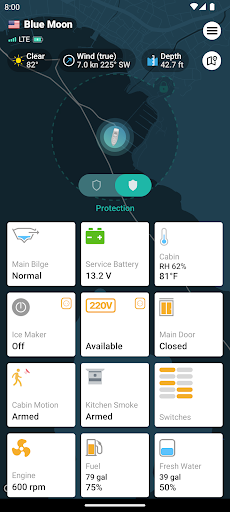
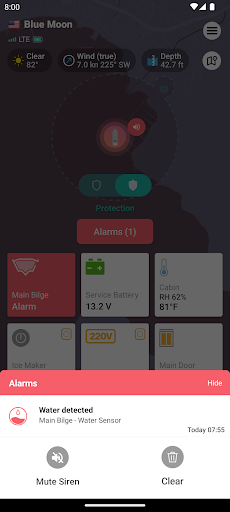
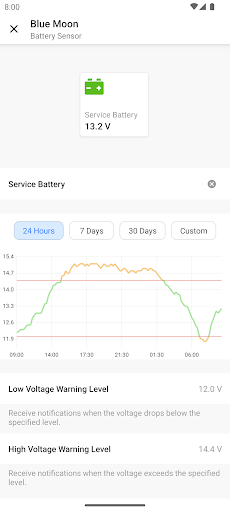
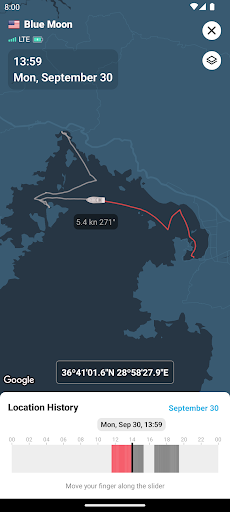
Vanemar offers an easy and intuitive way to monitor your boat remotely. With world-class design and technology, you will never have to worry about your boat's status anymore.
Instant Notifications
Instantly get notified with the mobile app, email, SMS, and automated phone calls.
Arm & disarm with a touch
Switch between modes and protect your boat with a single touch. Protection mode automatically creates a geofence around your boat. This mode also arms entry and motion sensors.
Browse location history
Browse your trips and location history, frequently visited places, cruising speeds, and more by simply sliding your finger.
Know your boat is right where you left it with Geofence
Vanemar automatically creates a 500-meter-wide geofence around your boat's location when you set the mode to "Protection". If the boat moves out of the geofence area, the system immediately dispatches an alarm.
Track battery voltages
Vanemar Battery Sensors constantly monitor the connected battery or battery groups and alert you if the voltage gets low. You can also browse your battery's voltage history.
Get high bilge water alerts
Track all your bilges with easy-to-install wireless bilge high water sensors without wiring and drilling. Get high water alerts in time.
Avoid intruders
When you set the mode to "Protection", the system automatically arms all motion and entry sensors.
Avoid the worst with smoke sensors
Monitor and get alerted if there is smoke in cabins, galley, or engine room with Vanemar wireless smoke sensors featuring a built-in loud siren.
Track ambient temperature and humidity
Vanemar wireless temperature and humidity sensor allows you to monitor the ambient conditions of cabins, engine rooms, wineries, and more.
Turn devices On/Off remotely with smart plugs
Remotely switch On/Off the plugged devices with Vanemar Smart Plug & Power Sensor. The device can also detect 110 V/220 V availability on your boat.
Share access with family and friends
Add family members, friends, and staff by simply typing their email without a limit or extra cost.
Visit vanemar.com to learn more.
For all your questions, suggestions and comments, you can contact us at support.vanemar.com.
Meer tonen

1. Download de MEmu-installatie en voltooi de setup

2. Start MEmu en open vervolgens Google Play op het bureaublad

3. Zoek Vanemar in Google Play
Install
4. Download en installeer Vanemar
5. Klik op het icoon om te starten na het voltooien van de installatie

6. Ervaar Vanemar op pc met MEmu
MEmu Play is de beste Android-emulator, met meer dan 100 miljoen gebruikers die genieten van de superieure Android-app-ervaring. Dankzij de virtualisatietechnologie van MEmu kun je duizenden Android-apps soepel op je computer draaien, zelfs de meest veeleisende.
Groter scherm met betere graphics; Lange duur, zonder beperking van batterij of mobiele data.
Volledige Keymapping-ondersteuning voor nauwkeurige besturing van toetsenbord en muis of gamepad.
Meerdere game-accounts of taken op één PC tegelijk met Multi-Instance manager.
Gebruik Vanemar op PC door de volgende stappen te volgen: