Viral Proxy Browser with VPN
Bijgewerkt
Huidige Versie
1.2.1
Aangeboden door

Maak je geen zorgen meer over extra kosten bij het gebruik van Viral Proxy Browser with VPN op je mobiele telefoon, bevrijd jezelf van het kleine scherm en geniet van het gebruik van de app op een veel groter display. Vanaf nu, krijg een volledige schermervaring van je app met toetsenbord en muis. MEmu biedt je alle verrassende functies die je verwachtte: snelle installatie en eenvoudige configuratie, intuïtieve besturing, geen beperkingen meer van batterij, mobiele data en storende oproepen. De gloednieuwe MEmu 9 is de beste keuze voor het gebruik van Viral Proxy Browser with VPN op je computer. MEmu multi-instance manager maakt het mogelijk om tegelijkertijd 2 of meer accounts te openen. En het belangrijkste, onze exclusieve emulatiemotor kan het volledige potentieel van je PC benutten, waardoor alles soepel en plezierig wordt.
Meer tonen
Download Viral Proxy Browser with VPN on PC with MEmu Android Emulator. Enjoy playing on big screen. Viral Proxy Browser with VPN: Fast, Safe, and Private Browsing.
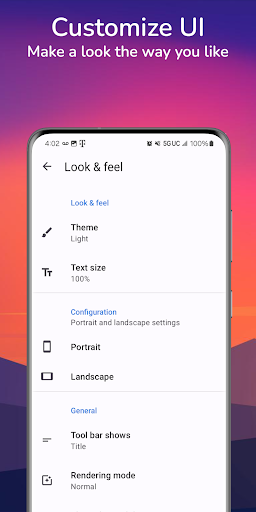
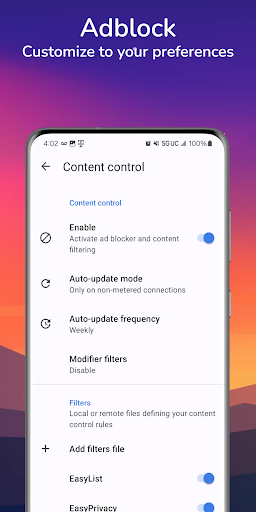
Viral Proxy Browser with VPN: Fast, Safe, and Private Browsing
Browse anonymously via proxy servers. Protect your online privacy.
Viral Proxy Browser provides you with a fast, secure, and safe private browsing experience. Whether you're looking to access global content or protect your privacy online, our no log browser has you covered with state-of-the-art security and privacy tools. With a built-in unblock proxy feature and incognito mode, you can browse safely and privately on any network.
Key Features of Viral Proxy Browser with VPN:
Privacy-Focused Search Engine
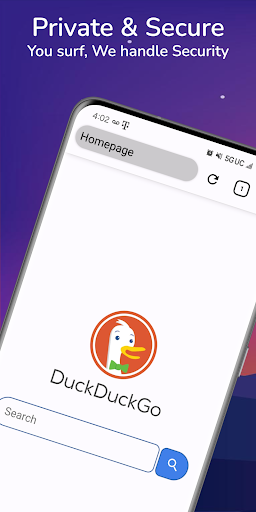
Keep your online activities private with our privacy browser for android integration and DuckDuckGo as homepage. Enjoy search results without being tracked, and maintain full control over your data. Our anonymous browser ensures that your search history and personal information remain confidential.
Anonymous Browser with Incognito Mode
Activate the incognito mode to browse the web without leaving a trail. No history, cookies, or stored data—just pure privacy. This is ideal for users who want to keep their browsing sessions private without compromising on security. Please use this feature in compliance with applicable laws.
Anti-Hacker Security Privacy
Stay safe online with anti-hacker privacy measures. The no history browser provides top-tier encryption to protect your sensitive data from malicious attacks and hackers. Whether you're using public Wi-Fi or a home network, rest assured that your connection is secure.
Fast Speeds with Global Server Network
Experience fast browsing speeds with our global network of proxy servers. The incognito web browser delivers smooth performance without lag or buffering for smooth browsing.
Private Browser with Adblocker and Tracker Blocker
Unlike other incognito apps, this is a private browser with adblocker and tracker blocker, allowing you to browse without intrusive ads or pop-ups. Private browser with adblocker tracker blocker feature also helps protect your privacy by preventing third-party tracking, resulting in faster page load times and improved overall browsing efficiency.
No Log Browser
We understand the importance of privacy. That’s why this no log browser maintains a strict no-log policy, ensuring that your browsing history and personal data are never stored or shared. Your online activities remain fully private with no tracking or data collection.
Global Content Access
Unlock global websites, media platforms, news outlets, and more, provided that access to such content is legal in your area. Whether you're traveling or living abroad, the no history browser helps you stay connected to content you love without compromising your privacy.
Always-On VPN with Fail-Safe Protection
Our fail-safe protection keeps your data secure, even if the connection drops unexpectedly.
Why Choose this Stealth Browser?
Unlimited Proxy Access: Access a wide range of legal overseas content through our secure proxy network.
Private Search Engine: Use our privacy browser for android integration for private, secure searches.
Incognito Mode: Surf the web anonymously —perfect for users who value privacy.
Advanced Security: Protect your data with top-level encryption and anti-hacker security measures.
Adblock & Tracker Blocker: Block unwanted ads and trackers for a smoother, faster browsing.
No-Log Policy: Your privacy is our priority. We don’t store or share your data.
Global Access: Browse content from around the world where legally allowed, with no geo-restriction barriers.
Enjoy a fast, secure, and private browsing experience with this privacy browser for android . Access legal content worldwide, protect your data with advanced encryption, and enjoy the web without ads or trackers. Download Viral Proxy Browser with VPN Now!
Please note: The app is designed to ensure secure browsing in compliance with local laws and website terms of service. We do not condone or support the use of our services for any illegal activities.
Meer tonen

1. Download de MEmu-installatie en voltooi de setup

2. Start MEmu en open vervolgens Google Play op het bureaublad

3. Zoek Viral Proxy Browser with VPN in Google Play
Install
4. Download en installeer Viral Proxy Browser with VPN
5. Klik op het icoon om te starten na het voltooien van de installatie

6. Ervaar Viral Proxy Browser with VPN op pc met MEmu
MEmu Play is de beste Android-emulator, met meer dan 100 miljoen gebruikers die genieten van de superieure Android-app-ervaring. Dankzij de virtualisatietechnologie van MEmu kun je duizenden Android-apps soepel op je computer draaien, zelfs de meest veeleisende.
Groter scherm met betere graphics; Lange duur, zonder beperking van batterij of mobiele data.
Volledige Keymapping-ondersteuning voor nauwkeurige besturing van toetsenbord en muis of gamepad.
Meerdere game-accounts of taken op één PC tegelijk met Multi-Instance manager.
Gebruik Viral Proxy Browser with VPN op PC door de volgende stappen te volgen: