Voetbal Tactiek Boord
Bijgewerkt
Huidige Versie
5.4.3
Aangeboden door

Maak je geen zorgen meer over extra kosten bij het gebruik van Voetbal Tactiek Boord op je mobiele telefoon, bevrijd jezelf van het kleine scherm en geniet van het gebruik van de app op een veel groter display. Vanaf nu, krijg een volledige schermervaring van je app met toetsenbord en muis. MEmu biedt je alle verrassende functies die je verwachtte: snelle installatie en eenvoudige configuratie, intuïtieve besturing, geen beperkingen meer van batterij, mobiele data en storende oproepen. De gloednieuwe MEmu 9 is de beste keuze voor het gebruik van Voetbal Tactiek Boord op je computer. MEmu multi-instance manager maakt het mogelijk om tegelijkertijd 2 of meer accounts te openen. En het belangrijkste, onze exclusieve emulatiemotor kan het volledige potentieel van je PC benutten, waardoor alles soepel en plezierig wordt.
Meer tonen
Geniet van een fantastische ervaring met Voetbal Tactiek Boord op je pc met MEmu Play. Het is een krachtige gratis Android-emulator die je duizenden Android-apps biedt voor de desktopversie. Geniet van contact met vrienden en verbeter je werk met hogere efficiëntie! Football Tactic Board, allows you to create your own tactics for every match situation, for FREE and NO REGISTRATIONS nor payments are needed for more advanced tools ;).
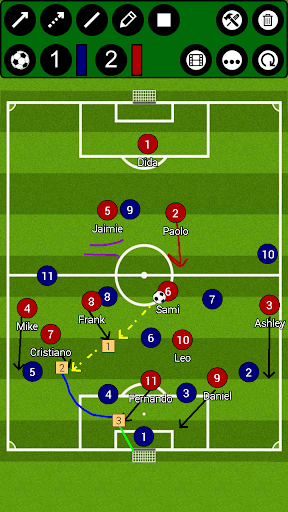
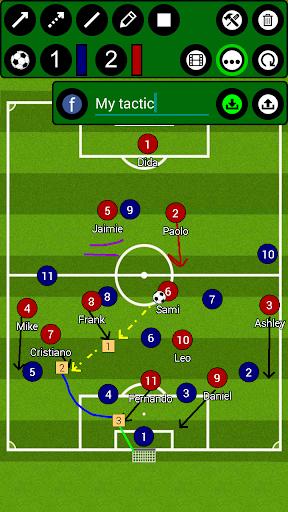
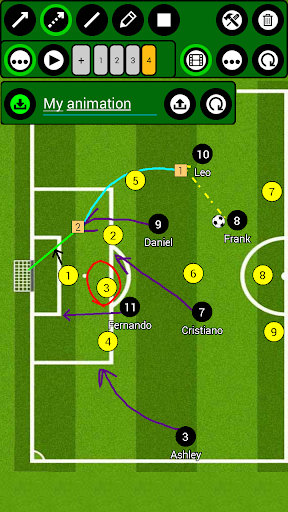
Football Tactic Board, allows you to create your own tactics for every match situation, for FREE and NO REGISTRATIONS nor payments are needed for more advanced tools ;). Intuitive UI, simple, quick using.
Video Manuals here:
https://drive.google.com/drive/folders/1w66zK4uM23tQ9rrOQpkoOJPHZTydqIeG?usp=sharing
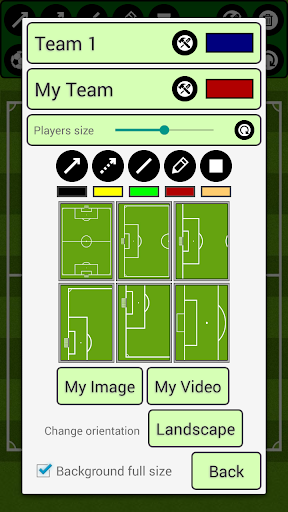
You can change the field, to six different options. Full field view, Half field view, Freekicks left, right, straight and of course penalty!
FTB provides you seven tools! Rectangle with number inside! Sipmle Line, Arrow, Dotted arrow, Pen, Text and Area! Everything you need to create your tactic!
Save your tactics into one frame, or do frame by frame ANIMATION, for more advanced tactics! You can set animation speed to make it simply the BEST.
You can analyse your own photos and your own videos!
Create your teams and players!
***manual on bottom of the page***
FTB allows you several ways to share tactic or animation with others!
- for tactic - you can do photo of your tactic or you can export it into file
- for animation - you can export it into file
This file can be easily imported into app on any other device ;)
***manual on bottom of the page***
Simply remove objects, if you want to rework your tactic, with remove function! Or you can reset everything with just one click!
Create football tactics
/*More field options*/
*Full field
*Half field
*Freekicks
*Corners
*Penalties
/*Tools*/
*Arrow
*Dotted arrow
*Line
*Rectangle
*Pen
*Text
*Area
*Delete
/*Useful features*/
*Change players size
*Save tactics
*Export/Import tactics and animations
*Frame by frame animation
*Portrait/Landscape mode
***HOW TO ADD YOUR TEAM***
Go to edit window (top right tools button), click on team1/team2 edit button on the right of team, add new team and players. Then select this team by clicking on it.
***HOW TO EXPORT TACTIC / ANIMATION***
Go to tactic / animation loading window, on the bottom click on EXPORT, and then click on the tactic / animation which you want to be exported.
Tactics are then exported to your device to folder /FootballBoard/Tactics
Animations to /FootballBoard/Animations
Now you can send them to others and they can import them ;)
***HOW TO IMPORT TACTIC / ANIMATION***
Copy tactic / animation file to your device folder
- tactic to /FootballBoard/Import/Tactics
- animation to /FootballBoard/Import/Animations
(if this folder doesnt exists - Go to tactic / animation loading window, on the bottom click on IMPORT and folders will be created)
Now you have tactic / animation in right folder, so now it is very simple:
Go to tactic / animation loading window, on the bottom click on IMPORT
In import window, there are shown tactics / animations which are copied in import folder
and now you just click on the tactic / animation which you want to be imported.
Meer tonen

1. Download de MEmu-installatie en voltooi de setup

2. Start MEmu en open vervolgens Google Play op het bureaublad

3. Zoek Voetbal Tactiek Boord in Google Play
Install
4. Download en installeer Voetbal Tactiek Boord
5. Klik op het icoon om te starten na het voltooien van de installatie

6. Ervaar Voetbal Tactiek Boord op pc met MEmu
MEmu Play is de beste Android-emulator, met meer dan 100 miljoen gebruikers die genieten van de superieure Android-app-ervaring. Dankzij de virtualisatietechnologie van MEmu kun je duizenden Android-apps soepel op je computer draaien, zelfs de meest veeleisende.
Groter scherm met betere graphics; Lange duur, zonder beperking van batterij of mobiele data.
Volledige Keymapping-ondersteuning voor nauwkeurige besturing van toetsenbord en muis of gamepad.
Meerdere game-accounts of taken op één PC tegelijk met Multi-Instance manager.
Gebruik Voetbal Tactiek Boord op PC door de volgende stappen te volgen: