คณะกรรมการชั้นเชิงฟุตบอล
อัปเดตเมื่อ
เวอร์ชันปัจจุบัน
5.4.3
ให้บริการโดย

เมื่อใช้ คณะกรรมการชั้นเชิงฟุตบอล บนโทรศัพท์ของคุณไม่ต้องกังวลกับการชาร์จไฟมากเกินไปปลดปล่อยตัวคุณเองจากหน้าจอขนาดเล็กและสนุกกับการใช้แอพนี้บนหน้าจอขนาดใหญ่ จากนี้ไปรับประสบการณ์เต็มหน้าจอของแอปพลิเคชันของคุณด้วยคีย์บอร์ดและเมาส์ MEmu มีคุณสมบัติที่น่าแปลกใจที่คุณคาดหวัง: การติดตั้งที่รวดเร็วและการตั้งค่าที่ง่ายควบคุมได้ง่ายไม่ จำกัด แบตเตอรี่ข้อมูลมือถือและการโทรที่รบกวน MEmu 9 ใหม่ล่าสุดเป็นตัวเลือกที่ดีที่สุดสำหรับการใช้ Meitu – โปรแกรมแก้ไขภาพแนวธรรมชาติ บนคอมพิวเตอร์ของคุณ ด้วยรหัสการดูดซึมของเราผู้จัดการหลายอินสแตนซ์ทำให้สามารถเปิดบัญชี 2 บัญชีขึ้นไปในเวลาเดียวกันได้ และที่สำคัญที่สุดเอ็นจิ้นจำลองพิเศษของเราสามารถปลดปล่อยศักยภาพของPCของคุณและทำให้ทุกอย่างราบรื่นและสนุกสนาน
แสดงเพิ่มเติม
ดาวน์โหลด คณะกรรมการชั้นเชิงฟุตบอล บน PC ด้วย MEmu Android Emulator สนุกกับการเล่นบนหน้าจอขนาดใหญ่ Football Tactic Board, allows you to create your own tactics for every match situation, for FREE and NO REGISTRATIONS nor payments are needed for more advanced tools ;).
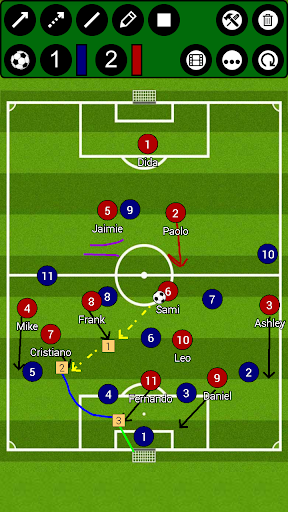
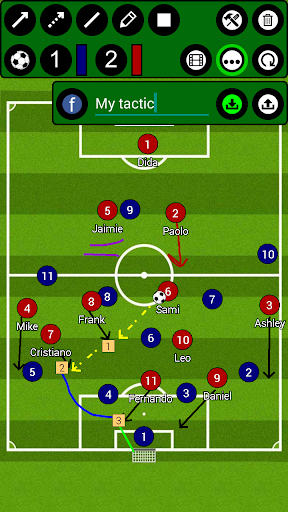
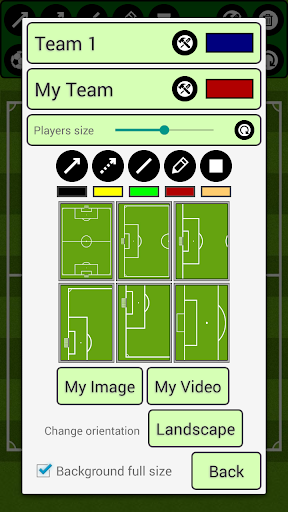
Football Tactic Board, allows you to create your own tactics for every match situation, for FREE and NO REGISTRATIONS nor payments are needed for more advanced tools ;). Intuitive UI, simple, quick using.
Video Manuals here:
https://drive.google.com/drive/folders/1w66zK4uM23tQ9rrOQpkoOJPHZTydqIeG?usp=sharing
You can change the field, to six different options. Full field view, Half field view, Freekicks left, right, straight and of course penalty!
FTB provides you seven tools! Rectangle with number inside! Sipmle Line, Arrow, Dotted arrow, Pen, Text and Area! Everything you need to create your tactic!
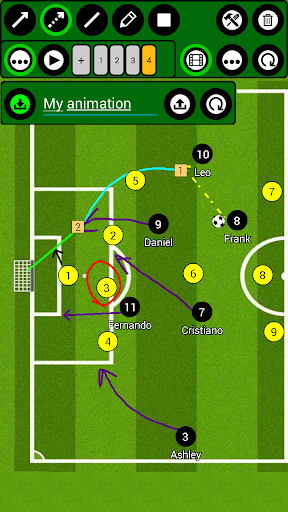
Save your tactics into one frame, or do frame by frame ANIMATION, for more advanced tactics! You can set animation speed to make it simply the BEST.
You can analyse your own photos and your own videos!
Create your teams and players!
***manual on bottom of the page***
FTB allows you several ways to share tactic or animation with others!
- for tactic - you can do photo of your tactic or you can export it into file
- for animation - you can export it into file
This file can be easily imported into app on any other device ;)
***manual on bottom of the page***
Simply remove objects, if you want to rework your tactic, with remove function! Or you can reset everything with just one click!
Create football tactics
/*More field options*/
*Full field
*Half field
*Freekicks
*Corners
*Penalties
/*Tools*/
*Arrow
*Dotted arrow
*Line
*Rectangle
*Pen
*Text
*Area
*Delete
/*Useful features*/
*Change players size
*Save tactics
*Export/Import tactics and animations
*Frame by frame animation
*Portrait/Landscape mode
***HOW TO ADD YOUR TEAM***
Go to edit window (top right tools button), click on team1/team2 edit button on the right of team, add new team and players. Then select this team by clicking on it.
***HOW TO EXPORT TACTIC / ANIMATION***
Go to tactic / animation loading window, on the bottom click on EXPORT, and then click on the tactic / animation which you want to be exported.
Tactics are then exported to your device to folder /FootballBoard/Tactics
Animations to /FootballBoard/Animations
Now you can send them to others and they can import them ;)
***HOW TO IMPORT TACTIC / ANIMATION***
Copy tactic / animation file to your device folder
- tactic to /FootballBoard/Import/Tactics
- animation to /FootballBoard/Import/Animations
(if this folder doesnt exists - Go to tactic / animation loading window, on the bottom click on IMPORT and folders will be created)
Now you have tactic / animation in right folder, so now it is very simple:
Go to tactic / animation loading window, on the bottom click on IMPORT
In import window, there are shown tactics / animations which are copied in import folder
and now you just click on the tactic / animation which you want to be imported.
แสดงเพิ่มเติม

1. ดาวน์โหลดตัวติดตั้ง MEmu และสิ้นสุดการติดตั้ง

2. เริ่ม MEmu จากนั้นเปิด Google Play บนหน้าแรก

3. ค้นหา คณะกรรมการชั้นเชิงฟุตบอล ใน Google Play
Install
4. ดาวน์โหลดและติดตั้ง คณะกรรมการชั้นเชิงฟุตบอล
5. เมื่อติดตั้งเสร็จให้คลิกที่ไอคอนเพื่อเริ่มใช้งาน

6. ใช้ MEmu เพื่อสัมผัสประสบการณ์ คณะกรรมการชั้นเชิงฟุตบอล บนคอมพิวเตอร์ของคุณ
MEmu Play คือโปรแกรมจำลอง Android ที่ดีที่สุด มีผู้ใช้มากกว่า 50 ล้านคน มอบประสบการณ์การใช้งานแอป Android ขั้นสุดยอดให้กับคุณ เทคโนโลยีจำลองเสมือนของ MEmu ช่วยให้คุณรันแอป Android หลายพันแอปบนคอมพิวเตอร์ได้อย่างราบรื่น แม้แอปที่กินทรัพยากรเครื่องสูงที่สุด
จอใหญ่และกราฟฟิกสวยกว่า; เล่นได้นาน, ไม่ต้องใช้แบตเตอรี่โทรศัพท์หรือเน็ตโทรศัพท์.
ระบบปรับแต่งปุ่มคีย์บอร์ดและเม้าส์ตามที่คุณเลือก
เล่นมากกว่าหนึ่งเกมบน PC ในเวลาเดียวกันด้วยระบบหลายจอหรือ Multi-Instance manager.
Use คณะกรรมการชั้นเชิงฟุตบอล on PC by following steps: