Bingo Slot Machine.
Zaktualizowano
Aktualna wersja
2.2.4
Sprzedawca

Przy całej swojej pasji do grania w Bingo Slot Machine., twoje ręce nie powinny być ograniczone na małym ekranie telefonu. Graj jak zawodowiec i uzyskaj pełną kontrolę nad grą za pomocą klawiatury i myszy. MEmu oferuje ci wszystko, czego oczekujesz. Pobierz i graj Bingo Slot Machine. na PC. Graj tak długo, jak chcesz, bez ograniczeń baterii, danych komórkowych i niepokojących połączeń. Zupełnie nowy MEmu 9 to najlepszy wybór do grania w Bingo Slot Machine. na PC. Przygotowany dzięki naszej wiedzy, znakomity, wstępnie ustawiony system mapowania klawiszy sprawia, że Bingo Slot Machine. jest prawdziwą grą na PC. Zakodowany naszą absorpcją, menedżer wielu instancji umożliwia granie na 2 lub więcej kontach na tym samym urządzeniu. A co najważniejsze, nasz emulator może uwolnić pełny potencjał twojego komputera, sprawić, że wszystko będzie płynne. Dbamy nie tylko o to, jak grasz, ale także o cały proces czerpania radości z grania.
Pokaż więcej
Ciesz się wspaniałym doświadczeniem podczas grania w Bingo Slot Machine. na komputerze z aplikacją MEMU App Player. Jest to potężny darmowy emulator Androida pozwalający grać w tysiące gier na Androida. Bingo Slot Machine.

Bingo Slot Machine.
We hope you will enjoy playing our brand new Bingo Slot Machine game!
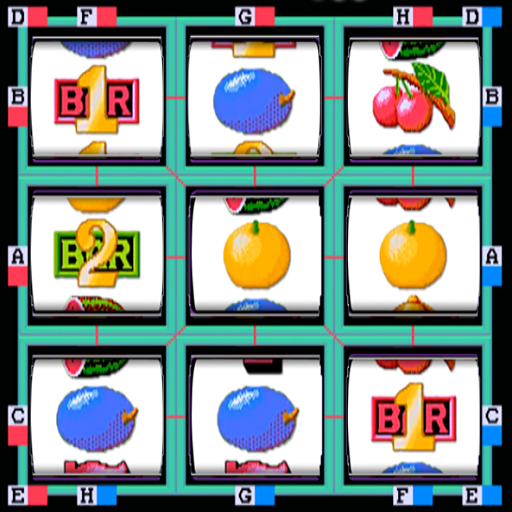
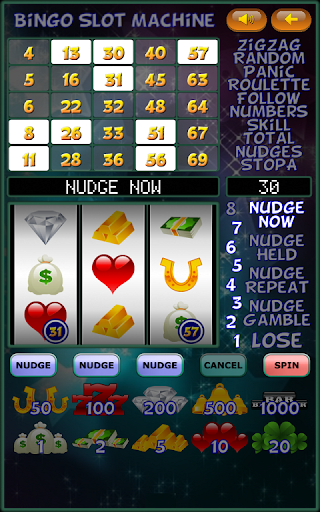
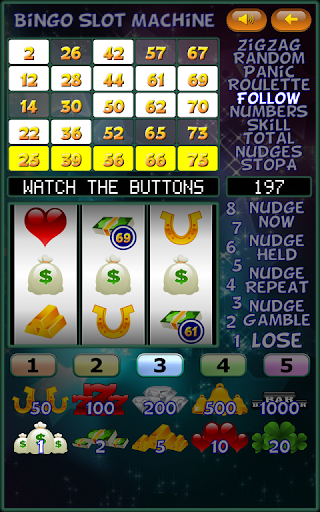
Numbers on the reels light the numbers on your card.
Get a line vertically of horizontally to activate one of ten different features.
Any winning line will start a new game with a different card.
No money is required to play this Bingo Slot Machine game as its absolutely FREE.
You win virtual coins. You will experience the full emotions and uplift of the real thing without the fear of losing money.
If your virtual coins drop to zero, don't worry it still works which makes it impossible to lose.
A statistics screen is included to see how many times you have won.
Press the flashing red spin button to start the reels moving.
We wrote this game so you can have fun playing slot machines without gambling money.
Thank you for downloading and playing it.
DETAILS:
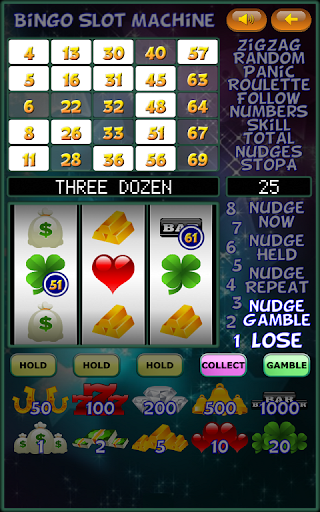
This is a three reel machine.
Nudges with Hold, Repeat, and Gamble are included.
There is a Hold with Hold after win option.
Ten different winning symbols.
Get a line vertically of horizontally to activate ten different features.
BONUS FEATURES:
1/. ZigZag: Stop on a column, then a row, to win that amount.
2/. Random: The symbols on the reels are lit in a random order, just close your eyes and press the stop button.
3/. Panic: Start nudging. Get the best win you can, try for the jackpot.
4/. Roulette: The outer symbols on the reels are lit one at a time. Use your skill to stop on the best one.
5/. Follow: Repeat the sequence in the correct order to advance.
6/. Numbers: The reels are spun a number of times. Press the hold button when you see a number on the win line.
7/. Skill: Stop on the best win you can.
8/. Total: A number of winning lines are spun in. You win the total amount.
9/. Nudge: A series of wins are spun in, you have to stop the machine on one.
10/. StopA: Stop the reels on the best win you can.
Pokaż więcej

1. Pobierz instalator MEmu i zakończ instalację

2. Uruchom MEmu, a następnie otwórz Google Play na pulpicie

3. Wyszukaj Bingo Slot Machine. w Google Play
Install
4. Pobierz i zainstaluj Bingo Slot Machine.
5. Po zakończeniu instalacji kliknij ikonę, aby rozpocząć

6. Ciesz się grą Bingo Slot Machine. na PC z MEmu
MEmu Play to najlepszy emulator Androida, a 100 milionów ludzi już korzysta z jego i dosta doskonałe wrażenia z gier na Androida. Technologia wirtualizacji MEmu umożliwia płynne granie w tysiące gier Androida na komputerze, nawet tych najbardziej wymagających grafiki.
Większy ekran z lepszą grafiką; Długi czas, bez ograniczeń baterii lub danych mobilnych.
Pełna obsługa mapowania klawiszy dla precyzyjnego sterowania klawiaturą i myszą lub gamepadem.
Wiele kont gier lub zadań na jednym komputerze jednocześnie z menedżerem wielu instancji.
Play Bingo Slot Machine. on PC by following steps: