Color Sort Master: Ball Puzzle
Zaktualizowano
Aktualna wersja
Sprzedawca

Przy całej swojej pasji do grania w Color Sort Master: Ball Puzzle, twoje ręce nie powinny być ograniczone na małym ekranie telefonu. Graj jak zawodowiec i uzyskaj pełną kontrolę nad grą za pomocą klawiatury i myszy. MEmu oferuje ci wszystko, czego oczekujesz. Pobierz i graj Color Sort Master: Ball Puzzle na PC. Graj tak długo, jak chcesz, bez ograniczeń baterii, danych komórkowych i niepokojących połączeń. Zupełnie nowy MEmu 9 to najlepszy wybór do grania w Color Sort Master: Ball Puzzle na PC. Przygotowany dzięki naszej wiedzy, znakomity, wstępnie ustawiony system mapowania klawiszy sprawia, że Color Sort Master: Ball Puzzle jest prawdziwą grą na PC. Zakodowany naszą absorpcją, menedżer wielu instancji umożliwia granie na 2 lub więcej kontach na tym samym urządzeniu. A co najważniejsze, nasz emulator może uwolnić pełny potencjał twojego komputera, sprawić, że wszystko będzie płynne. Dbamy nie tylko o to, jak grasz, ale także o cały proces czerpania radości z grania.
Pokaż więcej
Ciesz się wspaniałym doświadczeniem podczas grania w Color Sort Master: Ball Puzzle na komputerze z aplikacją MEMU App Player. Jest to potężny darmowy emulator Androida pozwalający grać w tysiące gier na Androida. Tap, move, and match!
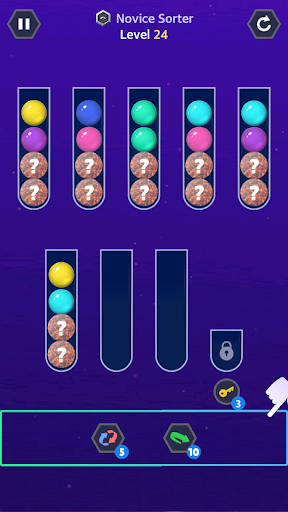
Tap, move, and match!
Welcome to Color Sort Master — a fun, relaxing, and addictive ball-sorting puzzle.
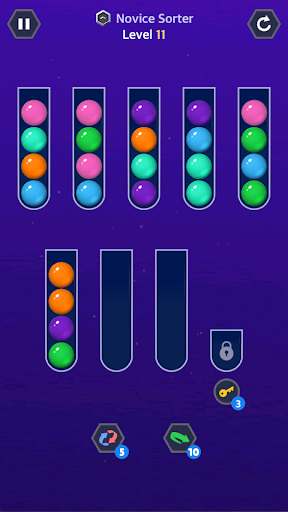
Sort the colored balls into tubes until all matching colors are grouped together. A simple yet satisfying brain teaser to relax and pass the time!
HOW TO PLAY
Tap any tube to pick up the top ball.
Move it to another tube with the same color on top, or into an empty tube.
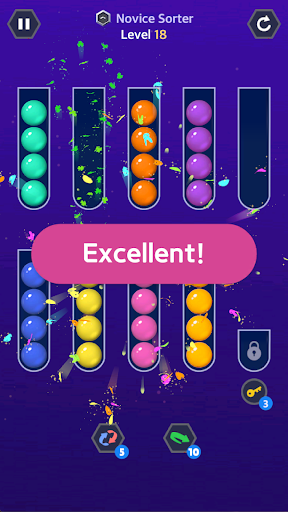
Sort each tube into a single color to clear the level!
Stuck? Use Undo, get a Hint, or add an Extra Tube anytime.
FEATURES
Easy One-Tap Controls: Simple to play, easy to pick up.
No Pressure: No timers or penalties. Relax at your own pace.
Thousands of Levels: Endless challenges ranging from easy to hard.
Helpful Items: Hints, Undo, and Extra Tubes to help when stuck.
100% Offline Support: Play anywhere without Wi-Fi or data.
Satisfying Experience: Clean visuals and crisp, soothing sounds.
Download Color Sort Master now and start sorting today!
Support: help@lunosoft.com
Pokaż więcej

1. Pobierz instalator MEmu i zakończ instalację

2. Uruchom MEmu, a następnie otwórz Google Play na pulpicie

3. Wyszukaj Color Sort Master: Ball Puzzle w Google Play
Install
4. Pobierz i zainstaluj Color Sort Master: Ball Puzzle
5. Po zakończeniu instalacji kliknij ikonę, aby rozpocząć

6. Ciesz się grą Color Sort Master: Ball Puzzle na PC z MEmu
MEmu Play to najlepszy emulator Androida, a 100 milionów ludzi już korzysta z jego i dosta doskonałe wrażenia z gier na Androida. Technologia wirtualizacji MEmu umożliwia płynne granie w tysiące gier Androida na komputerze, nawet tych najbardziej wymagających grafiki.
Większy ekran z lepszą grafiką; Długi czas, bez ograniczeń baterii lub danych mobilnych.
Pełna obsługa mapowania klawiszy dla precyzyjnego sterowania klawiaturą i myszą lub gamepadem.
Wiele kont gier lub zadań na jednym komputerze jednocześnie z menedżerem wielu instancji.
Play Color Sort Master: Ball Puzzle on PC by following steps: