Kaboom Metal Drums
Zaktualizowano
Aktualna wersja
1.10
Sprzedawca

Przy całej swojej pasji do grania w Kaboom Metal Drums, twoje ręce nie powinny być ograniczone na małym ekranie telefonu. Graj jak zawodowiec i uzyskaj pełną kontrolę nad grą za pomocą klawiatury i myszy. MEmu oferuje ci wszystko, czego oczekujesz. Pobierz i graj Kaboom Metal Drums na PC. Graj tak długo, jak chcesz, bez ograniczeń baterii, danych komórkowych i niepokojących połączeń. Zupełnie nowy MEmu 9 to najlepszy wybór do grania w Kaboom Metal Drums na PC. Przygotowany dzięki naszej wiedzy, znakomity, wstępnie ustawiony system mapowania klawiszy sprawia, że Kaboom Metal Drums jest prawdziwą grą na PC. Zakodowany naszą absorpcją, menedżer wielu instancji umożliwia granie na 2 lub więcej kontach na tym samym urządzeniu. A co najważniejsze, nasz emulator może uwolnić pełny potencjał twojego komputera, sprawić, że wszystko będzie płynne. Dbamy nie tylko o to, jak grasz, ale także o cały proces czerpania radości z grania.
Pokaż więcej
Ciesz się wspaniałym doświadczeniem podczas grania w Kaboom Metal Drums na komputerze z aplikacją MEMU App Player. Jest to potężny darmowy emulator Androida pozwalający grać w tysiące gier na Androida. This is a special metal edition of my Kaboom app.
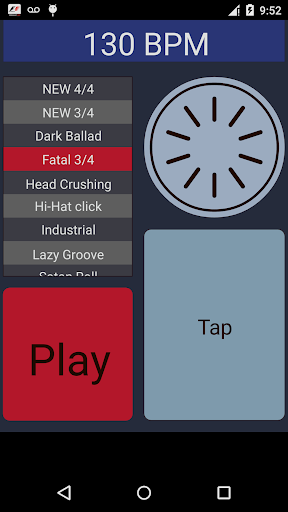
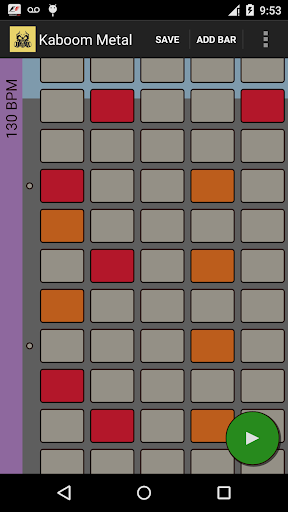
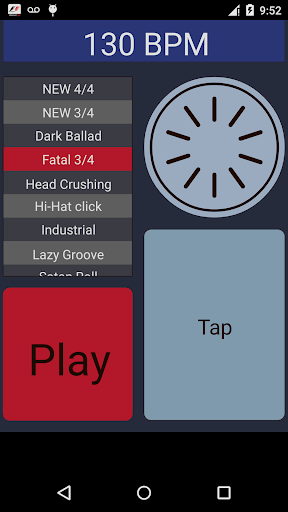
This is a special metal edition of my Kaboom app. This one comes with great metal drum samples sound, special heavy selection of preloaded beats from all Metal styles and a dark color theme.
Kaboom Metal Drums is a drum sequencer created for metal fans with lots of preload special metal drum beats that will help heavy players to practice without a drummer but with their phone connected to the loud speakers. Kaboom Metal Drums comes with high quality drum samples compressed to sound good with noisy distored guitars.
Every drum beat can have an intro and a loop-able part that will play until you stop it.
In the sequencer part you can create new drum beats or edit the existing ones and then save them on the device SD card. The drum beats are saved in a text files in a form very similar to that of a drum tabs so they can be read or even edited in any text editor app.
Kaboom Metal Drums will let you adjust the BPM from 60 to 220 and that will change smoothly even while a drum beat is playing. You can select the tempo or just tap it like in a good metronome app.
Kaboom Metal Drums Features:
- 7 preloaded drum beats in various metal music styles
- Tempo settings from 60 to 220 bpm
- 4/4 and 3/4 metrics
- Sequencer with 5 tracks: kick drum, snare drum, ride, hi-hat, crush
- 2 to 3 levels of dynamics in the sequencer
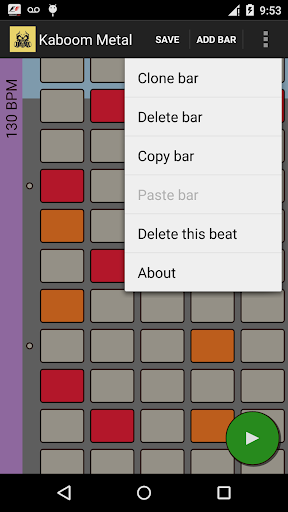
- add / remove bar
- create new drum beat
- delete drum beat
- copy and paste bar
- smooth and nice user interface
App by FinestAndroid.com created by biala
Pokaż więcej

1. Pobierz instalator MEmu i zakończ instalację

2. Uruchom MEmu, a następnie otwórz Google Play na pulpicie

3. Wyszukaj Kaboom Metal Drums w Google Play
Install
4. Pobierz i zainstaluj Kaboom Metal Drums
5. Po zakończeniu instalacji kliknij ikonę, aby rozpocząć

6. Ciesz się grą Kaboom Metal Drums na PC z MEmu
MEmu Play to najlepszy emulator Androida, a 100 milionów ludzi już korzysta z jego i dosta doskonałe wrażenia z gier na Androida. Technologia wirtualizacji MEmu umożliwia płynne granie w tysiące gier Androida na komputerze, nawet tych najbardziej wymagających grafiki.
Większy ekran z lepszą grafiką; Długi czas, bez ograniczeń baterii lub danych mobilnych.
Pełna obsługa mapowania klawiszy dla precyzyjnego sterowania klawiaturą i myszą lub gamepadem.
Wiele kont gier lub zadań na jednym komputerze jednocześnie z menedżerem wielu instancji.
Play Kaboom Metal Drums on PC by following steps: