Orboot Earth AR by PlayShifu
Zaktualizowano
Aktualna wersja
149
Sprzedawca

Przy całej swojej pasji do grania w Orboot Earth AR by PlayShifu, twoje ręce nie powinny być ograniczone na małym ekranie telefonu. Graj jak zawodowiec i uzyskaj pełną kontrolę nad grą za pomocą klawiatury i myszy. MEmu oferuje ci wszystko, czego oczekujesz. Pobierz i graj Orboot Earth AR by PlayShifu na PC. Graj tak długo, jak chcesz, bez ograniczeń baterii, danych komórkowych i niepokojących połączeń. Zupełnie nowy MEmu 9 to najlepszy wybór do grania w Orboot Earth AR by PlayShifu na PC. Przygotowany dzięki naszej wiedzy, znakomity, wstępnie ustawiony system mapowania klawiszy sprawia, że Orboot Earth AR by PlayShifu jest prawdziwą grą na PC. Zakodowany naszą absorpcją, menedżer wielu instancji umożliwia granie na 2 lub więcej kontach na tym samym urządzeniu. A co najważniejsze, nasz emulator może uwolnić pełny potencjał twojego komputera, sprawić, że wszystko będzie płynne. Dbamy nie tylko o to, jak grasz, ale także o cały proces czerpania radości z grania.
Pokaż więcej
Ciesz się wspaniałym doświadczeniem podczas grania w Orboot Earth AR by PlayShifu na komputerze z aplikacją MEMU App Player. Jest to potężny darmowy emulator Androida pozwalający grać w tysiące gier na Androida. ★ PlayShifu's Orboot: The Smart Globe ★.
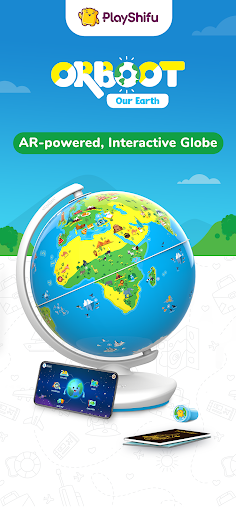
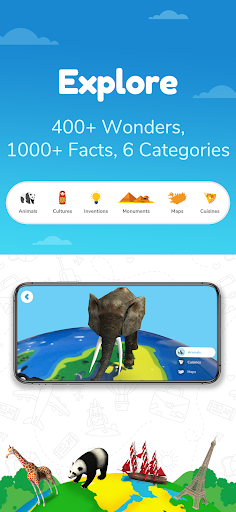
★ PlayShifu's Orboot: The Smart Globe ★
Orboot is a one of a kind globe without any names or borders but various highlights to identify the places with. It adds fun to learning by merging a physical globe with Augmented Reality through the Orboot App on your smartphones and tablets.
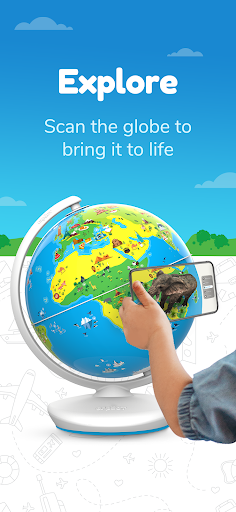
Just scan the Orboot globe with the Orboot app and explore countries and cultures in 3D with detailed information and interactive quizzes and activities.
Ignite your child’s imagination!
Check out www.playshifu.com to get your own Orboot and other Shifu games.
★ Features ★
☆ Scan every small region on your Orboot globe to see the highlights
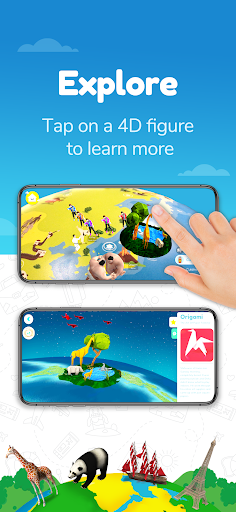
☆ Tap any highlight to get detailed information
☆ Get to know some cool facts about each highlight
☆ Take a fun quiz about what you’ve learnt
☆ Collect the points you’ve earned on your dashboard
☆ Categories available - Animals, Monuments, Inventions, Cultures, Cuisines, and Maps
☆ No 3rd party advertising
☆ No bluetooth required
★ S.T.E.A.M. Ahead ★
☆ Expands knowledge about the world
☆ Builds linguistic abilities
☆ Develops cognitive skills
☆ Inspires imagination & creativity
☆ Encourages enquiry, discovery of information and self-learning
★ How It Works ★
☆ Download the Orboot app
☆ Login to sync your data across several devices
☆ Click on the link sent to your inbox to avail the free categories in the app
☆ Sync the categories of your choice
☆ Scan any small region of the globe
☆ Tap on any highlight to learn more
★ About Team Shifu ★
We are a passionate team of parents, early learning experts, innovators and technologists that fit together like puzzle pieces. Our aim is to make every experience exciting and meaningful for kids, and we strive to give the best!
★ Contact us ★
Your feedback is very important to us. If you have any questions, comments, feedback or need any help, please contact us at: orboot@playshifu.com
Pokaż więcej

1. Pobierz instalator MEmu i zakończ instalację

2. Uruchom MEmu, a następnie otwórz Google Play na pulpicie

3. Wyszukaj Orboot Earth AR by PlayShifu w Google Play
Install
4. Pobierz i zainstaluj Orboot Earth AR by PlayShifu
5. Po zakończeniu instalacji kliknij ikonę, aby rozpocząć

6. Ciesz się grą Orboot Earth AR by PlayShifu na PC z MEmu
MEmu Play to najlepszy emulator Androida, a 100 milionów ludzi już korzysta z jego i dosta doskonałe wrażenia z gier na Androida. Technologia wirtualizacji MEmu umożliwia płynne granie w tysiące gier Androida na komputerze, nawet tych najbardziej wymagających grafiki.
Większy ekran z lepszą grafiką; Długi czas, bez ograniczeń baterii lub danych mobilnych.
Pełna obsługa mapowania klawiszy dla precyzyjnego sterowania klawiaturą i myszą lub gamepadem.
Wiele kont gier lub zadań na jednym komputerze jednocześnie z menedżerem wielu instancji.
Play Orboot Earth AR by PlayShifu on PC by following steps: