PS5 Emulator Prank
Zaktualizowano
Aktualna wersja
Sprzedawca

Przy całej swojej pasji do grania w PS5 Emulator Prank, twoje ręce nie powinny być ograniczone na małym ekranie telefonu. Graj jak zawodowiec i uzyskaj pełną kontrolę nad grą za pomocą klawiatury i myszy. MEmu oferuje ci wszystko, czego oczekujesz. Pobierz i graj PS5 Emulator Prank na PC. Graj tak długo, jak chcesz, bez ograniczeń baterii, danych komórkowych i niepokojących połączeń. Zupełnie nowy MEmu 9 to najlepszy wybór do grania w PS5 Emulator Prank na PC. Przygotowany dzięki naszej wiedzy, znakomity, wstępnie ustawiony system mapowania klawiszy sprawia, że PS5 Emulator Prank jest prawdziwą grą na PC. Zakodowany naszą absorpcją, menedżer wielu instancji umożliwia granie na 2 lub więcej kontach na tym samym urządzeniu. A co najważniejsze, nasz emulator może uwolnić pełny potencjał twojego komputera, sprawić, że wszystko będzie płynne. Dbamy nie tylko o to, jak grasz, ale także o cały proces czerpania radości z grania.
Pokaż więcej
Ciesz się wspaniałym doświadczeniem podczas grania w PS5 Emulator Prank na komputerze z aplikacją MEMU App Player. Jest to potężny darmowy emulator Androida pozwalający grać w tysiące gier na Androida. PS5 EMULATOR PRANK — The Ultimate Gaming Prank App!
PS5 EMULATOR PRANK — The Ultimate Gaming Prank App!
Ever wanted to make your friends think you're playing real PS5 games on your Android phone? PS5 Emulator Prank is the most realistic PlayStation 5 prank simulator ever made for Android!
WHAT MAKES IT AMAZING:
22 REAL PS5 GAME TITLES
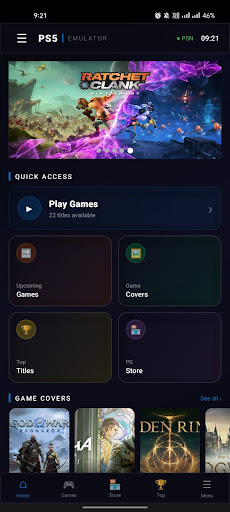
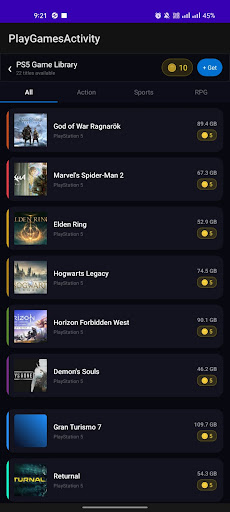
Browse and "play" 22 of the biggest PS5 games including God of War Ragnarök, Spider-Man 2, Elden Ring, The Last of Us, Hogwarts Legacy, Cyberpunk 2077, and many more!
REALISTIC CONTROLLER OVERLAY
Full DualSense controller interface with all buttons — L1/L2/R1/R2 triggers, D-pad, face buttons (△□○), joysticks, touchpad, and PS button. Every button has haptic feedback and realistic sound!
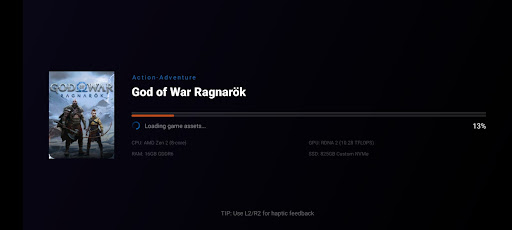
ULTRA REALISTIC LOADING SCREEN
Fool your friends with a PS5-style game loading screen complete with animated progress bar, shader loading messages, and real game cover art!
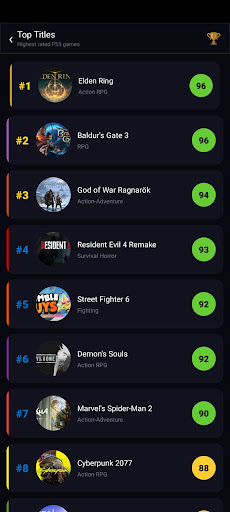
TOP TITLES & RANKINGS
Browse the top rated PS5 games with Metacritic scores and rankings. Looks exactly like a real PS5 interface!
UPCOMING GAMES SECTION
Check out the most anticipated upcoming PS5 titles including GTA VI, Death Stranding 2, Monster Hunter Wilds and more!
PLAYSTATION STORE
Fake PlayStation Store with Deals of the Week, New Releases, and Featured sections — all with real game prices and discount badges!
COIN SYSTEM
Earn coins to "play" games. Watch ads to earn more coins, claim daily bonuses, and visit the coin shop!
THE ULTIMATE PRANK REVEAL
After 30 seconds of "gameplay," the prank is revealed with an epic animation and a hilarious prank message! Share the reaction with your friends!
FEATURES:
- 22 PS5 game titles with real cover images
- Realistic DualSense controller with haptic feedback
- PS5-style UI and animations
- Game loading screens with progress bar
- PlayStation Store with deals and pricing
- Top titles with Metacritic ratings
- Upcoming games section
- Coin reward system
- Daily login bonus
- Share the prank with friends
- Dark futuristic PS5 theme
- Smooth animations throughout
DISCLAIMER:
PS5 Emulator Prank is a PRANK / ENTERTAINMENT app only. It does NOT actually emulate or run any PlayStation 5 games. All game titles, names, and images are used for entertainment and parody purposes only. This app is not affiliated with Sony Interactive Entertainment or PlayStation.
Download now and start pranking your friends!
Keywords: PS5 prank, PlayStation 5 prank, PS5 emulator prank, fake PS5, gaming prank, prank your friends, PS5 simulator
Pokaż więcej

1. Pobierz instalator MEmu i zakończ instalację

2. Uruchom MEmu, a następnie otwórz Google Play na pulpicie

3. Wyszukaj PS5 Emulator Prank w Google Play
Install
4. Pobierz i zainstaluj PS5 Emulator Prank
5. Po zakończeniu instalacji kliknij ikonę, aby rozpocząć

6. Ciesz się grą PS5 Emulator Prank na PC z MEmu
MEmu Play to najlepszy emulator Androida, a 100 milionów ludzi już korzysta z jego i dosta doskonałe wrażenia z gier na Androida. Technologia wirtualizacji MEmu umożliwia płynne granie w tysiące gier Androida na komputerze, nawet tych najbardziej wymagających grafiki.
Większy ekran z lepszą grafiką; Długi czas, bez ograniczeń baterii lub danych mobilnych.
Pełna obsługa mapowania klawiszy dla precyzyjnego sterowania klawiaturą i myszą lub gamepadem.
Wiele kont gier lub zadań na jednym komputerze jednocześnie z menedżerem wielu instancji.
Play PS5 Emulator Prank on PC by following steps: