Tropico
Zaktualizowano
Aktualna wersja
1.4.4RC1
Sprzedawca

Przy całej swojej pasji do grania w Tropico, twoje ręce nie powinny być ograniczone na małym ekranie telefonu. Graj jak zawodowiec i uzyskaj pełną kontrolę nad grą za pomocą klawiatury i myszy. MEmu oferuje ci wszystko, czego oczekujesz. Pobierz i graj Tropico na PC. Graj tak długo, jak chcesz, bez ograniczeń baterii, danych komórkowych i niepokojących połączeń. Zupełnie nowy MEmu 9 to najlepszy wybór do grania w Tropico na PC. Przygotowany dzięki naszej wiedzy, znakomity, wstępnie ustawiony system mapowania klawiszy sprawia, że Tropico jest prawdziwą grą na PC. Zakodowany naszą absorpcją, menedżer wielu instancji umożliwia granie na 2 lub więcej kontach na tym samym urządzeniu. A co najważniejsze, nasz emulator może uwolnić pełny potencjał twojego komputera, sprawić, że wszystko będzie płynne. Dbamy nie tylko o to, jak grasz, ale także o cały proces czerpania radości z grania.
Pokaż więcej
Ciesz się wspaniałym doświadczeniem podczas grania w Tropico na komputerze z aplikacją MEMU App Player. Jest to potężny darmowy emulator Androida pozwalający grać w tysiące gier na Androida. All hail El Presidente!
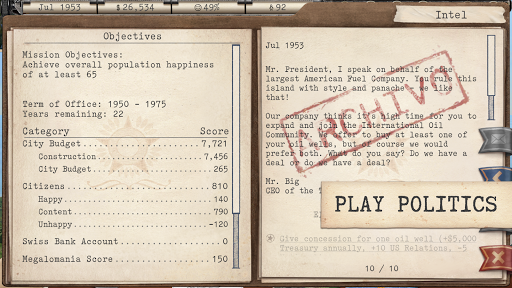
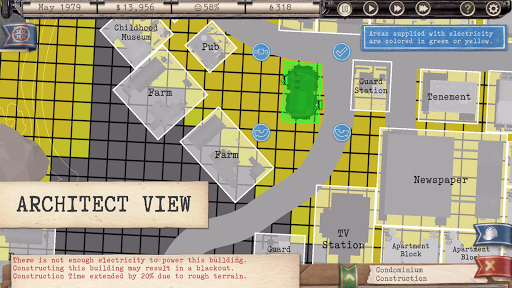
All hail El Presidente! The proud nation of Tropico is now in your hands and badly in need of modernisation!
As the freshly elected leader of an underdeveloped Caribbean island with untapped resources and enormous potential, hopes are high that you will deliver Tropico into the glorious future its people deserve.
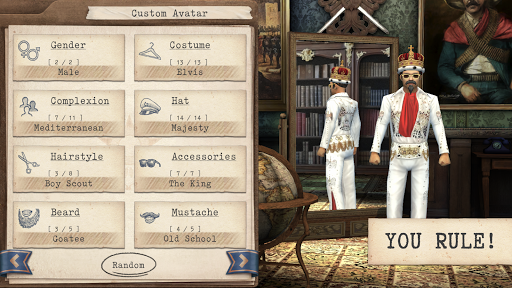
YOU RULE!
Develop and manage every aspect of Tropico, from its roads, buildings and people, to its military, trade and foreign policies.
BE A VISIONARY LEADER
Transform Tropico into the country you want it to be: a tourist paradise, an industrial powerhouse, a police state, or all three!
PLAY POLITICS
Recount elections, calm unruly elements, manage public opinion and reward your loyal followers…
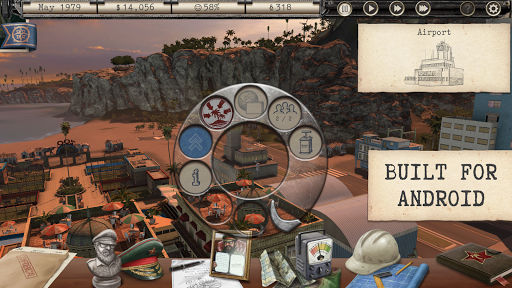
BUILT FOR ANDROID
Exercise complete control with an intuitive touch interface and gameplay mechanics designed and refined for mobile gaming.
EXERT ABSOLUTE POWER!
From printing your own money to growing your own fanclub, Tropico includes all the extra edicts, missions, landmarks and leisure facilities of its popular expansion pack, Absolute Power.
ADDITIONAL MISSION PACKS
Fleece revolutionary llamas and search for alien life in the free 'Postcards from Tropico' mission pack. Or play the markets and face God’s wrath in 'The Tropican Dream' mission pack, available via in-app purchase.
---
Tropico requires 2.5GB of free space, Android 8.0 (Oreo) or later, and is supported on the following devices:
• ASUS ROG Phone II
• Google Pixel 2 / 2 XL / 3 / 3XL / 3a / 3a XL / 4 / 4a / 4a 5G / 5 / 6 / 6 pro / 6a / 7 / 7 pro / 7a
• Google Pixel Tablet
• HTC U12+
• Huawei Honor 10
• Huawei Mate 10 / Mate 20
• Lenovo Tab P11 Pro Gen 2
• LG V30+
• Motorola Moto G 5G Plus/ G9 Play / Z2 Force / Moto G100 / Moto G50
• Nokia 8
• Nothing Phone (1)
• OPPO Reno4 Z 5G
• OnePlus 5T / 6T / 7 / 8 / 8T / 9 / 10 Pro
• OnePlus Nord / Nord N10 5G
• Razer Phone
• Samsung Galaxy A50 / A51 / A51 5G / A70 / A80
• Samsung Galaxy S8 / S9 / S10 / S10+ / S10e / S20 / S21 / S21 Ultra 5G / S22 / S22 + / S22 Ultra / S23 / S23+ / S23 Ultra
• Samsung Galaxy Note8 / Note9 / Note10 / Note10+ 5G / Note20
• Samsung Galaxy Tab S4 / S6 / S7 / S8 / S8+ / S8 Ultra
• Sony Xperia 1 / Xperia 1 II / Xperia 1 III / Xperia 5 II / XZ2 Compact
• Ulefone Armor 12S
• Vivo NEX S
• Xiaomi Mi 6 / 9 SE / 9 / 9T / 10T Lite / 11 / 12
• Xiaomi Pocophone F1 / POCO F3 / POCO X3 NFC / POCO X3 Pro / POCO X4 Pro 5G / POCO M4 Pro
• Xiaomi Redmi Note 8 / 8 Pro / 9S / Note 11
If your device is not listed above but you are still able to purchase Tropico, your device is capable of running the game but is not officially supported. Devices that are not capable of running Tropico are blocked from purchasing it.
---
Supported Languages: English, German, Spanish, French, Italian, Japanese, Russian
---
Copyright © 2021 Kalypso Media Group GmbH. Tropico is a registered trademark of Kalypso Media Group GmbH. All rights reserved. Developed for and published on Android by Feral Interactive Ltd. Android is a trademark of Google LLC. The Android robot is reproduced or modified from work created and shared by Google and used according to terms described in the Creative Commons 3.0 Attribution License. Feral and the Feral logo are trademarks of Feral Interactive Ltd. All other logos, copyrights and trademarks are property of their respective owners. All rights reserved.
Pokaż więcej

1. Pobierz instalator MEmu i zakończ instalację

2. Uruchom MEmu, a następnie otwórz Google Play na pulpicie

3. Wyszukaj Tropico w Google Play
Install
4. Pobierz i zainstaluj Tropico
5. Po zakończeniu instalacji kliknij ikonę, aby rozpocząć

6. Ciesz się grą Tropico na PC z MEmu
MEmu Play to najlepszy emulator Androida, a 100 milionów ludzi już korzysta z jego i dosta doskonałe wrażenia z gier na Androida. Technologia wirtualizacji MEmu umożliwia płynne granie w tysiące gier Androida na komputerze, nawet tych najbardziej wymagających grafiki.
Większy ekran z lepszą grafiką; Długi czas, bez ograniczeń baterii lub danych mobilnych.
Pełna obsługa mapowania klawiszy dla precyzyjnego sterowania klawiaturą i myszą lub gamepadem.
Wiele kont gier lub zadań na jednym komputerze jednocześnie z menedżerem wielu instancji.
Play Tropico on PC by following steps: