Who Am I ? Name Guessing Game
Zaktualizowano
Aktualna wersja
9.3.0
Sprzedawca

Przy całej swojej pasji do grania w Who Am I ? Name Guessing Game, twoje ręce nie powinny być ograniczone na małym ekranie telefonu. Graj jak zawodowiec i uzyskaj pełną kontrolę nad grą za pomocą klawiatury i myszy. MEmu oferuje ci wszystko, czego oczekujesz. Pobierz i graj Who Am I ? Name Guessing Game na PC. Graj tak długo, jak chcesz, bez ograniczeń baterii, danych komórkowych i niepokojących połączeń. Zupełnie nowy MEmu 9 to najlepszy wybór do grania w Who Am I ? Name Guessing Game na PC. Przygotowany dzięki naszej wiedzy, znakomity, wstępnie ustawiony system mapowania klawiszy sprawia, że Who Am I ? Name Guessing Game jest prawdziwą grą na PC. Zakodowany naszą absorpcją, menedżer wielu instancji umożliwia granie na 2 lub więcej kontach na tym samym urządzeniu. A co najważniejsze, nasz emulator może uwolnić pełny potencjał twojego komputera, sprawić, że wszystko będzie płynne. Dbamy nie tylko o to, jak grasz, ale także o cały proces czerpania radości z grania.
Pokaż więcej
Ciesz się wspaniałym doświadczeniem podczas grania w Who Am I ? Name Guessing Game na komputerze z aplikacją MEMU App Player. Jest to potężny darmowy emulator Androida pozwalający grać w tysiące gier na Androida. Your search is over!

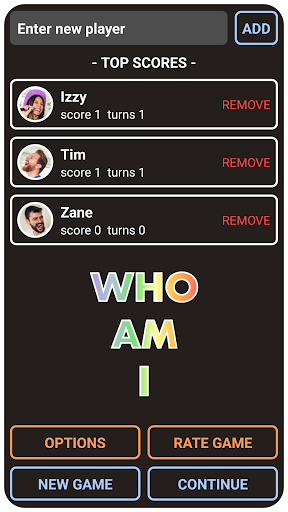
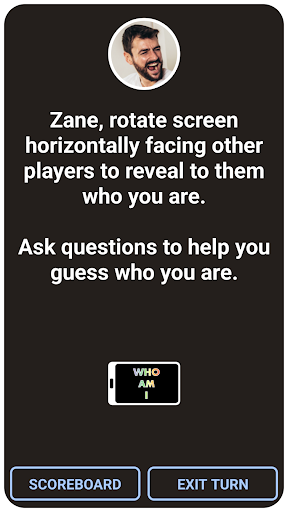
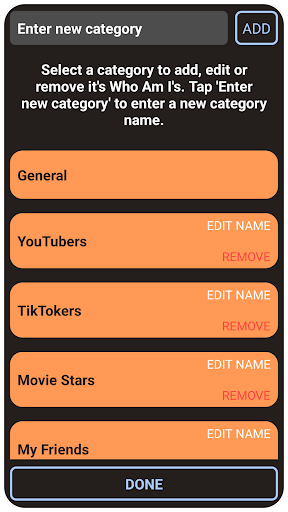
Your search is over! THIS is the Who Am I ? Name Guessing Game you’ve been looking for! It’s packed with names to guess and ultimate features that you’ll love so download this app now and get your game face on as it’s time to play!
Don’t like the built in name cards? No problem - they are fully customizable! You can view, add to and remove all the built in name cards and create your own unique game making it as child friendly, teenager friendly or adult friendly as you want! We’ve added famous celebrity names from Hollywood, history and the US Billboard charts and more but you could add famous celebrity names from any Country, culture or community and make your own unique game - you could even add people you know!
Do you want to make the game more of a challenge by controlling the time in which names have to be guessed? We’ve got this covered - you can set a customizable guessing time from 20 to 200 seconds to make the players really break a sweat!
How about keeping score of who’s guessed the most names so you can find out who’s the best player? We’ve got this covered - there’s a leaderboard which shows how many turns each player has had and how many names they have guessed correctly (points scored).
Do you want to play with all your friends or family no matter how many? No problem - you can add an unlimited number of players! Just keep adding your friends and family’s names or nicknames to play! If someone shows up late to the party they can join in too - just add their name or nickname to the leaderboard anytime during the game!
Feature Roundup:
● PACKED with built in famous celebrity names from Hollywood, history and the US Billboard charts and more!
● ADD your own custom categories of names to guess!
● CUSTOMISE the built in names - view, add to or remove them to make them relevant to guess for any Country, culture or community!
● SCORE POINTS for correctly guessing names.
● LEADERBOARD with a score counter and a turn counter to find out who’s the best player!
● GAME TIMER to set a custom guessing time.
● UNLIMITED number of players. Add as many player names or nicknames as you want!
● PLAY OFFLINE or online. This game requires no internet/WIFI connection or user account creation or login.
If you’ve not played Who Am I before here’s a quick overview of the game (if you have then you can skip this paragraph). You’ll ideally need 2 or more players. Before play you need to enter each players name or nickname into the app. The game can then start by handing the device to the first player who rotates the device towards the other players and the name to guess will appear. The player holding the device then asks yes/no type questions to the other players to find out who they are. If they guess who they are within the set time they will score a point, if they don't then no points are scored. Play is then passed to the next player.
This free Who Am I ? Name Guessing Game will provide hours of fun and frolics for you and your friends and family! We’ve designed it to be as fun and user friendly as possible so players of all ages from kids to teenagers and adults can all easily play. We really hope that you enjoy this free game and have strived for the highest standards possible. If you have any suggestions for improvements or features you would like to see please do not hesitate to contact us as we’d love to hear them!
So what are you waiting for? Get your friends and family together and get your game face on as its time to have some serious fun with a game of Who Am I ? Name Guessing Game!
Find us on Facebook:
https://www.facebook.com/WhoAmICustomApp/
Pokaż więcej

1. Pobierz instalator MEmu i zakończ instalację

2. Uruchom MEmu, a następnie otwórz Google Play na pulpicie

3. Wyszukaj Who Am I ? Name Guessing Game w Google Play
Install
4. Pobierz i zainstaluj Who Am I ? Name Guessing Game
5. Po zakończeniu instalacji kliknij ikonę, aby rozpocząć

6. Ciesz się grą Who Am I ? Name Guessing Game na PC z MEmu
MEmu Play to najlepszy emulator Androida, a 100 milionów ludzi już korzysta z jego i dosta doskonałe wrażenia z gier na Androida. Technologia wirtualizacji MEmu umożliwia płynne granie w tysiące gier Androida na komputerze, nawet tych najbardziej wymagających grafiki.
Większy ekran z lepszą grafiką; Długi czas, bez ograniczeń baterii lub danych mobilnych.
Pełna obsługa mapowania klawiszy dla precyzyjnego sterowania klawiaturą i myszą lub gamepadem.
Wiele kont gier lub zadań na jednym komputerze jednocześnie z menedżerem wielu instancji.
Play Who Am I ? Name Guessing Game on PC by following steps: