Access Care Planning
Zaktualizowano
Aktualna wersja
v7.4.4-620
Sprzedawca

Przestań martwić się nadmiernymi opłatami podczas korzystania z Access Care Planning na telefonie komórkowym, uwolnij się od małego ekranu i ciesz się korzystaniem z aplikacji na znacznie większym wyświetlaczu. Od teraz korzystaj z aplikacji na pełnym ekranie za pomocą klawiatury i myszy. MEmu oferuje wszystkie zaskakujące funkcje, których się spodziewałeś: szybką instalację i łatwą konfigurację, intuicyjne sterowanie, koniec z ograniczeniami baterii, danych mobilnych i niepokojących połączeń. Zupełnie nowy MEmu 9 to najlepszy wybór do używania Access Care Planning na twoim komputerze. Zakodowany przez naszą absorpcję, menedżer wielu instancji umożliwia otwarcie 2 lub więcej kont w tym samym czasie. A co najważniejsze, nasz ekskluzywny emulator może uwolnić pełny potencjał twojego komputera, sprawić, że wszystko będzie płynne i przyjemne.
Pokaż więcej
Ciesz się wspaniałym doświadczeniem podczas grania w Access Care Planning na komputerze z aplikacją MEMU App Player. Jest to potężny darmowy emulator Androida pozwalający grać w tysiące gier na Androida. Formerly Mobizio, now Access Care Planning.
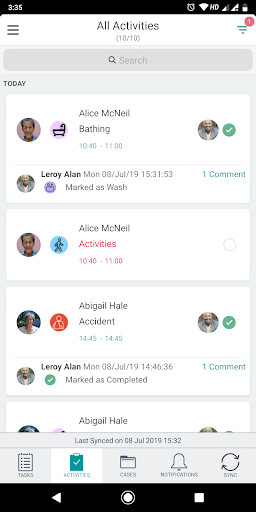
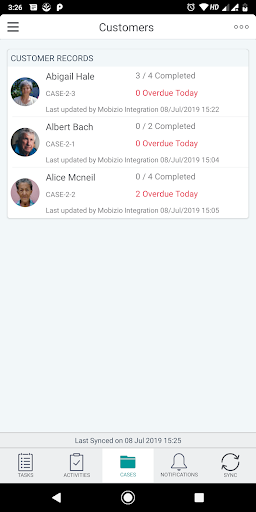
Formerly Mobizio, now Access Care Planning.
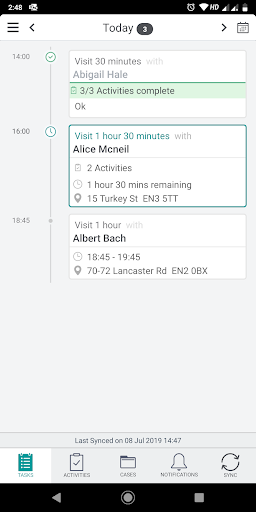
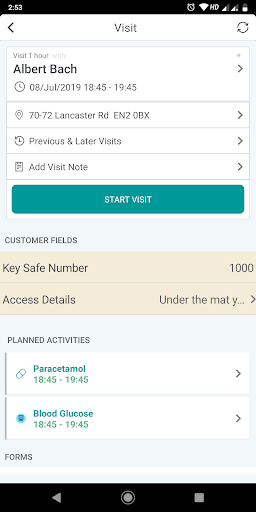
Access Care Planning enables organisations to replace their paper processes with mobile solutions that work with or without a network connection. Easy to configure, Access Care Planning can be tailored to specific business needs without requiring any technical knowledge. Access Care Planning integrates with your existing scheduling, rostering, CRM, PAS and finance systems and works with any smartphone or tablet.
Who is it for?
Access Care Planning is an award-winning solution developed in partnership with our customers to meet the evolving requirements of all stakeholders including:
- Department director: ensures service delivery, compliance and audit trail and evidences outcomes
- Operations director: gives full field staff visibility, monitoring, time and attendance tracking
- Field staff: easy-to-use mobile app with case access, form management, reminders and flexible data capture
- Next of kin: gives ability to self-serve and monitor delivered service in real time
Features of the app:
- Forms designer: With a simple drag and drop interface, forms can be constructed in minutes by non-technical users with Access Care Planning forms designer.
- Forms management: Field staff can now manage their form in the most efficient way: scroll, click, scroll, submit - and everything is synchronised!
- Rich data capture: Capture rich data such as pictures, bar codes and signatures. And since both mobile and web interfaces are completely in sync, everyone sees the same thing!
- Business rules: Set reminders, emails, alerts triggering and data changes automation. As with all features of our software, rules can easily be configured by non-technical users.
- Role based access control: Configure which groups of users have view, edit and create permissions on forms and case records. Permissions can be configured easily and deployed instantly.
- Offline working: When the device is connected, data is sent back at regular intervals. When offline, all data is stored securely on the device, and uploaded when back online.
- Data security: All communication between the user devices and server is over an encrypted channel and data stored on the devices is also encrypted.
For more information visit - https://www.theaccessgroup.com/care-management/products/care-planning-mobizio/
Pokaż więcej

1. Pobierz instalator MEmu i zakończ instalację

2. Uruchom MEmu, a następnie otwórz Google Play na pulpicie

3. Wyszukaj Access Care Planning w Google Play
Install
4. Pobierz i zainstaluj Access Care Planning
5. Po zakończeniu instalacji kliknij ikonę, aby rozpocząć

6. Użyj MEmu, aby doświadczyć Access Care Planning na swoim komputerze
MEmu Play to najlepszy emulator Androida, z którego korzysta ponad 100 milionów użytkowników, ciesząc się wyjątkowym doświadczeniem aplikacji na Androida. Technologia wirtualizacji MEmu pozwala na płynne uruchamianie tysięcy aplikacji Androida na komputerze, nawet tych najbardziej wymagających.
Większy ekran z lepszą grafiką; Długi czas, bez ograniczeń baterii lub danych mobilnych.
Pełna obsługa mapowania klawiszy dla precyzyjnego sterowania klawiaturą i myszą lub gamepadem.
Wiele kont gier lub zadań na jednym komputerze jednocześnie z menedżerem wielu instancji.
Use Access Care Planning on PC by following steps: