AI Video Translator & Dubbing
Zaktualizowano
Aktualna wersja
5.0.0
Sprzedawca

Przestań martwić się nadmiernymi opłatami podczas korzystania z AI Video Translator & Dubbing na telefonie komórkowym, uwolnij się od małego ekranu i ciesz się korzystaniem z aplikacji na znacznie większym wyświetlaczu. Od teraz korzystaj z aplikacji na pełnym ekranie za pomocą klawiatury i myszy. MEmu oferuje wszystkie zaskakujące funkcje, których się spodziewałeś: szybką instalację i łatwą konfigurację, intuicyjne sterowanie, koniec z ograniczeniami baterii, danych mobilnych i niepokojących połączeń. Zupełnie nowy MEmu 9 to najlepszy wybór do używania AI Video Translator & Dubbing na twoim komputerze. Zakodowany przez naszą absorpcję, menedżer wielu instancji umożliwia otwarcie 2 lub więcej kont w tym samym czasie. A co najważniejsze, nasz ekskluzywny emulator może uwolnić pełny potencjał twojego komputera, sprawić, że wszystko będzie płynne i przyjemne.
Pokaż więcej
Ciesz się wspaniałym doświadczeniem podczas grania w AI Video Translator & Dubbing na komputerze z aplikacją MEMU App Player. Jest to potężny darmowy emulator Androida Umożliwia korzystanie z tysięcy aplikacji Androida. Give your content a global voice with DubEnvoy.
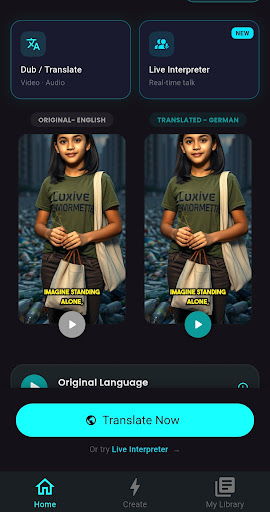
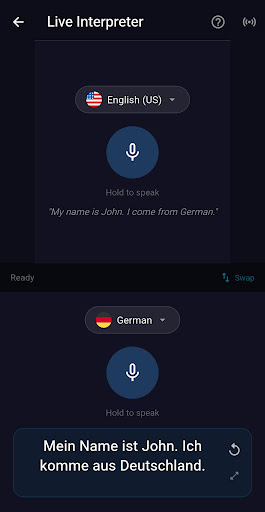
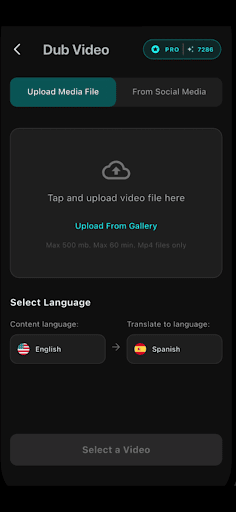
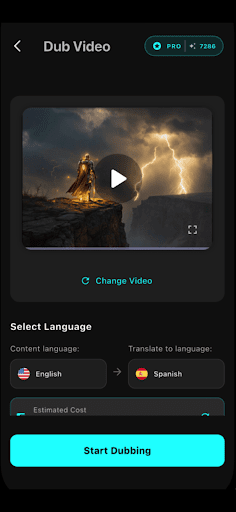
Give your content a global voice with DubEnvoy. More than just a translator, DubEnvoy is your all-in-one AI studio for professional-grade video dubbing, seamless audio translation, and precision-timed captions. Whether you’re a creator, educator, or business, we ensure your message never gets lost in translation.
▶ Diplomacy in Every Dialect
DubEnvoy uses advanced neural voice synthesis to ensure your dubbed content sounds human, not robotic.
Translate & Dub: Convert video and audio into dozens of languages instantly.
AI Voice Cloning: Maintain the tone and emotion of the original speaker.
Precision Auto-Captions: Generate subtitles that are perfectly synced with your new audio.
Audio-to-Audio: Perfect for podcasts, voice memos, and interviews.
▶ Speak the World’s Language
Break through borders without the cost of a production studio. Our AI doesn't just swap words; it adapts your content for a global stage, ensuring your "Envoy" delivers your message with total clarity.
Key Features for Global Growth:
Pro Video Dubbing: High-fidelity audio replacement with AI lip-sync compatibility.
Intelligent Captions: Auto-generate subtitles that look as good as they read.
Neural Voice Studio: Access a library of natural-sounding voices across 29+ languages.
Instant Audio Translation: Upload any MP3 or WAV and get a translated version in seconds.
Batch Processing: Translate entire playlists or folders to scale your reach fast.
Multi-Format Support: From TikToks to full-length documentaries.
Transform your content with DubEnvoy, the world-class AI video translator built for global creators, educators, and businesses. Our platform makes video translation seamless, allowing you to translate video and audio into 29+ languages instantly while maintaining studio-quality sound. With our advanced AI dubbing technology, you can break language barriers and reach international audiences without the need for expensive production teams or manual recording.
Pokaż więcej

1. Pobierz instalator MEmu i zakończ instalację

2. Uruchom MEmu, a następnie otwórz Google Play na pulpicie

3. Wyszukaj AI Video Translator & Dubbing w Google Play
Install
4. Pobierz i zainstaluj AI Video Translator & Dubbing
5. Po zakończeniu instalacji kliknij ikonę, aby rozpocząć

6. Użyj MEmu, aby doświadczyć AI Video Translator & Dubbing na swoim komputerze
MEmu Play to najlepszy emulator Androida, z którego korzysta ponad 100 milionów użytkowników, ciesząc się wyjątkowym doświadczeniem aplikacji na Androida. Technologia wirtualizacji MEmu pozwala na płynne uruchamianie tysięcy aplikacji Androida na komputerze, nawet tych najbardziej wymagających.
Większy ekran z lepszą grafiką; Długi czas, bez ograniczeń baterii lub danych mobilnych.
Pełna obsługa mapowania klawiszy dla precyzyjnego sterowania klawiaturą i myszą lub gamepadem.
Wiele kont gier lub zadań na jednym komputerze jednocześnie z menedżerem wielu instancji.
Use AI Video Translator & Dubbing on PC by following steps: