AIDA64
Zaktualizowano
Aktualna wersja
2.17
Sprzedawca

Przestań martwić się nadmiernymi opłatami podczas korzystania z AIDA64 na telefonie komórkowym, uwolnij się od małego ekranu i ciesz się korzystaniem z aplikacji na znacznie większym wyświetlaczu. Od teraz korzystaj z aplikacji na pełnym ekranie za pomocą klawiatury i myszy. MEmu oferuje wszystkie zaskakujące funkcje, których się spodziewałeś: szybką instalację i łatwą konfigurację, intuicyjne sterowanie, koniec z ograniczeniami baterii, danych mobilnych i niepokojących połączeń. Zupełnie nowy MEmu 9 to najlepszy wybór do używania AIDA64 na twoim komputerze. Zakodowany przez naszą absorpcję, menedżer wielu instancji umożliwia otwarcie 2 lub więcej kont w tym samym czasie. A co najważniejsze, nasz ekskluzywny emulator może uwolnić pełny potencjał twojego komputera, sprawić, że wszystko będzie płynne i przyjemne.
Pokaż więcej
Ciesz się wspaniałym doświadczeniem podczas grania w AIDA64 na komputerze z aplikacją MEMU App Player. Jest to potężny darmowy emulator Androida pozwalający grać w tysiące gier na Androida. Narzędzie do uzyskiwania informacji o sprzęcie i oprogramowaniu dla urządzeń z systemem Android.
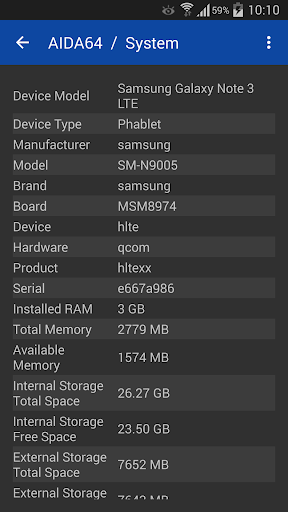
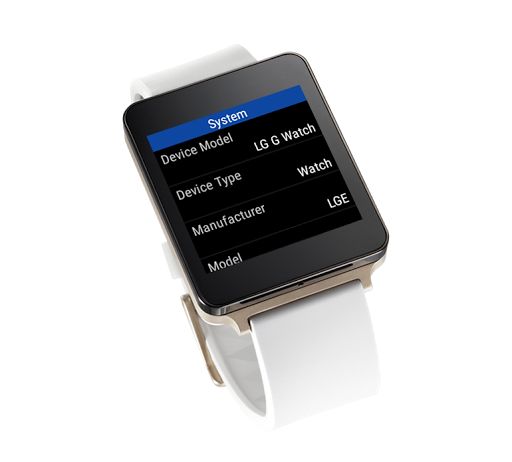
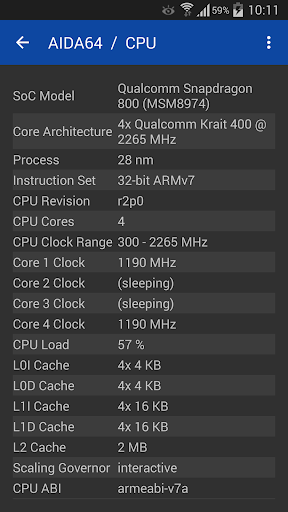
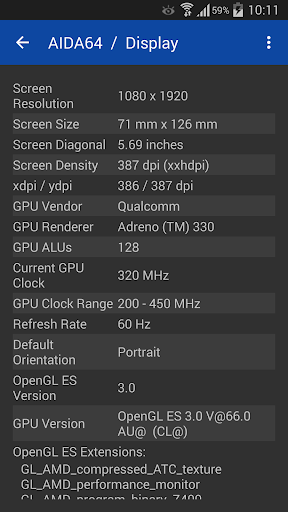
Narzędzie do uzyskiwania informacji o sprzęcie i oprogramowaniu dla urządzeń z systemem Android. Bazując na rozległej wiedzy sprzętowej aplikacji AIDA64 dla Windows, AIDA64 na Androida jest w stanie wyświetlać różne informacje diagnostyczne dla telefonów, tabletów, smartwatchów i telewizorów, w tym:
- Wykrywanie procesora, pomiar zegara rdzenia w czasie rzeczywistym
- Wymiary ekranu, gęstość pikseli i informacje o aparacie
- Monitorowanie poziomu baterii i temperatury
- Informacje o Wi-Fi i sieci komórkowej
- Właściwości systemu operacyjnego Android i Dalvik
- Identyfikacja SoC i modelu urządzenia
- Wykorzystanie pamięci i pamięci masowej
- Szczegóły GPU OpenGL ES, pomiar zegara GPU w czasie rzeczywistym
- Lista urządzeń Vulkan, OpenCL, CUDA, PCI, USB
- Odpytywanie czujnika
- Lista zainstalowanych aplikacji, kodeków i katalogów systemowych
- Moduł Android Wear: natywna aplikacja na zegarki
Wymagania systemowe:
- Android 4.4 lub nowszy
Wymagane uprawnienia:
- ACCESS_NETWORK_STATE
- ACCESS_WIFI_STATE - znane również jako informacje o połączeniu Wi-Fi. AIDA64 wymaga tego uprawnienia, aby wyświetlać informacje o sieci Wi-Fi, takie jak siła sygnału i identyfikator SSID.
- INTERNETU
- KAMERA. AIDA64 wymaga tego uprawnienia, aby wyświetlić informacje o kamerze, takie jak rozdzielczość obrazu. AIDA64 nie robi żadnych zdjęć ani filmów.
Znane problemy:
- Obliczenie rozmiaru przekątnej ekranu może dać nieprawidłową wartość, jeśli producent zakodował nieprawidłowe wartości xdpi i ydpi w profilu urządzenia z systemem Android. Jeśli stwierdzisz, że rozmiar ekranu jest nieprawidłowy, prześlij nam raport dotyczący swojego urządzenia ze strony Informacje, a my naprawimy to w następnej aktualizacji aplikacji AIDA64.
- Możliwości aparatu mogą wyświetlać nieprawidłowe informacje, jeśli producent zakodował nieprawidłowe wartości w profilu Androida urządzenia. Jeśli znajdziesz błędne informacje na stronie Urządzenia, prześlij nam raport dotyczący swojego urządzenia ze strony Informacje, a my naprawimy to w następnej aktualizacji aplikacji AIDA64.
- Pojemność baterii można raportować tylko w przypadku baterii domyślnych. Jeśli bateria została wymieniona na baterię o zwiększonej pojemności, ani Android, ani AIDA64 nie będą w stanie wykryć nowej pojemności.
- Szybkość ładowania baterii może być zgłaszana nieprawidłowo, jeśli telefon lub tablet nie obsługuje poprawnie nowych wywołań API baterii wprowadzonych w systemie Android 5.0. Nawet nowe urządzenia z Androidem wydane w 2015 roku, wyposażone w system Android 5.0 lub nowszy, mogą go nie obsługiwać poprawnie (przykład: Galaxy S6 nie obsługuje w pełni nowych interfejsów API).
Pokaż więcej

1. Pobierz instalator MEmu i zakończ instalację

2. Uruchom MEmu, a następnie otwórz Google Play na pulpicie

3. Wyszukaj AIDA64 w Google Play
Install
4. Pobierz i zainstaluj AIDA64
5. Po zakończeniu instalacji kliknij ikonę, aby rozpocząć

6. Użyj MEmu, aby doświadczyć AIDA64 na swoim komputerze
MEmu Play to najlepszy emulator Androida, z którego korzysta ponad 100 milionów użytkowników, ciesząc się wyjątkowym doświadczeniem aplikacji na Androida. Technologia wirtualizacji MEmu pozwala na płynne uruchamianie tysięcy aplikacji Androida na komputerze, nawet tych najbardziej wymagających.
Większy ekran z lepszą grafiką; Długi czas, bez ograniczeń baterii lub danych mobilnych.
Pełna obsługa mapowania klawiszy dla precyzyjnego sterowania klawiaturą i myszą lub gamepadem.
Wiele kont gier lub zadań na jednym komputerze jednocześnie z menedżerem wielu instancji.
Use AIDA64 on PC by following steps: