bootmod3
Zaktualizowano
Aktualna wersja
2.5.0
Sprzedawca

Przestań martwić się nadmiernymi opłatami podczas korzystania z bootmod3 na telefonie komórkowym, uwolnij się od małego ekranu i ciesz się korzystaniem z aplikacji na znacznie większym wyświetlaczu. Od teraz korzystaj z aplikacji na pełnym ekranie za pomocą klawiatury i myszy. MEmu oferuje wszystkie zaskakujące funkcje, których się spodziewałeś: szybką instalację i łatwą konfigurację, intuicyjne sterowanie, koniec z ograniczeniami baterii, danych mobilnych i niepokojących połączeń. Zupełnie nowy MEmu 9 to najlepszy wybór do używania bootmod3 na twoim komputerze. Zakodowany przez naszą absorpcję, menedżer wielu instancji umożliwia otwarcie 2 lub więcej kont w tym samym czasie. A co najważniejsze, nasz ekskluzywny emulator może uwolnić pełny potencjał twojego komputera, sprawić, że wszystko będzie płynne i przyjemne.
Pokaż więcej
Ciesz się wspaniałym doświadczeniem podczas grania w bootmod3 na komputerze z aplikacją MEMU App Player. Jest to potężny darmowy emulator Androida pozwalający grać w tysiące gier na Androida. Introducing the latest and greatest bootmod3 app!
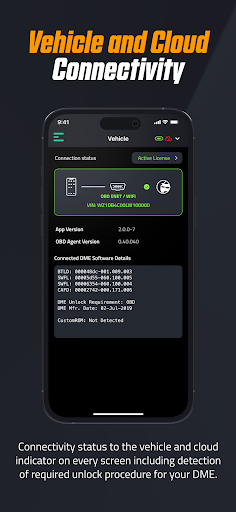
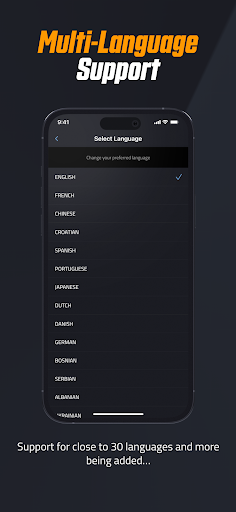
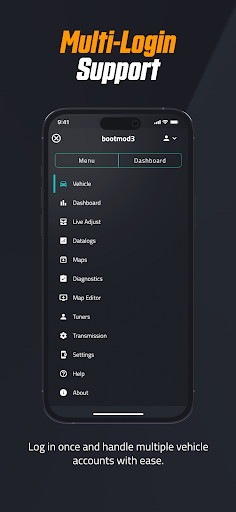
Introducing the latest and greatest bootmod3 app!
bootmod3 is the first, most advanced and most widely adopted cloud based performance flash tuning platform for the BMW F and G series vehicles, Mini, and the 2020+ A90 Toyota Supra. bootmod3 allows end users to unleash the full performance potential of their BMW while doing so as the factory intended by programming the factory engine control unit (ECU/DME) over the OBD diagnostic port.
Program your car and gain 70-120hp in just 3minutes with an off the shelf tune or push well over 1000hp with custom tuning and aftermarket modifications. Switch between pump gas, ethanol blend and race gas maps in just seconds.
/// OTS maps
Load pre-made performance tunes for your BMW F and G series vehicles
/// CUSTOM TUNING
Customize the performance tuning on your BMW F and G series DME / ECU using our custom tuning interface. Tailor performance, sound, fuel economy to your specific needs. Flash the transmission with GTS software on supported models.
/// Live Monitoring
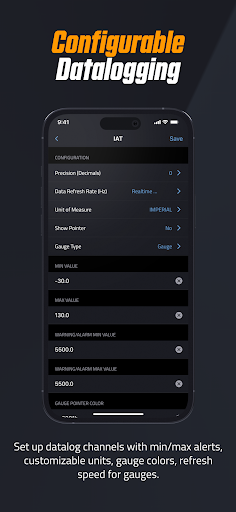
Monitor your engine behaviour using a configurable gauges layout to keep on eye on any of the hundreds of engine monitors like coolant temp, oil temp, boost, torque limits, load, ignition timing across all cylinders, knock feedback. Cloud services allow for logs and maps to be stored in one central location.
/// FEATURES
For feature descriptions please refer to our website for each particular vehicle you're interested in tuning using the bootmod3 platform.
Some of the supported vehicles, refer to our website for a complete listing:
F8x M3, M4
F2x F3x 135i, 235i, 335i, 435i
F1x 535i, 640i, M5, M6, 550i, 650i, X5, X6
F87 M2, M2 Competition
F4x X4, X4M
F8x X5M, X6M
F2x 2015 - 2019 M140i
F2x 2016 - 2019 M240i
F3x 2015 - 2018 340i
F3x 2016 - 2019 440i
G3x 2017+ 540i
GT G32 2017+ 640i
G1x F0x 2015+ 740i
G01 2017+ X3 M40i
G02 2018+ X4 M40i
2020+ A90 Toyota Supra
Mini vehicles 2014+
* This racing product is for competition closed course use only.
** Use of this software may void portions of your vehicle’s factory warranty. Some items may not be legal for “on highway use”. bootmod3 makes no guarantees to the legality of any parts used for “on highway vehicles” and accepts no responsibility for compliance with the vehicle’s factory warranty.
Pokaż więcej

1. Pobierz instalator MEmu i zakończ instalację

2. Uruchom MEmu, a następnie otwórz Google Play na pulpicie

3. Wyszukaj bootmod3 w Google Play
Install
4. Pobierz i zainstaluj bootmod3
5. Po zakończeniu instalacji kliknij ikonę, aby rozpocząć

6. Użyj MEmu, aby doświadczyć bootmod3 na swoim komputerze
MEmu Play to najlepszy emulator Androida, z którego korzysta ponad 100 milionów użytkowników, ciesząc się wyjątkowym doświadczeniem aplikacji na Androida. Technologia wirtualizacji MEmu pozwala na płynne uruchamianie tysięcy aplikacji Androida na komputerze, nawet tych najbardziej wymagających.
Większy ekran z lepszą grafiką; Długi czas, bez ograniczeń baterii lub danych mobilnych.
Pełna obsługa mapowania klawiszy dla precyzyjnego sterowania klawiaturą i myszą lub gamepadem.
Wiele kont gier lub zadań na jednym komputerze jednocześnie z menedżerem wielu instancji.
Use bootmod3 on PC by following steps: