Car Scanner OBD2 ELM327 Pro
Zaktualizowano
Aktualna wersja
1.1
Sprzedawca

Przestań martwić się nadmiernymi opłatami podczas korzystania z Car Scanner OBD2 ELM327 Pro na telefonie komórkowym, uwolnij się od małego ekranu i ciesz się korzystaniem z aplikacji na znacznie większym wyświetlaczu. Od teraz korzystaj z aplikacji na pełnym ekranie za pomocą klawiatury i myszy. MEmu oferuje wszystkie zaskakujące funkcje, których się spodziewałeś: szybką instalację i łatwą konfigurację, intuicyjne sterowanie, koniec z ograniczeniami baterii, danych mobilnych i niepokojących połączeń. Zupełnie nowy MEmu 9 to najlepszy wybór do używania Car Scanner OBD2 ELM327 Pro na twoim komputerze. Zakodowany przez naszą absorpcję, menedżer wielu instancji umożliwia otwarcie 2 lub więcej kont w tym samym czasie. A co najważniejsze, nasz ekskluzywny emulator może uwolnić pełny potencjał twojego komputera, sprawić, że wszystko będzie płynne i przyjemne.
Pokaż więcej
Ciesz się wspaniałym doświadczeniem podczas grania w Car Scanner OBD2 ELM327 Pro na komputerze z aplikacją MEMU App Player. Jest to potężny darmowy emulator Androida pozwalający grać w tysiące gier na Androida. Car Scanner OBD2 ELM327 Pro – Advanced Car Diagnostics & Real-Time Monitoring.
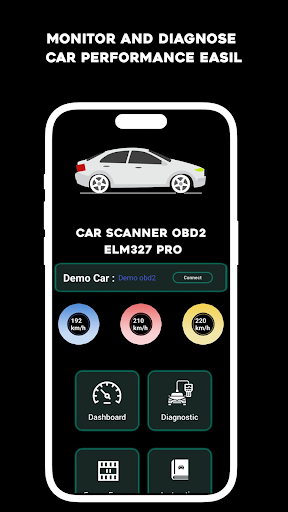
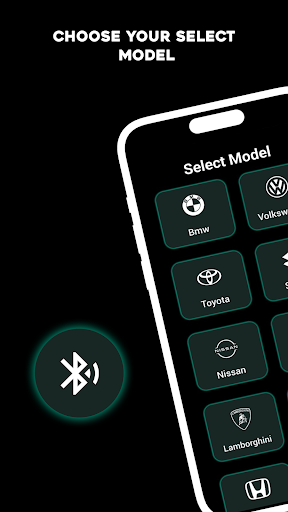
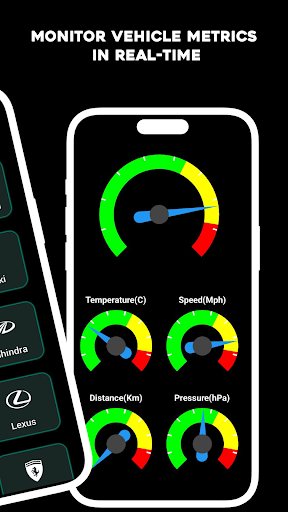
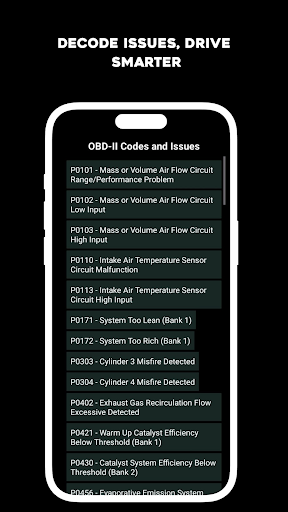
Car Scanner OBD2 ELM327 Pro – Advanced Car Diagnostics & Real-Time Monitoring
The Car Scanner OBD2 ELM327 Pro app is a reliable solution for car diagnostics, enabling drivers to monitor vehicle performance, diagnose issues, and view OBD2 codes directly from their Android device. Designed to work with OBD2 Bluetooth and USB ELM327 adapters, this app is ideal for both car enthusiasts and professionals looking for accurate insights into their vehicles.
Key Features of Car Scanner OBD2 ELM327 Pro
In-Depth OBD2 Diagnostics: Read and clear trouble codes easily with the OBD2 Car Scanner, providing accurate diagnostics across multiple systems.
Extensive OBD2 Codes Database: Decode OBD2 error codes with detailed descriptions, helping you understand and resolve vehicle issues promptly.
Flexible Connectivity Options: Use either Bluetooth or USB ELM327 adapters for seamless, stable connectivity with your vehicle’s OBD2 port.
Customizable Dashboards: Tailor your monitoring experience with customizable dashboards that display data based on your preferences.
Battery Health Monitoring: Track your vehicle’s battery status to prevent unexpected failures, with alerts for potential issues.
Historical Data Logging: Analyze past performance with data logging, allowing you to detect patterns or trends over time.
Easy-to-Use Interface<: Navigate effortlessly with a user-friendly design that simplifies the diagnostic process for beginners and experts alike.
Regular Firmware Updates: Stay current with the latest improvements and compatibility for new vehicle models with regular firmware updates.
Why Choose Car Scanner OBD2 ELM327 Pro?
Comprehensive Diagnostics: The app provides a broad range of diagnostics to help users monitor their vehicle’s health and resolve issues effectively.
Real-Time Data Access: Real-time data allows you to monitor essential metrics and adjust driving habits for improved performance.
Flexible Adapter Compatibility: Compatible with both Bluetooth and USB ELM327 adapters, enabling reliable connectivity and data access.
User-Centric Design: A simple and intuitive interface offers ease of use, making car diagnostics accessible to all.
Support for Multiple Vehicles
The app works with a wide range of OBD2-compliant vehicles, offering versatility across different makes and models.
How to Use Car Scanner OBD2 ELM327 Pro
Download the App: Install the Car Scanner OBD2 ELM327 Pro app from Google Play on your Android device.
Connect Your Adapter: Pair your Bluetooth or USB ELM327 adapter to establish a connection with your vehicle.
Launch the App: Open the app and follow on-screen instructions to connect to the OBD2 system.
Start Diagnostics: Begin diagnostics to view real-time data, read trouble codes, and track various vehicle performance metrics.
Customize Your Dashboard: Personalize your display to show the data that matters most to you, creating a tailored monitoring experience.
Optimize Vehicle Performance with Car Scanner OBD2 ELM327 Pro
With the Car Scanner OBD2 ELM327 Pro, managing vehicle health becomes easier and more efficient. Routine diagnostics, real-time monitoring, and trouble code identification provide all the insights needed to ensure your car’s optimal performance. Stay on top of maintenance and avoid costly repairs with the convenience of mobile diagnostics.
Download Car Scanner OBD2 ELM327 Pro Today
Get instant access to comprehensive diagnostics, data tracking, and performance monitoring directly on your Android device. Download
Car Scanner OBD2 ELM327 Pro and gain control over your vehicle’s health with a trusted OBD2 scanning tool. Make smarter, data-driven decisions for a smoother, safer drive.
Pokaż więcej

1. Pobierz instalator MEmu i zakończ instalację

2. Uruchom MEmu, a następnie otwórz Google Play na pulpicie

3. Wyszukaj Car Scanner OBD2 ELM327 Pro w Google Play
Install
4. Pobierz i zainstaluj Car Scanner OBD2 ELM327 Pro
5. Po zakończeniu instalacji kliknij ikonę, aby rozpocząć

6. Użyj MEmu, aby doświadczyć Car Scanner OBD2 ELM327 Pro na swoim komputerze
MEmu Play to najlepszy emulator Androida, z którego korzysta ponad 100 milionów użytkowników, ciesząc się wyjątkowym doświadczeniem aplikacji na Androida. Technologia wirtualizacji MEmu pozwala na płynne uruchamianie tysięcy aplikacji Androida na komputerze, nawet tych najbardziej wymagających.
Większy ekran z lepszą grafiką; Długi czas, bez ograniczeń baterii lub danych mobilnych.
Pełna obsługa mapowania klawiszy dla precyzyjnego sterowania klawiaturą i myszą lub gamepadem.
Wiele kont gier lub zadań na jednym komputerze jednocześnie z menedżerem wielu instancji.
Use Car Scanner OBD2 ELM327 Pro on PC by following steps: