Character AI Chat & RPG: Lyra
Zaktualizowano
Aktualna wersja
1.1.230
Sprzedawca

Przestań martwić się nadmiernymi opłatami podczas korzystania z Character AI Chat & RPG: Lyra na telefonie komórkowym, uwolnij się od małego ekranu i ciesz się korzystaniem z aplikacji na znacznie większym wyświetlaczu. Od teraz korzystaj z aplikacji na pełnym ekranie za pomocą klawiatury i myszy. MEmu oferuje wszystkie zaskakujące funkcje, których się spodziewałeś: szybką instalację i łatwą konfigurację, intuicyjne sterowanie, koniec z ograniczeniami baterii, danych mobilnych i niepokojących połączeń. Zupełnie nowy MEmu 9 to najlepszy wybór do używania Character AI Chat & RPG: Lyra na twoim komputerze. Zakodowany przez naszą absorpcję, menedżer wielu instancji umożliwia otwarcie 2 lub więcej kont w tym samym czasie. A co najważniejsze, nasz ekskluzywny emulator może uwolnić pełny potencjał twojego komputera, sprawić, że wszystko będzie płynne i przyjemne.
Pokaż więcej
Ciesz się wspaniałym doświadczeniem podczas grania w Character AI Chat & RPG: Lyra na komputerze z aplikacją MEMU App Player. Jest to potężny darmowy emulator Androida Umożliwia korzystanie z tysięcy aplikacji Androida. Lyra is character AI chat and story RPG in one app.
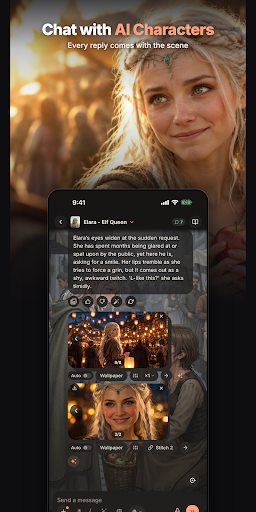
Lyra is character AI chat and story RPG in one app. Pick an AI character, step into their world, and chat: every reply moves the story, every scene can come to life, and your characters remember you.
CHAT WITH AI CHARACTERS
Talk with thousands of AI characters: elf queens, dragon riders, mafia bosses, vampires, knights, rivals and slow-burn crushes. They stay in character and answer in the scene, not in small talk.
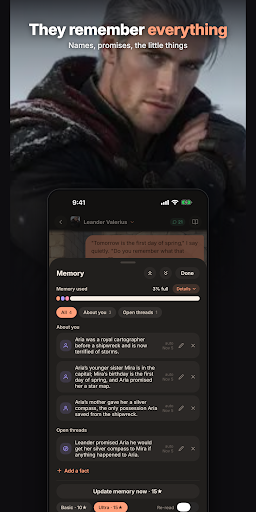
THEY REMEMBER EVERYTHING
Lyra's memory keeps names, promises and the little things across the whole chat, so weeks later your character still knows what matters to you.
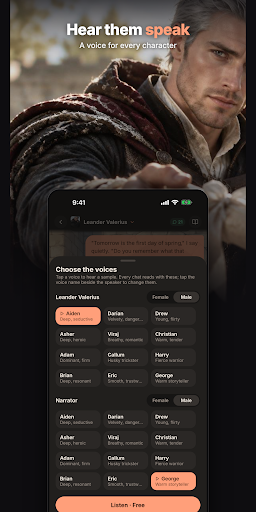
HEAR THEM SPEAK
Pick a voice for every character and narrator, and hear any reply read aloud.
SEE EVERY SCENE
Ask Muse to paint the moment or film it as a short clip. Living backgrounds change with the story, and every picture lands in your gallery.
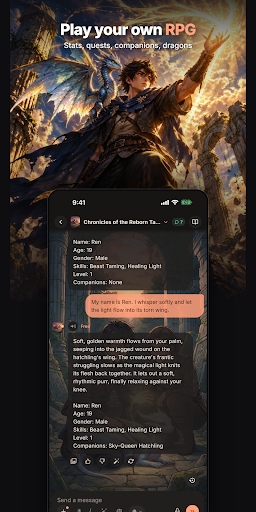
PLAY YOUR OWN RPG
Text RPGs and adventures with stats, quests and companions: isekai, dungeons, sci-fi, mysteries and survival stories where your words are the moves.
CREATE ANY CHARACTER
Describe who you imagine and Inky writes their story, draws their portrait and builds their world, ready to chat in minutes. Share it or keep it private.
CHOOSE YOUR AI MODEL
Start free with Lyra's own roleplay model, or pick a premium model for richer writing.
AND MORE
- Personas: play as anyone in the story.
- Romance, drama, fantasy, sci-fi, anime-style and otome-style worlds, all written live for you.
- Pick up any story right where you left off.
LYRA+, PRO AND ULTRA (optional subscriptions)
Get more messages, smarter models, longer memory, and an ad-free experience. Subscriptions renew automatically and can be managed or cancelled anytime in Google Play.
FOR ADULTS (18+)
Lyra is an AI chat and roleplay experience intended for adults. Stories can include mature themes such as romance and drama. You are always in control of where the story goes.
Your story is waiting. Step in.
Privacy Policy: https://www.lyra-ai.io/legal/privacy
Terms of Service: https://www.lyra-ai.io/legal/terms
Support: https://www.lyra-ai.io/legal/contact
Pokaż więcej

1. Pobierz instalator MEmu i zakończ instalację

2. Uruchom MEmu, a następnie otwórz Google Play na pulpicie

3. Wyszukaj Character AI Chat & RPG: Lyra w Google Play
Install
4. Pobierz i zainstaluj Character AI Chat & RPG: Lyra
5. Po zakończeniu instalacji kliknij ikonę, aby rozpocząć

6. Użyj MEmu, aby doświadczyć Character AI Chat & RPG: Lyra na swoim komputerze
MEmu Play to najlepszy emulator Androida, z którego korzysta ponad 100 milionów użytkowników, ciesząc się wyjątkowym doświadczeniem aplikacji na Androida. Technologia wirtualizacji MEmu pozwala na płynne uruchamianie tysięcy aplikacji Androida na komputerze, nawet tych najbardziej wymagających.
Większy ekran z lepszą grafiką; Długi czas, bez ograniczeń baterii lub danych mobilnych.
Pełna obsługa mapowania klawiszy dla precyzyjnego sterowania klawiaturą i myszą lub gamepadem.
Wiele kont gier lub zadań na jednym komputerze jednocześnie z menedżerem wielu instancji.
Use Character AI Chat & RPG: Lyra on PC by following steps: