
Revolut: Spend, Save, Trade
Zaktualizowano
Aktualna wersja
10.148
Sprzedawca

Przestań martwić się nadmiernymi opłatami podczas korzystania z Revolut: Spend, Save, Trade na telefonie komórkowym, uwolnij się od małego ekranu i ciesz się korzystaniem z aplikacji na znacznie większym wyświetlaczu. Od teraz korzystaj z aplikacji na pełnym ekranie za pomocą klawiatury i myszy. MEmu oferuje wszystkie zaskakujące funkcje, których się spodziewałeś: szybką instalację i łatwą konfigurację, intuicyjne sterowanie, koniec z ograniczeniami baterii, danych mobilnych i niepokojących połączeń. Zupełnie nowy MEmu 9 to najlepszy wybór do używania Revolut: Spend, Save, Trade na twoim komputerze. Zakodowany przez naszą absorpcję, menedżer wielu instancji umożliwia otwarcie 2 lub więcej kont w tym samym czasie. A co najważniejsze, nasz ekskluzywny emulator może uwolnić pełny potencjał twojego komputera, sprawić, że wszystko będzie płynne i przyjemne.
Pokaż więcej
Ciesz się wspaniałym doświadczeniem podczas grania w Revolut: Spend, Save, Trade na komputerze z aplikacją MEMU App Player. Jest to potężny darmowy emulator Androida pozwalający grać w tysiące gier na Androida. Dołącz do ponad 80 milionów klientów na całym świecie, którzy korzystają z naszej aplikacji, aby wydawać i wysyłać pieniądze mądrzej.
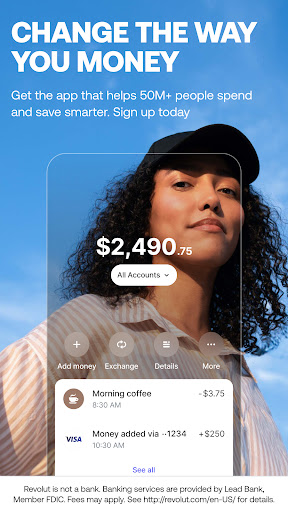
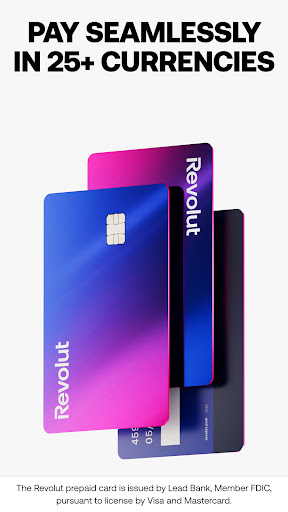
Dołącz do ponad 80 milionów klientów na całym świecie, którzy korzystają z naszej aplikacji, aby wydawać i wysyłać pieniądze mądrzej.
Dobrze wydane pieniądze
- Płać tak, jak chcesz: kartą fizyczną, wirtualną, jednorazową (dla dodatkowej ochrony) albo przy pomocy Google lub Apple Pay.
- Wydawaj za granicą jak miejscowy dzięki korzystnym kursom wymiany (mogą obowiązywać opłaty po przekroczeniu limitu uzasadnionej wymiany oraz prowizje za wymianę weekendy).
- Łatwo śledź i analizuj swoje wydatki.
- Połącz swoje zewnętrzne konta bankowe z Revolut, aby mieć wgląd we wszystkie wydatki w jednym miejscu.
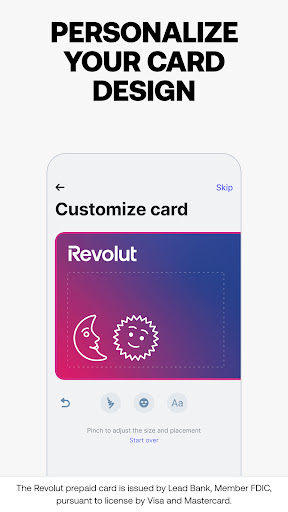
- Zaprojektuj swoją kartę fizyczną, nadając jej indywidualny charakter (mogą obowiązywać opłaty). Chcesz poczuć odrobinę luksusu? Przejdź na plan Metal, aby otrzymać błyszczącą kartę z dodatkiem stali. To za mało? Wybierz plan Ultra i korzystaj z ekskluzywnej karty pokrytej platyną (obowiązują opłaty za subskrypcję oraz Regulamin planów płatnych).
- Przygotuj swoje dzieci na finansowy sukces. Załóż dla nich darmowe konto Revolut <18 z własną kartą, aby mogły uczyć się o pieniądzach w bezpieczny i ekscytujący sposób.
Wysyłaj pieniądze w każdy zakątek świata
- Wysyłaj pieniądze i prośby o płatności jednym kliknięciem, do kogokolwiek i gdziekolwiek na świecie — do dyspozycji masz ponad 30 walut.
- Czatuj ze znajomymi oraz wysyłaj i odbieraj pieniądze w jednym miejscu. Niezależnie od Twoich planów przelewy między znajomymi w Revolut są natychmiastowe.
- Zapomnij o niezręcznych rozmowach! Omawiaj sprawy finansowe oraz dziel i rozliczaj rachunki na czacie w aplikacji. Chcesz rozluźnić atmosferę? Wyślij znajomemu zabawny GIF.
Odkryj obrót giełdowy (ryzyko utraty kapitału)
- Obracaj akcjami już od 1 EUR (mogą obowiązywać inne opłaty).
- Wybieraj spośród ponad 2000 akcji i inwestuj w najpopularniejsze firmy na świecie.
- Korzystaj z comiesięcznego limitu bezpłatnych transakcji giełdowych (mogą obowiązywać inne opłaty).
- Uzyskaj dostęp do kursów i quizów na temat inwestowania.
Usługi świadczy RSEUAB.
Koniec z nadmiernymi wydatkami
- Otrzymuj natychmiastowe powiadomienia o wydatkach i kontroluj każdą płatność.
- Korzystaj z inteligentnych narzędzi do tworzenia statystyk i planowania budżetu. Przestań zastanawiać się, gdzie podziały się Twoje pieniądze — zamiast tego samodzielnie decyduj o tym, na co chcesz je przeznaczyć.
- Boisz się, że przegapisz nadchodzące płatności lub opłaty subskrypcyjne? Nie martw się — powiadomimy Cię z wyprzedzeniem.
Chcesz pójść o krok dalej? Wybierz jeden z planów płatnych, by zyskać ekskluzywne karty, dodatkowe korzyści i jeszcze więcej atrakcyjnych ofert. Dobierz wersję do swoich potrzeb — do wyboru masz plan Plus, Premium, Metal i Ultra (obowiązują opłaty subskrypcyjne oraz Regulamin planów płatnych).
Odblokuj funkcje bezpieczeństwa i przejmij kontrolę
- Blokuj i odblokowuj karty jednym kliknięciem.
- Używaj kart jednorazowych z danymi, które odświeżają się przy każdej płatności, aby zapewnić sobie dodatkową ochronę.
- Ustaw limity wydatków i otrzymuj powiadomienia, aby zawsze trzymać rękę na pulsie.
Jak chronimy Twoje pieniądze?
- Jako bank Revolut podlega regulacjom prawnym, a Twoje środki są objęte gwarancją litewskiej spółki państwowej ds. ubezpieczeń depozytów i inwestycji.
- Nasz zaawansowany system zapobiegania oszustwom ostrzega przed transakcjami wysokiego ryzyka, dzięki czemu możesz wykryć oszustwa odpowiednio wcześniej.
- Ochrona Twoich danych to nasz najwyższy priorytet. Rozbudowana weryfikacja tożsamości zapewnia bezpieczeństwo podczas rejestracji, a konto jest chronione za pomocą kodów dostępu i danych biometrycznych.
- Nasza obsługa klienta w aplikacji jest dostępna 24 godziny na dobę, 7 dni w tygodniu.
https://www.revolut.com/pl-PL/contact-us/
30 South Colonnade, London E14 5HX, United Kingdom
Pokaż więcej

1. Pobierz instalator MEmu i zakończ instalację

2. Uruchom MEmu, a następnie otwórz Google Play na pulpicie

3. Wyszukaj Revolut: Spend, Save, Trade w Google Play
Install
4. Pobierz i zainstaluj Revolut: Spend, Save, Trade
5. Po zakończeniu instalacji kliknij ikonę, aby rozpocząć

6. Użyj MEmu, aby doświadczyć Revolut: Spend, Save, Trade na swoim komputerze
MEmu Play to najlepszy emulator Androida, z którego korzysta ponad 100 milionów użytkowników, ciesząc się wyjątkowym doświadczeniem aplikacji na Androida. Technologia wirtualizacji MEmu pozwala na płynne uruchamianie tysięcy aplikacji Androida na komputerze, nawet tych najbardziej wymagających.
Większy ekran z lepszą grafiką; Długi czas, bez ograniczeń baterii lub danych mobilnych.
Pełna obsługa mapowania klawiszy dla precyzyjnego sterowania klawiaturą i myszą lub gamepadem.
Wiele kont gier lub zadań na jednym komputerze jednocześnie z menedżerem wielu instancji.
Use Revolut: Spend, Save, Trade on PC by following steps: