EPUB Reader for all books
Zaktualizowano
Aktualna wersja
9.3.55
Sprzedawca

Przestań martwić się nadmiernymi opłatami podczas korzystania z EPUB Reader for all books na telefonie komórkowym, uwolnij się od małego ekranu i ciesz się korzystaniem z aplikacji na znacznie większym wyświetlaczu. Od teraz korzystaj z aplikacji na pełnym ekranie za pomocą klawiatury i myszy. MEmu oferuje wszystkie zaskakujące funkcje, których się spodziewałeś: szybką instalację i łatwą konfigurację, intuicyjne sterowanie, koniec z ograniczeniami baterii, danych mobilnych i niepokojących połączeń. Zupełnie nowy MEmu 9 to najlepszy wybór do używania EPUB Reader for all books na twoim komputerze. Zakodowany przez naszą absorpcję, menedżer wielu instancji umożliwia otwarcie 2 lub więcej kont w tym samym czasie. A co najważniejsze, nasz ekskluzywny emulator może uwolnić pełny potencjał twojego komputera, sprawić, że wszystko będzie płynne i przyjemne.
Pokaż więcej
Ciesz się wspaniałym doświadczeniem podczas grania w EPUB Reader for all books na komputerze z aplikacją MEMU App Player. Jest to potężny darmowy emulator Androida pozwalający grać w tysiące gier na Androida. EPUB Reader to piękna aplikacja do czytania wszystkich książek, które kochasz, wystarczy pobrać tę aplikację i cieszyć się.
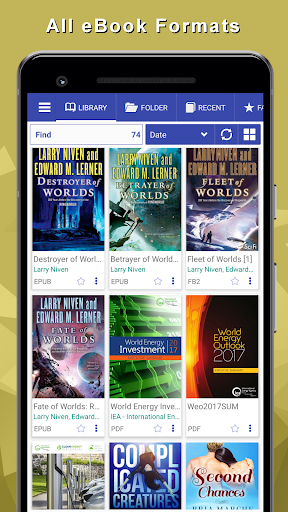
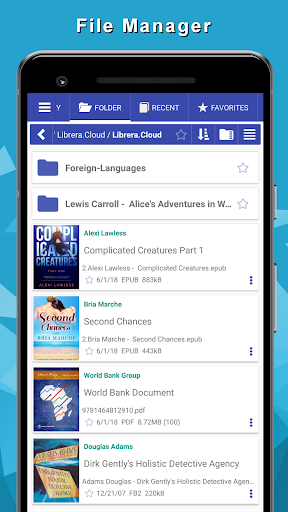
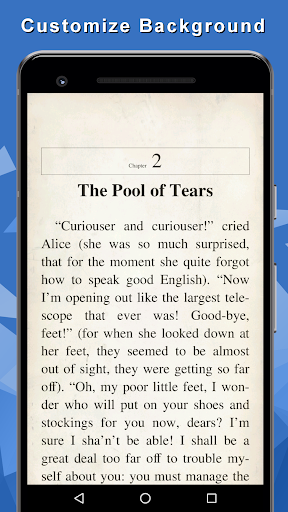
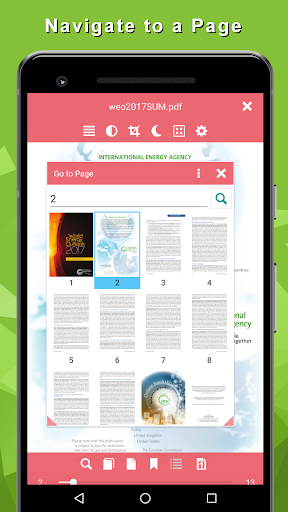
EPUB Reader to piękna aplikacja do czytania wszystkich książek, które kochasz, wystarczy pobrać tę aplikację i cieszyć się.
Świetne sposoby czytania książek
• Formaty wsparcia EPUB, PDF, MOBI, DJVU, FB2, TXT, RTF, AZW, DOC, DOCX, ODT
• Wybierz atrakcyjne czcionki i dostosuj tło
• Dodaj zakładki, notatki
• Otwórz wybrane słowo lub zdanie w słowniku
• Możesz znaleźć słowo lub frazę w dowolnym miejscu książki
• Włącz motyw nocny, aby wygodniej czytać
• Dostosuj jasność ekranu
• Wybierz tryb czytania: przewijaj w sposób ciągły lub przewijaj strony książki
• Zorganizuj swoją bibliotekę w dowolny sposób
• Wyszukaj wiele bezpłatnych książek w katalogach OPDS
• Słuchaj książek, które są czytane na głos za pomocą funkcji Text To Speach (TTS, syntezator mowy)
• Przeglądaj książki w wbudowanym Menedżerze plików
• Organizuj książki na liście ulubionych, oznaczaj kolekcje
• Spis treści
• Czcionki, kolor czcionki, tło, rozmiar czcionki, marginesy, odstępy między wierszami, dzielenie wyrazów, język dzielenia wyrazów, pomiń opcje stylu autora
• Kontrola jasności (przesuń palcem w górę, aby dostosować)
• Blokada obrotu, blokada ruchu w lewo i prawo
• Zakładki (możliwość eksportu jako tekstu na e-mail)
• Podwójne (dwie) strony, połowa strony lub jedna strona na ekranie.
• Otwieranie książek z zewnętrznych aplikacji i przeglądarki
• Ostatnia (ostatnia otwarta) lista książek
• Katalogi książek online (OPDS)
• Udostępnij stronę internetową czytnikowi EPUB jako książkę
• Widżet pięknych książek (najnowsze lub ulubione) na pulpit
• Tryb szybkiego czytania
• Wsparcie książek w archiwum (zip, rar)
Pokaż więcej

1. Pobierz instalator MEmu i zakończ instalację

2. Uruchom MEmu, a następnie otwórz Google Play na pulpicie

3. Wyszukaj EPUB Reader for all books w Google Play
Install
4. Pobierz i zainstaluj EPUB Reader for all books
5. Po zakończeniu instalacji kliknij ikonę, aby rozpocząć

6. Użyj MEmu, aby doświadczyć EPUB Reader for all books na swoim komputerze
MEmu Play to najlepszy emulator Androida, z którego korzysta ponad 100 milionów użytkowników, ciesząc się wyjątkowym doświadczeniem aplikacji na Androida. Technologia wirtualizacji MEmu pozwala na płynne uruchamianie tysięcy aplikacji Androida na komputerze, nawet tych najbardziej wymagających.
Większy ekran z lepszą grafiką; Długi czas, bez ograniczeń baterii lub danych mobilnych.
Pełna obsługa mapowania klawiszy dla precyzyjnego sterowania klawiaturą i myszą lub gamepadem.
Wiele kont gier lub zadań na jednym komputerze jednocześnie z menedżerem wielu instancji.
Use EPUB Reader for all books on PC by following steps: