
Fig: Food Scanner & Guide
Zaktualizowano
Aktualna wersja
4.148.2
Sprzedawca

Przestań martwić się nadmiernymi opłatami podczas korzystania z Fig: Food Scanner & Guide na telefonie komórkowym, uwolnij się od małego ekranu i ciesz się korzystaniem z aplikacji na znacznie większym wyświetlaczu. Od teraz korzystaj z aplikacji na pełnym ekranie za pomocą klawiatury i myszy. MEmu oferuje wszystkie zaskakujące funkcje, których się spodziewałeś: szybką instalację i łatwą konfigurację, intuicyjne sterowanie, koniec z ograniczeniami baterii, danych mobilnych i niepokojących połączeń. Zupełnie nowy MEmu 9 to najlepszy wybór do używania Fig: Food Scanner & Guide na twoim komputerze. Zakodowany przez naszą absorpcję, menedżer wielu instancji umożliwia otwarcie 2 lub więcej kont w tym samym czasie. A co najważniejsze, nasz ekskluzywny emulator może uwolnić pełny potencjał twojego komputera, sprawić, że wszystko będzie płynne i przyjemne.
Pokaż więcej
Ciesz się wspaniałym doświadczeniem podczas grania w Fig: Food Scanner & Guide na komputerze z aplikacją MEMU App Player. Jest to potężny darmowy emulator Androida Umożliwia korzystanie z tysięcy aplikacji Androida. With 1M+ satisfied members, Fig is the only app that supports EVERY dietary restriction and allergy, helping you find food you CAN eat and avoid reactions.
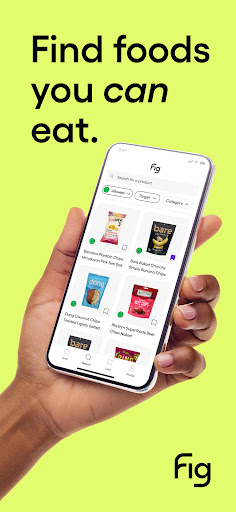
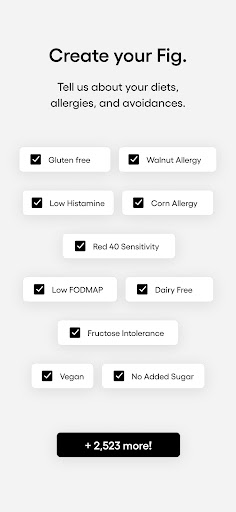
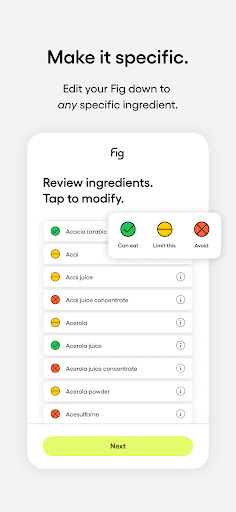
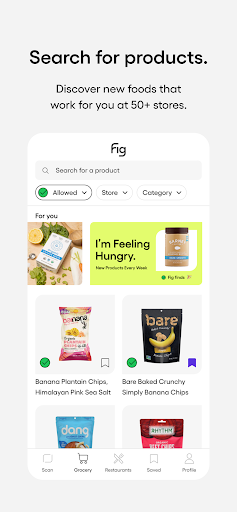
With 1M+ satisfied members, Fig is the only app that supports EVERY dietary restriction and allergy, helping you find food you CAN eat and avoid reactions.
Whether you have food allergies or follow a specialized diet like Low FODMAP, Gluten-Free, Vegan, Low Histamine, Alpha-Gal, or any of our 2,800+ other options, Fig empowers you to navigate grocery aisles and restaurants with confidence and reclaim your love for food.
No more second-guessing or tedious label reading—simply scan, discover, and enjoy a wide range of foods that align with your specific dietary needs and help you hit your nutrition goals.
CUSTOMER REVIEWS
“This app is an ABSOLUTE GODSEND and I cannot recommend it enough. It works amazingly, is so easy to use, scans things super quickly and allows you to put in so many different things (I’ve got allergies, intolerances, and OAS [yay me, right!])” -Karina C.
“Fig has changed my life. Being able to easily scan labels and quickly see if a product is safe for me to eat has been a game changer. I used to cry almost every time I went to the store. My eyesight is terrible, so reading labels is difficult. Now I can get in and out easily. Thank you!!” -Allegra K.
“I have never felt more liberated, supported, seen and represented by an app and its founders. I am better able to manage my allergies and food intolerances through Fig and it has made an immense impact in my everyday life.” -Rachel S.
“Food allergies had turned grocery shopping into a nightmare for me. I was having so much trouble finding foods that I could eat that I started having panic attacks. A friend told me about the Fig app & I immediately downloaded it. My life changed again, only this time for the better! Wow, not only was I able to find new foods to eat, but I also discovered many foods that I thought were okay-weren’t. My health improved. I’m so thankful for Fig. -Raella T.
"Finally, an app that understands the needs of families with dietary restrictions. The Multiple Figs feature is a game-changer for managing my kids' allergies. Thank you, Fig!" - Jason M.
KEY FEATURES
-Check if a product’s ingredients are compatible with your diet in under a second using the barcode scanner
-Discover a comprehensive list of foods that work for you at 100+ grocery stores and restaurants.
-Learn about ingredients and follow complex diets with confidence.
-Make a profile for everyone you care about and find food that works for everyone at once.
-Create shopping lists and save hours at the grocery store.
Fig goes beyond basic ingredient analysis. Our powerful technology is powered by millions of ingredient ratings and notes from our team of 11+ expert dietitians, to help you find what you CAN eat at grocery stores and restaurants. No matter how unique your dietary needs are, Fig has got you covered.
Join the Fig Movement
Our small team consists of individuals with dietary restrictions, just like you. We understand the struggles and challenges you face, and we're committed to continually improving Fig to meet your evolving needs and fighting for causes that matter to us. Together, we're building the app we’ve all dreamed of and fostering a community where you feel represented and welcomed.
Download Fig Today!
Save yourself from the pain of reading every label, researching every ingredient, and wasting money on products you can't actually eat. Start using Fig and experience the joy of finding food that makes you feel your best.
We respect your privacy. For more information, please read our privacy policy at http://foodisgood.com/privacy.
By using Fig, you agree to our terms of service. Read them at http://foodisgood.com/terms-of-service.
Fig is free to download and use. However, we offer an additional subscription (Fig+) that unlocks additional features, including Restaurants, Multiple Figs, Unlimited Scans and more.
Want something added to the app? Email support@foodisgood.com and we’ll be happy to help you!
Pokaż więcej

1. Pobierz instalator MEmu i zakończ instalację

2. Uruchom MEmu, a następnie otwórz Google Play na pulpicie

3. Wyszukaj Fig: Food Scanner & Guide w Google Play
Install
4. Pobierz i zainstaluj Fig: Food Scanner & Guide
5. Po zakończeniu instalacji kliknij ikonę, aby rozpocząć

6. Użyj MEmu, aby doświadczyć Fig: Food Scanner & Guide na swoim komputerze
MEmu Play to najlepszy emulator Androida, z którego korzysta ponad 100 milionów użytkowników, ciesząc się wyjątkowym doświadczeniem aplikacji na Androida. Technologia wirtualizacji MEmu pozwala na płynne uruchamianie tysięcy aplikacji Androida na komputerze, nawet tych najbardziej wymagających.
Większy ekran z lepszą grafiką; Długi czas, bez ograniczeń baterii lub danych mobilnych.
Pełna obsługa mapowania klawiszy dla precyzyjnego sterowania klawiaturą i myszą lub gamepadem.
Wiele kont gier lub zadań na jednym komputerze jednocześnie z menedżerem wielu instancji.
Use Fig: Food Scanner & Guide on PC by following steps: