Fotogenic : Face & Body Editor
Zaktualizowano
Aktualna wersja
2.0.37
Sprzedawca

Przestań martwić się nadmiernymi opłatami podczas korzystania z Fotogenic : Face & Body Editor na telefonie komórkowym, uwolnij się od małego ekranu i ciesz się korzystaniem z aplikacji na znacznie większym wyświetlaczu. Od teraz korzystaj z aplikacji na pełnym ekranie za pomocą klawiatury i myszy. MEmu oferuje wszystkie zaskakujące funkcje, których się spodziewałeś: szybką instalację i łatwą konfigurację, intuicyjne sterowanie, koniec z ograniczeniami baterii, danych mobilnych i niepokojących połączeń. Zupełnie nowy MEmu 9 to najlepszy wybór do używania Fotogenic : Face & Body Editor na twoim komputerze. Zakodowany przez naszą absorpcję, menedżer wielu instancji umożliwia otwarcie 2 lub więcej kont w tym samym czasie. A co najważniejsze, nasz ekskluzywny emulator może uwolnić pełny potencjał twojego komputera, sprawić, że wszystko będzie płynne i przyjemne.
Pokaż więcej
Ciesz się wspaniałym doświadczeniem podczas grania w Fotogenic : Face & Body Editor na komputerze z aplikacją MEMU App Player. Jest to potężny darmowy emulator Androida pozwalający grać w tysiące gier na Androida. "EVERYONE IS PHOTOGENICS".
"EVERYONE IS PHOTOGENICS"
Are you searching the right photo editing app for your mobile photography?
"Fotogenic" is the best choices for photo editing app to suit every level of photographer.
We've created an interactive help for you to understand how to use it for each feature. Even if you have never used photo editing app before, you will create wonderful works of art.
It has an innovative and easy to use interface that creates a beautifully simple user experience. It's easy and intuitive for beginners yet capable enough to be appreciated by professional photographers.
Features :
TOOLS
• Text On Path : Adding text on a path is an important way to create unique text effects
• Speech Bubble : A fun way to perk up your photos is by adding cartoon style speech balloons
• Captions : Add a caption below and above your photos
• Stretch : Make you taller
• Slimmer : It's a snap to get a leaner
• Crop : Crop photo
• Perspective : Fix Keystone distortion
• Rotate : Turn your photo 90 degrees left or right
• Straighten : You can easily fix slanted photos
• Square Fit : Square photo without cropping
• Mosaic : Hide the unwanted parts
BEAUTY
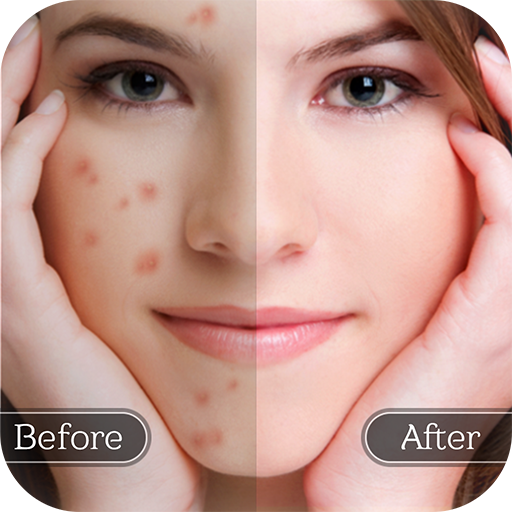
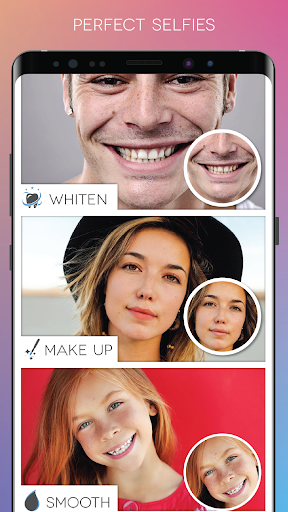
• Smooth : Flawless complexion
• Whiten : Dazzling white smiles
• Detail : It provides unrivaled clarity
• Makeup : Adding a shadow for your eyes or paint a nice color for your lip
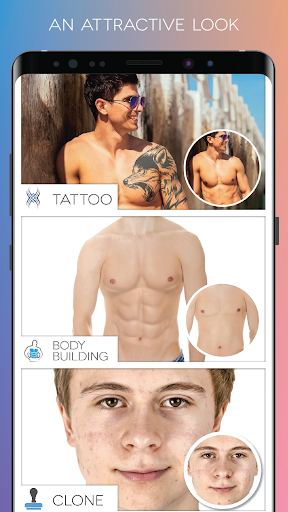
• Clone : Eliminate unwanted objects
• Bodybuilding : You can get an attractive and sexy body in seconds
• Tattoo : You can get inspiration what symbol to put permanently on your body
• Bronze Skin : Making your bronzer appear naturally sun kissed
• Defocus : It allows you to focus a subject of your photo
• Reshape : Simulate realistic plastic surgeries
COLOR ADJUSTMENT
• Vibrance : Well saturated colors
• Color Splash : Nice looking abstract artworks
• Color Replacement : Easily change the color of objects
• Levels : Stretch brightness levels in a histogram
• Filters : Hundreds of great photo filters in 5 different categories
• Red Eye : Fix red eye effect
• Lighting : Add depth and warmth
• Channel Mixer : Adjust the percentages for the Red, Green and Blue
• Brightness & Contrast : Fix too light or too dark areas
• Sharpen : Almost every digital image needs at least a little bit of sharpening
• HDR : Achieve an HDR (high dynamic range) look
• Highlights & Shadows : Easy method for correcting lighting
PAINT
• Signature : Add digital Signature
• Paint : Perfect tool for those who love the art of hand painted
Artistic Brushes
• Funny Brushes : 40 fun brushes in 5 different categories (Cute,Halloween,Indicator,Kid,People)
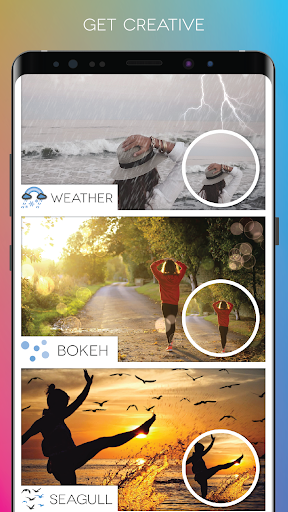
• Weather : You’ll be able to transform the atmosphere of your picture in just a few seconds(Clouds,Lightning,Rain,Rainbow,Snow)
• Glowing Lines : Wrap a part of the main object with a glowing beam of light (Glow lamp,sparkle,Fire,Glow Line)
• Seagull : Create a wonderful graphic composition (Butterfly, Seagull)
Live Brushes
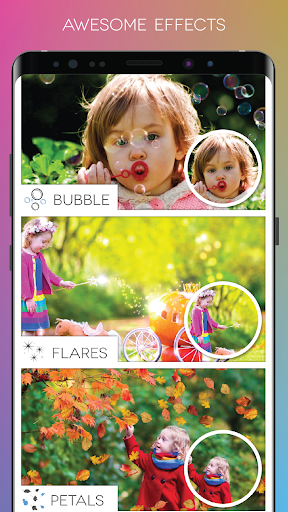
• Flare : Add magic to your photos
• Bokeh : Create soft dreamy backgrounds
• Money : Take them, they are flying into your hands!
• Dandelion : Bring happiness to your photos
• Bubble : Add the wonderful flying bubbles
• Petals : Falling petals. Your photos will look very elegant and ethereal (Red Rose,Yellow Rose,Daisy,Autumn)
• Confetti : Essential part of memorable photos
• Shapes : The ideal complement for a fun photo composition
TEXTURES
• Mixer : One of the fastest ways to get amazing looking images is by using Blending modes.
• Light Leaks : Add an artistic touch to your photos
• Grunge : Convert normal everyday photos into worn out style.
• Gradient : Create natural looking composite images.
• Lens Flare : Trendy cool colorized photos
• Vignette : A popular photo effect
• Mask : Highlight a part of your image in different shapes
• Frames : Dozens of Picture frame with 4 different categories
• Doodle : Perfect way for you to add humor or feeling to your photo (5 different categories)
• Borders : Create a simple but effective border
Pokaż więcej

1. Pobierz instalator MEmu i zakończ instalację

2. Uruchom MEmu, a następnie otwórz Google Play na pulpicie

3. Wyszukaj Fotogenic : Face & Body Editor w Google Play
Install
4. Pobierz i zainstaluj Fotogenic : Face & Body Editor
5. Po zakończeniu instalacji kliknij ikonę, aby rozpocząć

6. Użyj MEmu, aby doświadczyć Fotogenic : Face & Body Editor na swoim komputerze
MEmu Play to najlepszy emulator Androida, z którego korzysta ponad 100 milionów użytkowników, ciesząc się wyjątkowym doświadczeniem aplikacji na Androida. Technologia wirtualizacji MEmu pozwala na płynne uruchamianie tysięcy aplikacji Androida na komputerze, nawet tych najbardziej wymagających.
Większy ekran z lepszą grafiką; Długi czas, bez ograniczeń baterii lub danych mobilnych.
Pełna obsługa mapowania klawiszy dla precyzyjnego sterowania klawiaturą i myszą lub gamepadem.
Wiele kont gier lub zadań na jednym komputerze jednocześnie z menedżerem wielu instancji.
Use Fotogenic : Face & Body Editor on PC by following steps: