JC Tools Skin ML Injector 2026
Zaktualizowano
Aktualna wersja
1.1
Sprzedawca

Przestań martwić się nadmiernymi opłatami podczas korzystania z JC Tools Skin ML Injector 2026 na telefonie komórkowym, uwolnij się od małego ekranu i ciesz się korzystaniem z aplikacji na znacznie większym wyświetlaczu. Od teraz korzystaj z aplikacji na pełnym ekranie za pomocą klawiatury i myszy. MEmu oferuje wszystkie zaskakujące funkcje, których się spodziewałeś: szybką instalację i łatwą konfigurację, intuicyjne sterowanie, koniec z ograniczeniami baterii, danych mobilnych i niepokojących połączeń. Zupełnie nowy MEmu 9 to najlepszy wybór do używania JC Tools Skin ML Injector 2026 na twoim komputerze. Zakodowany przez naszą absorpcję, menedżer wielu instancji umożliwia otwarcie 2 lub więcej kont w tym samym czasie. A co najważniejsze, nasz ekskluzywny emulator może uwolnić pełny potencjał twojego komputera, sprawić, że wszystko będzie płynne i przyjemne.
Pokaż więcej
Ciesz się wspaniałym doświadczeniem podczas grania w JC Tools Skin ML Injector 2026 na komputerze z aplikacją MEMU App Player. Jest to potężny darmowy emulator Androida Umożliwia korzystanie z tysięcy aplikacji Androida. JC Tools Skin ML Injector 2026 is a creative companion app designed for MOBA enthusiasts who enjoy exploring customization ideas and enhancing their overall gaming inspiration.
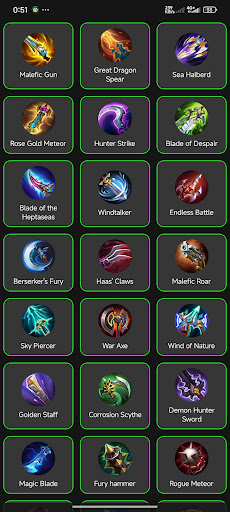
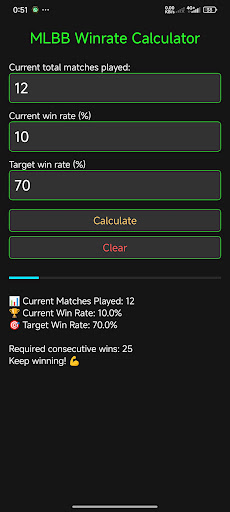
JC Tools Skin ML Injector 2026 is a creative companion app designed for MOBA enthusiasts who enjoy exploring customization ideas and enhancing their overall gaming inspiration. The app provides a smooth and user-friendly experience, making it easy to browse, preview, and organize visual and audio resources that reflect your personal style and preferences.
With JC Tools - ML Tools Skin, you can explore a wide variety of visual themes, expressive emotes, inspiration collections, map aesthetics, and loading screen concepts designed to make your gaming experience more enjoyable and less repetitive. These features are created to spark creativity, express your personality, and bring fresh ideas to your gameplay atmosphere.
The app also helps you organize and manage your selected resources, allowing you to preview and customize visual and audio elements for personal inspiration, media use, or creative reference. Everything is designed to be simple and accessible, so you can focus on enjoying and personalizing your experience.
COMPLETE HERO GUIDE
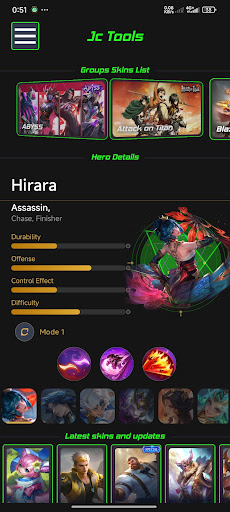
ML Tools now includes a comprehensive hero reference database to help you understand every hero in greater detail before entering battle.
Hero Statistics
Discover detailed information for every hero, including:
Durability – How well the hero can withstand damage in battle.
Offense – The hero's damage potential and offensive capabilities.
Control Effects – Crowd control abilities such as stun, slow, knock-up, and other CC effects.
Difficulty – How easy or challenging the hero is to master.
Skill Combos
Learn the optimal skill combinations to maximize your hero's potential. Each combo includes explanations of when and how to use it effectively in different match situations.
Designed for Every Player
Whether you're a beginner learning a new hero or an experienced player looking to refine your strategy, the Hero Guide serves as a quick and convenient reference that you can access anytime—even when you're not in a match.
All hero information is presented in a clean and intuitive interface, seamlessly complementing the familiar visual experience of the ML GFX Skin Injector.
Pokaż więcej

1. Pobierz instalator MEmu i zakończ instalację

2. Uruchom MEmu, a następnie otwórz Google Play na pulpicie

3. Wyszukaj JC Tools Skin ML Injector 2026 w Google Play
Install
4. Pobierz i zainstaluj JC Tools Skin ML Injector 2026
5. Po zakończeniu instalacji kliknij ikonę, aby rozpocząć

6. Użyj MEmu, aby doświadczyć JC Tools Skin ML Injector 2026 na swoim komputerze
MEmu Play to najlepszy emulator Androida, z którego korzysta ponad 100 milionów użytkowników, ciesząc się wyjątkowym doświadczeniem aplikacji na Androida. Technologia wirtualizacji MEmu pozwala na płynne uruchamianie tysięcy aplikacji Androida na komputerze, nawet tych najbardziej wymagających.
Większy ekran z lepszą grafiką; Długi czas, bez ograniczeń baterii lub danych mobilnych.
Pełna obsługa mapowania klawiszy dla precyzyjnego sterowania klawiaturą i myszą lub gamepadem.
Wiele kont gier lub zadań na jednym komputerze jednocześnie z menedżerem wielu instancji.
Use JC Tools Skin ML Injector 2026 on PC by following steps: