Learn Art History & Painting
Zaktualizowano
Aktualna wersja
2.38.0
Sprzedawca

Przestań martwić się nadmiernymi opłatami podczas korzystania z Learn Art History & Painting na telefonie komórkowym, uwolnij się od małego ekranu i ciesz się korzystaniem z aplikacji na znacznie większym wyświetlaczu. Od teraz korzystaj z aplikacji na pełnym ekranie za pomocą klawiatury i myszy. MEmu oferuje wszystkie zaskakujące funkcje, których się spodziewałeś: szybką instalację i łatwą konfigurację, intuicyjne sterowanie, koniec z ograniczeniami baterii, danych mobilnych i niepokojących połączeń. Zupełnie nowy MEmu 9 to najlepszy wybór do używania Learn Art History & Painting na twoim komputerze. Zakodowany przez naszą absorpcję, menedżer wielu instancji umożliwia otwarcie 2 lub więcej kont w tym samym czasie. A co najważniejsze, nasz ekskluzywny emulator może uwolnić pełny potencjał twojego komputera, sprawić, że wszystko będzie płynne i przyjemne.
Pokaż więcej
Ciesz się wspaniałym doświadczeniem podczas grania w Learn Art History & Painting na komputerze z aplikacją MEMU App Player. Jest to potężny darmowy emulator Androida pozwalający grać w tysiące gier na Androida. Improve your knowledge of visual art history.
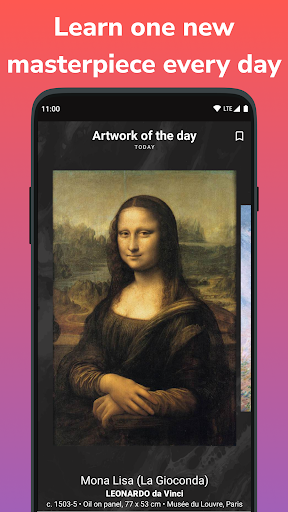
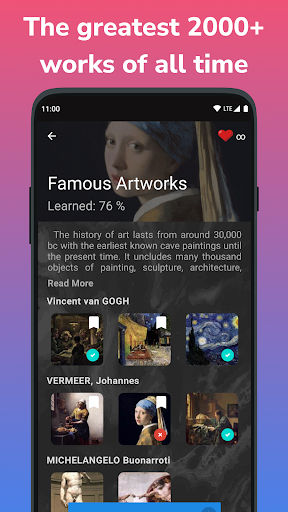
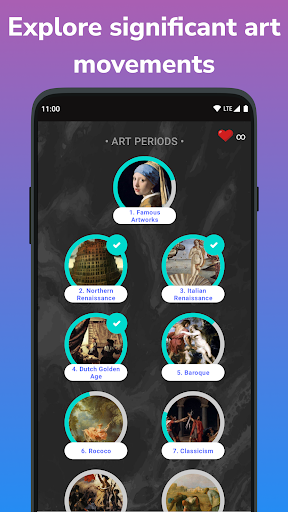
Improve your knowledge of visual art history. Learn the Western art history. Study the basics of Impressionism, Modernism, Renaissance etc. Guess who is the artist of masterpiece in a quiz!
"Artly" is a fascinating intellectual game, museum and art gallery. You can recognize the paintings of great artists, as well as test your erudition and strengthen your knowledge of culture. As you progress through the art quiz levels, masterpieces will be less popular.
Following topics in the app:
• Famous Artworks. Most popular artworks around the world
• The Italian Renaissance. Great artists, sculptures and architects: from Leonardo da Vinci and Michelangelo to Raphael
• The Northern Renaissance: Albrecht Durer, Jerome Bosch, Pieter Bruegel and others
• Dutch Golden Age: painting of Rembrandt, Vermeer and Hals
• Baroque. Canvases by Rubens, Diego Velazquez and Poussin
• Rococo: Watteau, Fragonard and Boucher
• Classicism. Masterpieces by Ingres, David, sculptures of Canova
• Art of the Romanticism: Goya and Delacroix, Turner and Constable
• Impressionism: masterpieces of Claude Monet, Renoir, Degas and others
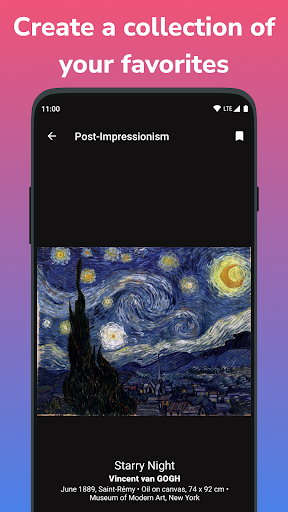
• Post-Impressionism: "Starry Night" by Vincent Van Gogh, "The Card Players" by Cezanne
Futhermore:
• Modern and Contemporary Art masterpieces: "The Kiss" by Gustav Klimt, "Composition VII" by Kandinsky
• Expressionism: "Scream" by Munch
• Russian School
• Scrulpture and Architecture
• Many other paintings and artists :)
Artworks of world-famous museums:
• The Louvre Museum, The Musée d'Orsay, Musée Rodin
• The National Gallery of London, Tate Gallery, British Museum, Victoria and Albert Museum
• The Prado Museum, Colegio de San Telmo
• The Hermitage, State Russian Museum, State Tretyakov Gallery, Pushkin Museum
• The Metropolitan Museum, MoMA (Museum of Modern Art), Museum of Art, Museum of Fine Arts, Frick Collection, National Gallery of Art in Washington
• Staatliche Museen, Staatliche Kunsthalle, Städelsches Kunstinstitut, Residenzgalerie, Neue Pinakothek
• Galleria degli Uffizi, Museo Nazionale del Bargello, Loggia dei Lanzi in Florence, Palazzo Medici Riccardi
• Van Gogh Museum in Amsterdam, Rijksmuseum Kröller-Müller
• etc.
Key Features:
• View paintings by great artists in Museum of the app
• Test knowledge in the quiz
• Complete lessons and courses about art history epochs and artists
• Daily dose of art – receive daily notifications about artwork of the day
Our goal:
Improve the level of culture
Note:
If you have any support-related inquiries or need assistance, please contact kozemirov.developer@gmail.com
Pokaż więcej

1. Pobierz instalator MEmu i zakończ instalację

2. Uruchom MEmu, a następnie otwórz Google Play na pulpicie

3. Wyszukaj Learn Art History & Painting w Google Play
Install
4. Pobierz i zainstaluj Learn Art History & Painting
5. Po zakończeniu instalacji kliknij ikonę, aby rozpocząć

6. Użyj MEmu, aby doświadczyć Learn Art History & Painting na swoim komputerze
MEmu Play to najlepszy emulator Androida, z którego korzysta ponad 100 milionów użytkowników, ciesząc się wyjątkowym doświadczeniem aplikacji na Androida. Technologia wirtualizacji MEmu pozwala na płynne uruchamianie tysięcy aplikacji Androida na komputerze, nawet tych najbardziej wymagających.
Większy ekran z lepszą grafiką; Długi czas, bez ograniczeń baterii lub danych mobilnych.
Pełna obsługa mapowania klawiszy dla precyzyjnego sterowania klawiaturą i myszą lub gamepadem.
Wiele kont gier lub zadań na jednym komputerze jednocześnie z menedżerem wielu instancji.
Use Learn Art History & Painting on PC by following steps: