Luna Band and Ring: LifeOS
Zaktualizowano
Aktualna wersja
2.0.3
Sprzedawca

Przestań martwić się nadmiernymi opłatami podczas korzystania z Luna Band and Ring: LifeOS na telefonie komórkowym, uwolnij się od małego ekranu i ciesz się korzystaniem z aplikacji na znacznie większym wyświetlaczu. Od teraz korzystaj z aplikacji na pełnym ekranie za pomocą klawiatury i myszy. MEmu oferuje wszystkie zaskakujące funkcje, których się spodziewałeś: szybką instalację i łatwą konfigurację, intuicyjne sterowanie, koniec z ograniczeniami baterii, danych mobilnych i niepokojących połączeń. Zupełnie nowy MEmu 9 to najlepszy wybór do używania Luna Band and Ring: LifeOS na twoim komputerze. Zakodowany przez naszą absorpcję, menedżer wielu instancji umożliwia otwarcie 2 lub więcej kont w tym samym czasie. A co najważniejsze, nasz ekskluzywny emulator może uwolnić pełny potencjał twojego komputera, sprawić, że wszystko będzie płynne i przyjemne.
Pokaż więcej
Ciesz się wspaniałym doświadczeniem podczas grania w Luna Band and Ring: LifeOS na komputerze z aplikacją MEMU App Player. Jest to potężny darmowy emulator Androida Umożliwia korzystanie z tysięcy aplikacji Androida. Luna is a comprehensive health tracking ecosystem that comes with a smart ring, a fitness band, and an always-on intelligence layer called LifeOS.
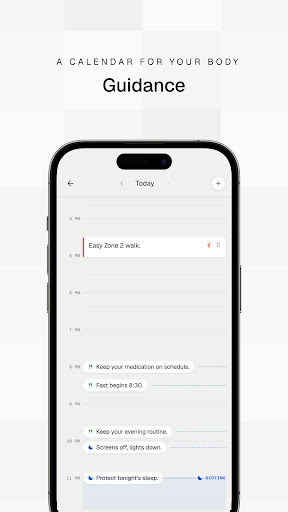
Luna is a comprehensive health tracking ecosystem that comes with a smart ring, a fitness band, and an always-on intelligence layer called LifeOS. Instead of passively displaying data in dashboards, Luna understands your biomarkers and your health goals, and turns them into a personalized plan for your day.
A calendar for your body:
You wake to a day that has already been shaped around the state you are in. Breakfast has a time, your workout planned based on your preferred slot and goals, and a nutrition plan based on your calorie targets and macro consumption. The plan also takes into account what you actually did in the past days and weeks, and learns from your preferences and available resources.
Sleep tracking and continuous vitals:
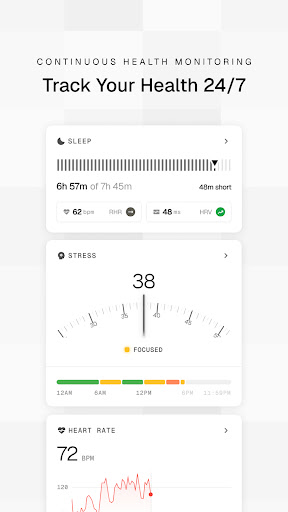
Understand how well or poorly you slept, with an analysis to meet a single chart. Sleep tracking separates the night into stages, and blood oxygen, or SpO2, along with resting heart rate, HRV and skin temperature are all measured while you sleep, then weighed against your own normal instead of a population average. A figure that looks unremarkable on somebody else's chart gets flagged when it is unusual for you, and every value on the page says whether it was measured, worked out by a stated formula, or estimated.
Manage your health goals:
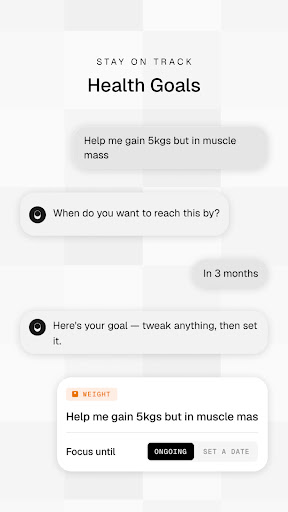
You describe what you are working towards in your own words, such as running twenty kilometres in a week, and what comes back is a plan with check-ins rather than an empty tracker to fill in yourself. Progress stays honest on the weeks that go badly. The goal also changes what each morning asks of you, so the thing you want and the day in front of you stop being separate conversations.
Track your health 24/7:
Your sleep and stress recorded throughout the day, and your HR recorded every second. Training Load tells you whether recent effort is building you up or wearing you down, VO2 Max estimates aerobic capacity after any outdoor run, walk or ride of fifteen minutes or more, and strain reads as Relaxed, Focused or Stressed as the hours pass. Anything in that history can be asked about out loud, in English, and the reply comes from your own record rather than general advice.
Luna Apps:
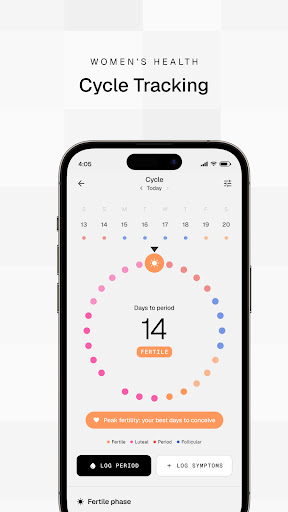
You carry only the parts of Luna you use. Cycle Tracker, Calorie Tracker and Circadian switch on when they matter and stay out of sight when they do not, so somebody tracking a menstrual cycle and somebody managing their weight are not looking at the same crowded screen. Calorie tracking holds what you ate and what remains against a target, and explains where that target came from and when recovery moved it. Cycle tracking shows the days to your next period and where the fertile window falls, and the phase you are in shapes the guidance you get that morning.
Track your biomarkers:
Blood work stops being a PDF you cannot read and forget in your inbox. Upload a lab report or blood test result and every marker on it is pulled out, sorted into optimal, in range and out of range, and explained in terms you can act on. The next panel joins the same record, so you watch an individual marker move across months and find out whether the change you made worked, which is the part a printed result has never been able to tell you.
One Luna, many devices:
You take the ring, the band, or both, and your history stays in one piece regardless. Whichever one you have on reports into the same record, and the header shows its battery level and the time it last synced, so you are never left guessing whether today counted. Training Load is measured by the band. Luna also connects to Health Connect, which brings the workouts and vitals other apps captured alongside everything Luna recorded, and spares you entering anything twice.
Pokaż więcej

1. Pobierz instalator MEmu i zakończ instalację

2. Uruchom MEmu, a następnie otwórz Google Play na pulpicie

3. Wyszukaj Luna Band and Ring: LifeOS w Google Play
Install
4. Pobierz i zainstaluj Luna Band and Ring: LifeOS
5. Po zakończeniu instalacji kliknij ikonę, aby rozpocząć

6. Użyj MEmu, aby doświadczyć Luna Band and Ring: LifeOS na swoim komputerze
MEmu Play to najlepszy emulator Androida, z którego korzysta ponad 100 milionów użytkowników, ciesząc się wyjątkowym doświadczeniem aplikacji na Androida. Technologia wirtualizacji MEmu pozwala na płynne uruchamianie tysięcy aplikacji Androida na komputerze, nawet tych najbardziej wymagających.
Większy ekran z lepszą grafiką; Długi czas, bez ograniczeń baterii lub danych mobilnych.
Pełna obsługa mapowania klawiszy dla precyzyjnego sterowania klawiaturą i myszą lub gamepadem.
Wiele kont gier lub zadań na jednym komputerze jednocześnie z menedżerem wielu instancji.
Use Luna Band and Ring: LifeOS on PC by following steps: