MicroCut
Zaktualizowano
Aktualna wersja
1.3.4.260728
Sprzedawca

Przestań martwić się nadmiernymi opłatami podczas korzystania z MicroCut na telefonie komórkowym, uwolnij się od małego ekranu i ciesz się korzystaniem z aplikacji na znacznie większym wyświetlaczu. Od teraz korzystaj z aplikacji na pełnym ekranie za pomocą klawiatury i myszy. MEmu oferuje wszystkie zaskakujące funkcje, których się spodziewałeś: szybką instalację i łatwą konfigurację, intuicyjne sterowanie, koniec z ograniczeniami baterii, danych mobilnych i niepokojących połączeń. Zupełnie nowy MEmu 9 to najlepszy wybór do używania MicroCut na twoim komputerze. Zakodowany przez naszą absorpcję, menedżer wielu instancji umożliwia otwarcie 2 lub więcej kont w tym samym czasie. A co najważniejsze, nasz ekskluzywny emulator może uwolnić pełny potencjał twojego komputera, sprawić, że wszystko będzie płynne i przyjemne.
Pokaż więcej
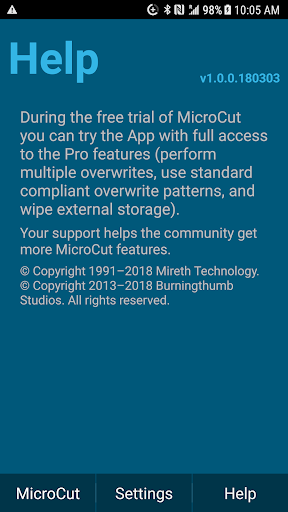
Ciesz się wspaniałym doświadczeniem podczas grania w MicroCut na komputerze z aplikacją MEMU App Player. Jest to potężny darmowy emulator Androida Umożliwia korzystanie z tysięcy aplikacji Androida. Free 7-Day Trial Period - you can try before you buy.
Free 7-Day Trial Period - you can try before you buy
Subscription - you support ongoing development for the community
MicroCut, formerly ShredIt Mobile, is the proven free space overwrite App, that has been serving customers since 1991 on desktop computers and since 2013 on mobile devices. MicroCut truly is: A cut above the rest(TM). Whether you need something simple like a single overwrite of zeros, or something complex like the US Department of Energy standard used in nuclear labs, MicroCut has you covered.
With all the choices that you have, between the simple and the sublime, why not choose proven software from an industry leader. You deserve the best, you deserve MicroCut.
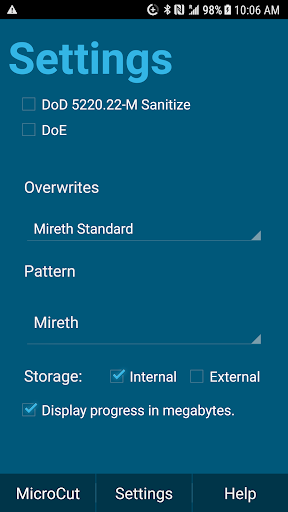
Data wipe the free space on an Android phone, tablet, or TV and protect your privacy with this easy to use App that will wipe the free space on any Android device so the data can’t be recovered. Easy to use, MicroCut, supports a configurable overwrite pattern, multiple overwrites, government standard write patterns (DoD, DoE), and wipes the internal and external storage on your device.
Features
- Wipes free space of internal and external storage (SD card flash drive memory)
- Proven Track Record: ShredIt software has been successfully wiping data since 1991.
- Easy to use: You will be up and running in less than a minute.
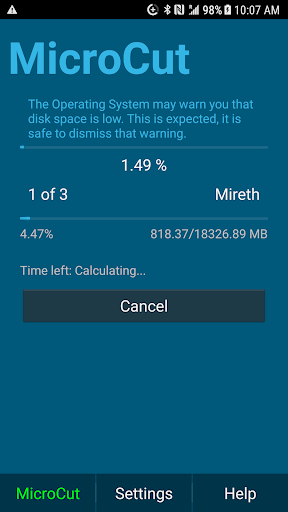
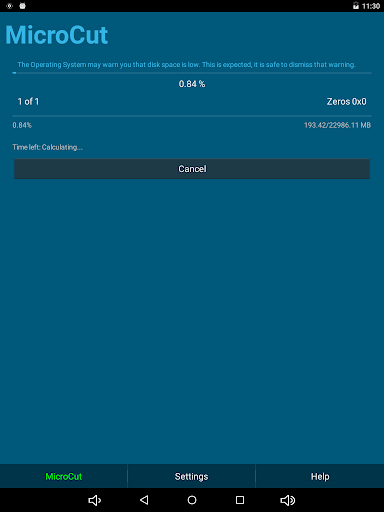
- With an accurate time estimate and status display, you’ll know exactly what’s happening and how long it will take.
- Standards Compliance: US Dept of Defense (DoD 5220), US Dept of Energy (DoE) electronic shredding standards, Gutmann
- Overwrite Options: A configurable overwrite pattern and number of overwrites.
Using MicroCut to wipe an Android phone, tablet or TV is easy! Here’s what you do:
1. Delete the private data and private apps from your device
2. Open MicroCut
3. From the Settings screen, pick your overwrite options. Your overwrite options determine how long it takes the job to complete. If you choose more overwrites, like using the Gutmann standard, the job will take longer. You can watch the progress on the Progress screen.
4. From the MicroCut screen, choose the MicroCut button to start the job
MicroCut does the rest for you. When the operation is complete, the private data on your Android device will be wiped so it can’t be recovered.
Usage Notes
Important Note - only data that is in the free space will be wiped; this needs to be very clear. The easiest way to do this is to uninstall the App(s), use MicroCut, and then if you still need the Apps, re-install them later.
For some Apps it's not possible to uninstall them. In those cases, you need to get the App info (Long press and drag the App onto the info icon), clear its cache, clear its storage, and force the App to stop. And then wipe the free space with MicroCut.
MicroCut is a subscription based, community supported, privacy tool with a 100% fully functional (all features / no ads) free trial period. If you want to make a volume purchase or cannot afford a subscription, please contact us directly to make other payment arrangements.
MicroCut - well-written, easy to use software, A cut above the rest(TM)
Pokaż więcej

1. Pobierz instalator MEmu i zakończ instalację

2. Uruchom MEmu, a następnie otwórz Google Play na pulpicie

3. Wyszukaj MicroCut w Google Play
Install
4. Pobierz i zainstaluj MicroCut
5. Po zakończeniu instalacji kliknij ikonę, aby rozpocząć

6. Użyj MEmu, aby doświadczyć MicroCut na swoim komputerze
MEmu Play to najlepszy emulator Androida, z którego korzysta ponad 100 milionów użytkowników, ciesząc się wyjątkowym doświadczeniem aplikacji na Androida. Technologia wirtualizacji MEmu pozwala na płynne uruchamianie tysięcy aplikacji Androida na komputerze, nawet tych najbardziej wymagających.
Większy ekran z lepszą grafiką; Długi czas, bez ograniczeń baterii lub danych mobilnych.
Pełna obsługa mapowania klawiszy dla precyzyjnego sterowania klawiaturą i myszą lub gamepadem.
Wiele kont gier lub zadań na jednym komputerze jednocześnie z menedżerem wielu instancji.
Use MicroCut on PC by following steps: