Mobile Scout App
Zaktualizowano
Aktualna wersja
5.66
Sprzedawca

Przestań martwić się nadmiernymi opłatami podczas korzystania z Mobile Scout App na telefonie komórkowym, uwolnij się od małego ekranu i ciesz się korzystaniem z aplikacji na znacznie większym wyświetlaczu. Od teraz korzystaj z aplikacji na pełnym ekranie za pomocą klawiatury i myszy. MEmu oferuje wszystkie zaskakujące funkcje, których się spodziewałeś: szybką instalację i łatwą konfigurację, intuicyjne sterowanie, koniec z ograniczeniami baterii, danych mobilnych i niepokojących połączeń. Zupełnie nowy MEmu 9 to najlepszy wybór do używania Mobile Scout App na twoim komputerze. Zakodowany przez naszą absorpcję, menedżer wielu instancji umożliwia otwarcie 2 lub więcej kont w tym samym czasie. A co najważniejsze, nasz ekskluzywny emulator może uwolnić pełny potencjał twojego komputera, sprawić, że wszystko będzie płynne i przyjemne.
Pokaż więcej
Ciesz się wspaniałym doświadczeniem podczas grania w Mobile Scout App na komputerze z aplikacją MEMU App Player. Jest to potężny darmowy emulator Androida pozwalający grać w tysiące gier na Androida. Achieve total operational awareness all season long with Taranis.
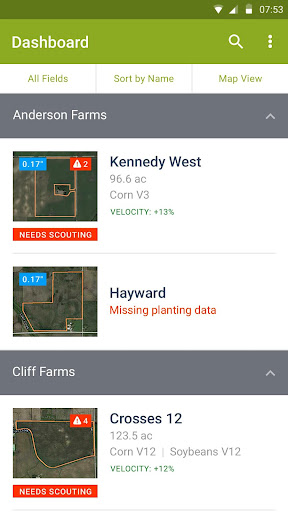
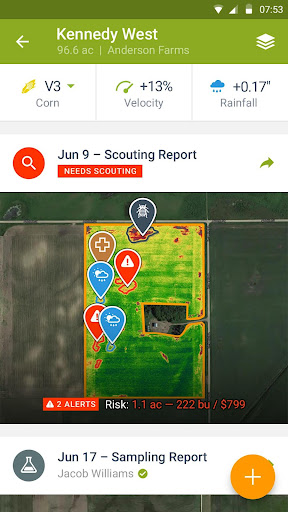
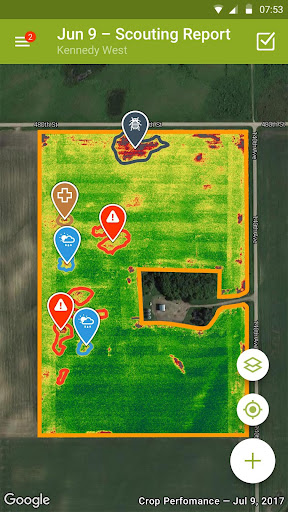
Achieve total operational awareness all season long with Taranis.
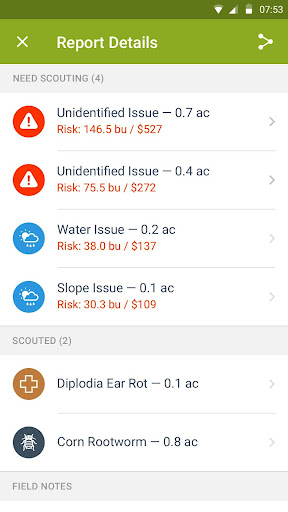
Take the power of imaging, analytics, and comprehensive reporting to the field with automatic issue detection and quantified alerts delivered to you and your team anytime, anywhere.
Prioritize fields to scout and sample, navigate to areas at risk, and record observations with just a few clicks. Utilize high-resolution or satellite layers to direct scouting activities, on or offline. Monitor field conditions like rainfall and GDDs, and access our large database of issues -- from weeds to diseases, insects, and disorders -- to record what you’re seeing.
Add geotagged notes, photos, and voice memos to reports to validate services you offer to your client base, then email those reports directly from the field.
This software application incorporates research and educational content from a variety of independent research institutions the Iowa State University of Science and Technology.
Continued use of GPS running in the background can dramatically decrease battery life.
FEATURES:
•Bring timely, actionable high-resolution imagery and map layers with you to the field
•Receive automatic notifications to alert you to potential crop performance issues and yield at risk
•Seamlessly import and export any and all data for optimal sharing and analysis
•Take geotagged field observations, photos, and voice memos while you're working
•Quickly update crop growth stages from your device
•Access all imagery, map layers, and reports online or offline
•Scout with our large database of weeds, diseases, insects, and disorders
•Track rainfall, field velocity, and GDDs across your operation
•Easy navigation between your organization’s field hierarchy
ABOUT TARANIS:
Taranis is an analytics company leveraging imagery to drive the next revolution in farm efficiency. With its network of aircraft and satellites, Taranis provides total field awareness enabling growers and their service providers to maximize yields and reduce costs. Taranis combines computer vision algorithms and machine learning to detect, predict, and alert to changes in crop conditions to help you prioritize where you scout, sample, and ultimately achieve your yield goals every season.
To sign up, visit http://www.taranis.ag
Pokaż więcej

1. Pobierz instalator MEmu i zakończ instalację

2. Uruchom MEmu, a następnie otwórz Google Play na pulpicie

3. Wyszukaj Mobile Scout App w Google Play
Install
4. Pobierz i zainstaluj Mobile Scout App
5. Po zakończeniu instalacji kliknij ikonę, aby rozpocząć

6. Użyj MEmu, aby doświadczyć Mobile Scout App na swoim komputerze
MEmu Play to najlepszy emulator Androida, z którego korzysta ponad 100 milionów użytkowników, ciesząc się wyjątkowym doświadczeniem aplikacji na Androida. Technologia wirtualizacji MEmu pozwala na płynne uruchamianie tysięcy aplikacji Androida na komputerze, nawet tych najbardziej wymagających.
Większy ekran z lepszą grafiką; Długi czas, bez ograniczeń baterii lub danych mobilnych.
Pełna obsługa mapowania klawiszy dla precyzyjnego sterowania klawiaturą i myszą lub gamepadem.
Wiele kont gier lub zadań na jednym komputerze jednocześnie z menedżerem wielu instancji.
Use Mobile Scout App on PC by following steps: