OBD Scanner ELM327: GaragePro
Zaktualizowano
Aktualna wersja
3.6.9
Sprzedawca

Przestań martwić się nadmiernymi opłatami podczas korzystania z OBD Scanner ELM327: GaragePro na telefonie komórkowym, uwolnij się od małego ekranu i ciesz się korzystaniem z aplikacji na znacznie większym wyświetlaczu. Od teraz korzystaj z aplikacji na pełnym ekranie za pomocą klawiatury i myszy. MEmu oferuje wszystkie zaskakujące funkcje, których się spodziewałeś: szybką instalację i łatwą konfigurację, intuicyjne sterowanie, koniec z ograniczeniami baterii, danych mobilnych i niepokojących połączeń. Zupełnie nowy MEmu 9 to najlepszy wybór do używania OBD Scanner ELM327: GaragePro na twoim komputerze. Zakodowany przez naszą absorpcję, menedżer wielu instancji umożliwia otwarcie 2 lub więcej kont w tym samym czasie. A co najważniejsze, nasz ekskluzywny emulator może uwolnić pełny potencjał twojego komputera, sprawić, że wszystko będzie płynne i przyjemne.
Pokaż więcej
Ciesz się wspaniałym doświadczeniem podczas grania w OBD Scanner ELM327: GaragePro na komputerze z aplikacją MEMU App Player. Jest to potężny darmowy emulator Androida pozwalający grać w tysiące gier na Androida. GaragePro is the perfect app for vehicle owners, repair shops and DIYers who want access to comprehensive OBD coverage (reading codes from all ECUs- Engine, Airbag, ABS, BCM and more), as well as special functions such as Injector coding, DPF regeneration, Throttle Reset, ABS (Brake) bleeding, Steering angle reset etc.
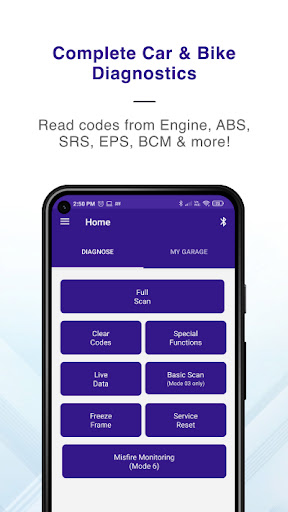
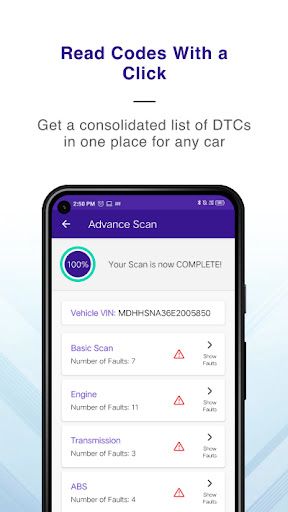
GaragePro is the perfect app for vehicle owners, repair shops and DIYers who want access to comprehensive OBD coverage (reading codes from all ECUs- Engine, Airbag, ABS, BCM and more), as well as special functions such as Injector coding, DPF regeneration, Throttle Reset, ABS (Brake) bleeding, Steering angle reset etc.
GaragePro offers you 200+ diagnostics functions in cars, bikes and heavy vehicles and can be used with any common OBD2 scanner like ELM327 scanners and others.
Key Features:
Advanced OBD Scanning: Scan and retrieve real-time data, trouble codes, and vehicle information directly from multiple systems such as Engine, ABS, SRS, EPS, BCM, Transmission, HVAC, Instrument cluster and many more.
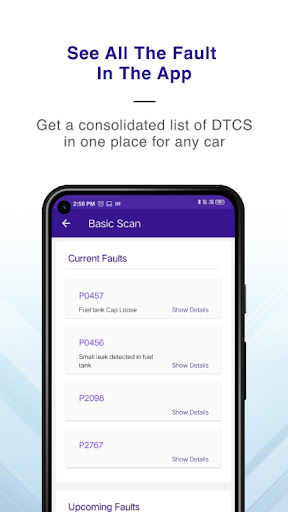
Comprehensive explanations: Gain insights into a vehicle's health and identify potential issues with our scanning PDFs. GaragePro provides detailed explanations for trouble codes, allowing you to troubleshoot and resolve problems efficiently.
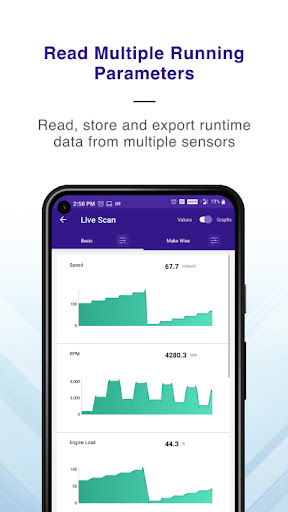
Live Data Monitoring: Monitor over 100 crucial sensor datapoints across vehicles in real-time, including RPM, speed, coolant temperature, fuel trim, and more. GaragePro offers intuitive graphs and customizable displays, empowering you to track a vehicle's performance and make informed decisions. What's more, export your data to excel to run your own analysis.
Check Engine Light/Dashboard Lights Assistance: Apart from reading fault codes, GaragePro allows you to clear the codes post repair as well. Over a million codes have been cleared in the past 12 months itself!
Multi Mode coverage: Unlike most apps that are limited to a few modes, GaragePro offers access to a wide variety of modes/service IDs such as, modes 01, 02, 03, 04, 06, 07, 09, 0A and many more.
More OBD features: Run Smog checks on your car, read vehicle info like VIN, calibration ID etc., do service/oil reset and read Freeze Frame data with GaragePro.
Monitor misfires with Mode 06 reading: Includes Exhaust Gas Sensor, Catalyst, EGR, VVT, EVAP, Exhaust Gas Sensor, Heater, Heated Catalyst, Secondary Air, Fuel System, Boost Pressure Control, NOx Adsorber, NOx/SCR Catalyst, Misfire Cylinder Data, PM Filter
Special functions: Perform Injector coding, DPF regeneration, Throttle Reset, ABS (Brake) bleeding, Steering angle reset, Power balance, Fuel Density Reset, Learning Value Reset, Actuation Tests, AC Control Module Reset, Indicator light reset, Brake Pedal Position Sensor learning, Light and Door customizations etc. Check the app for the full list applicable to your car.
PDF report and Support: Get a shareable PDF with code descriptions on scanning a vehicle and share it with your technician, friends, customers or store it for future comparisons. GaragePro also offers email and chat support to its customers.
Track mode/Acceleration test- 0-60,0-80, 0-100 and more. Turn on the track mode for accurate acceleration data.
Compatibility: The GaragePro OBD2 Scanner app works with any vehicle that’s compliant with the OBD2 standard (introduced in the USA in 1996). It is compatible with all American, Japanese, Korean, German & other European car & bike makes.
For motorcycles, you will need a connecting cable that connects the 16 pin OBD scanner with the bike OBD port. Bike diagnostics include DTC reading & deletion, live data stream & freeze frame data.
Wireless Connectivity: Say goodbye to tangled cables and embrace the wireless convenience of GaragePro. Our app seamlessly connects to your OBD2 Scanner using Bluetooth, eliminating the need for cumbersome cords.
Compatible OBD2 Scanners: GaragePro works with most bluetooth based OBD scanners, including generic ELM327 scanners. Our recommended scanners are GaragePro (our own scanner- https://garagepro.shop/), VGate, OBDLink, Veepeak, Carista. You can always check with us to get more details.
Pricing: Scanning and live data are free, with higher functions included in paid plans starting at $10 only
So, download GaragePro now and for any questions, email us at fix@carpm.in
Pokaż więcej

1. Pobierz instalator MEmu i zakończ instalację

2. Uruchom MEmu, a następnie otwórz Google Play na pulpicie

3. Wyszukaj OBD Scanner ELM327: GaragePro w Google Play
Install
4. Pobierz i zainstaluj OBD Scanner ELM327: GaragePro
5. Po zakończeniu instalacji kliknij ikonę, aby rozpocząć

6. Użyj MEmu, aby doświadczyć OBD Scanner ELM327: GaragePro na swoim komputerze
MEmu Play to najlepszy emulator Androida, z którego korzysta ponad 100 milionów użytkowników, ciesząc się wyjątkowym doświadczeniem aplikacji na Androida. Technologia wirtualizacji MEmu pozwala na płynne uruchamianie tysięcy aplikacji Androida na komputerze, nawet tych najbardziej wymagających.
Większy ekran z lepszą grafiką; Długi czas, bez ograniczeń baterii lub danych mobilnych.
Pełna obsługa mapowania klawiszy dla precyzyjnego sterowania klawiaturą i myszą lub gamepadem.
Wiele kont gier lub zadań na jednym komputerze jednocześnie z menedżerem wielu instancji.
Use OBD Scanner ELM327: GaragePro on PC by following steps: