OBD Scanner ELM327: GaragePro
อัปเดตเมื่อ
เวอร์ชันปัจจุบัน
3.6.9
ให้บริการโดย

เมื่อใช้ OBD Scanner ELM327: GaragePro บนโทรศัพท์ของคุณไม่ต้องกังวลกับการชาร์จไฟมากเกินไปปลดปล่อยตัวคุณเองจากหน้าจอขนาดเล็กและสนุกกับการใช้แอพนี้บนหน้าจอขนาดใหญ่ จากนี้ไปรับประสบการณ์เต็มหน้าจอของแอปพลิเคชันของคุณด้วยคีย์บอร์ดและเมาส์ MEmu มีคุณสมบัติที่น่าแปลกใจที่คุณคาดหวัง: การติดตั้งที่รวดเร็วและการตั้งค่าที่ง่ายควบคุมได้ง่ายไม่ จำกัด แบตเตอรี่ข้อมูลมือถือและการโทรที่รบกวน MEmu 9 ใหม่ล่าสุดเป็นตัวเลือกที่ดีที่สุดสำหรับการใช้ Meitu – โปรแกรมแก้ไขภาพแนวธรรมชาติ บนคอมพิวเตอร์ของคุณ ด้วยรหัสการดูดซึมของเราผู้จัดการหลายอินสแตนซ์ทำให้สามารถเปิดบัญชี 2 บัญชีขึ้นไปในเวลาเดียวกันได้ และที่สำคัญที่สุดเอ็นจิ้นจำลองพิเศษของเราสามารถปลดปล่อยศักยภาพของPCของคุณและทำให้ทุกอย่างราบรื่นและสนุกสนาน
แสดงเพิ่มเติม
ดาวน์โหลด OBD Scanner ELM327: GaragePro บน PC ด้วย MEmu Android Emulator สนุกกับการเล่นบนหน้าจอขนาดใหญ่ GaragePro is the perfect app for vehicle owners, repair shops and DIYers who want access to comprehensive OBD coverage (reading codes from all ECUs- Engine, Airbag, ABS, BCM and more), as well as special functions such as Injector coding, DPF regeneration, Throttle Reset, ABS (Brake) bleeding, Steering angle reset etc.
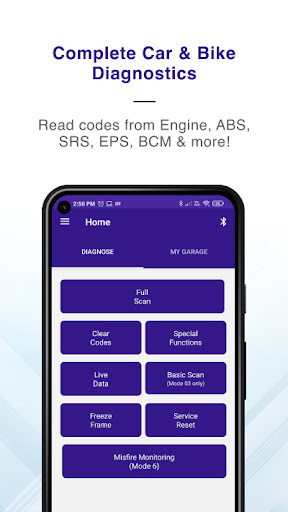
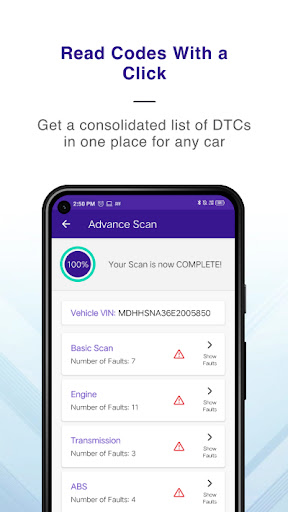
GaragePro is the perfect app for vehicle owners, repair shops and DIYers who want access to comprehensive OBD coverage (reading codes from all ECUs- Engine, Airbag, ABS, BCM and more), as well as special functions such as Injector coding, DPF regeneration, Throttle Reset, ABS (Brake) bleeding, Steering angle reset etc.
GaragePro offers you 200+ diagnostics functions in cars, bikes and heavy vehicles and can be used with any common OBD2 scanner like ELM327 scanners and others.
Key Features:
Advanced OBD Scanning: Scan and retrieve real-time data, trouble codes, and vehicle information directly from multiple systems such as Engine, ABS, SRS, EPS, BCM, Transmission, HVAC, Instrument cluster and many more.
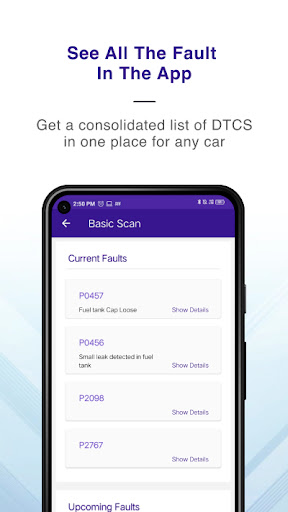
Comprehensive explanations: Gain insights into a vehicle's health and identify potential issues with our scanning PDFs. GaragePro provides detailed explanations for trouble codes, allowing you to troubleshoot and resolve problems efficiently.
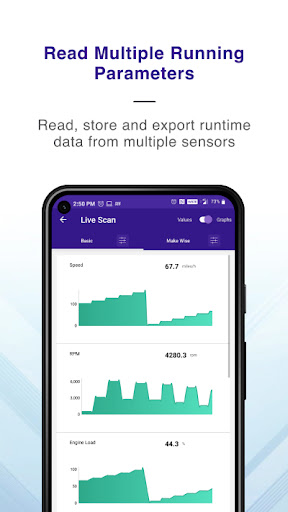
Live Data Monitoring: Monitor over 100 crucial sensor datapoints across vehicles in real-time, including RPM, speed, coolant temperature, fuel trim, and more. GaragePro offers intuitive graphs and customizable displays, empowering you to track a vehicle's performance and make informed decisions. What's more, export your data to excel to run your own analysis.
Check Engine Light/Dashboard Lights Assistance: Apart from reading fault codes, GaragePro allows you to clear the codes post repair as well. Over a million codes have been cleared in the past 12 months itself!
Multi Mode coverage: Unlike most apps that are limited to a few modes, GaragePro offers access to a wide variety of modes/service IDs such as, modes 01, 02, 03, 04, 06, 07, 09, 0A and many more.
More OBD features: Run Smog checks on your car, read vehicle info like VIN, calibration ID etc., do service/oil reset and read Freeze Frame data with GaragePro.
Monitor misfires with Mode 06 reading: Includes Exhaust Gas Sensor, Catalyst, EGR, VVT, EVAP, Exhaust Gas Sensor, Heater, Heated Catalyst, Secondary Air, Fuel System, Boost Pressure Control, NOx Adsorber, NOx/SCR Catalyst, Misfire Cylinder Data, PM Filter
Special functions: Perform Injector coding, DPF regeneration, Throttle Reset, ABS (Brake) bleeding, Steering angle reset, Power balance, Fuel Density Reset, Learning Value Reset, Actuation Tests, AC Control Module Reset, Indicator light reset, Brake Pedal Position Sensor learning, Light and Door customizations etc. Check the app for the full list applicable to your car.
PDF report and Support: Get a shareable PDF with code descriptions on scanning a vehicle and share it with your technician, friends, customers or store it for future comparisons. GaragePro also offers email and chat support to its customers.
Track mode/Acceleration test- 0-60,0-80, 0-100 and more. Turn on the track mode for accurate acceleration data.
Compatibility: The GaragePro OBD2 Scanner app works with any vehicle that’s compliant with the OBD2 standard (introduced in the USA in 1996). It is compatible with all American, Japanese, Korean, German & other European car & bike makes.
For motorcycles, you will need a connecting cable that connects the 16 pin OBD scanner with the bike OBD port. Bike diagnostics include DTC reading & deletion, live data stream & freeze frame data.
Wireless Connectivity: Say goodbye to tangled cables and embrace the wireless convenience of GaragePro. Our app seamlessly connects to your OBD2 Scanner using Bluetooth, eliminating the need for cumbersome cords.
Compatible OBD2 Scanners: GaragePro works with most bluetooth based OBD scanners, including generic ELM327 scanners. Our recommended scanners are GaragePro (our own scanner- https://garagepro.shop/), VGate, OBDLink, Veepeak, Carista. You can always check with us to get more details.
Pricing: Scanning and live data are free, with higher functions included in paid plans starting at $10 only
So, download GaragePro now and for any questions, email us at fix@carpm.in
แสดงเพิ่มเติม

1. ดาวน์โหลดตัวติดตั้ง MEmu และสิ้นสุดการติดตั้ง

2. เริ่ม MEmu จากนั้นเปิด Google Play บนหน้าแรก

3. ค้นหา OBD Scanner ELM327: GaragePro ใน Google Play
Install
4. ดาวน์โหลดและติดตั้ง OBD Scanner ELM327: GaragePro
5. เมื่อติดตั้งเสร็จให้คลิกที่ไอคอนเพื่อเริ่มใช้งาน

6. ใช้ MEmu เพื่อสัมผัสประสบการณ์ OBD Scanner ELM327: GaragePro บนคอมพิวเตอร์ของคุณ
MEmu Play คือโปรแกรมจำลอง Android ที่ดีที่สุด มีผู้ใช้มากกว่า 50 ล้านคน มอบประสบการณ์การใช้งานแอป Android ขั้นสุดยอดให้กับคุณ เทคโนโลยีจำลองเสมือนของ MEmu ช่วยให้คุณรันแอป Android หลายพันแอปบนคอมพิวเตอร์ได้อย่างราบรื่น แม้แอปที่กินทรัพยากรเครื่องสูงที่สุด
จอใหญ่และกราฟฟิกสวยกว่า; เล่นได้นาน, ไม่ต้องใช้แบตเตอรี่โทรศัพท์หรือเน็ตโทรศัพท์.
ระบบปรับแต่งปุ่มคีย์บอร์ดและเม้าส์ตามที่คุณเลือก
เล่นมากกว่าหนึ่งเกมบน PC ในเวลาเดียวกันด้วยระบบหลายจอหรือ Multi-Instance manager.
Use OBD Scanner ELM327: GaragePro on PC by following steps: