
PedsGuide
Zaktualizowano
Aktualna wersja
2.3.3
Sprzedawca

Przestań martwić się nadmiernymi opłatami podczas korzystania z PedsGuide na telefonie komórkowym, uwolnij się od małego ekranu i ciesz się korzystaniem z aplikacji na znacznie większym wyświetlaczu. Od teraz korzystaj z aplikacji na pełnym ekranie za pomocą klawiatury i myszy. MEmu oferuje wszystkie zaskakujące funkcje, których się spodziewałeś: szybką instalację i łatwą konfigurację, intuicyjne sterowanie, koniec z ograniczeniami baterii, danych mobilnych i niepokojących połączeń. Zupełnie nowy MEmu 9 to najlepszy wybór do używania PedsGuide na twoim komputerze. Zakodowany przez naszą absorpcję, menedżer wielu instancji umożliwia otwarcie 2 lub więcej kont w tym samym czasie. A co najważniejsze, nasz ekskluzywny emulator może uwolnić pełny potencjał twojego komputera, sprawić, że wszystko będzie płynne i przyjemne.
Pokaż więcej
Ciesz się wspaniałym doświadczeniem podczas grania w PedsGuide na komputerze z aplikacją MEMU App Player. Jest to potężny darmowy emulator Androida pozwalający grać w tysiące gier na Androida. In our commitment to creating a world of well-being for all children, Children’s Mercy Kansas City has created PedsGuide as a means for evidence-based pediatric clinical support guidelines to be available to health care providers.
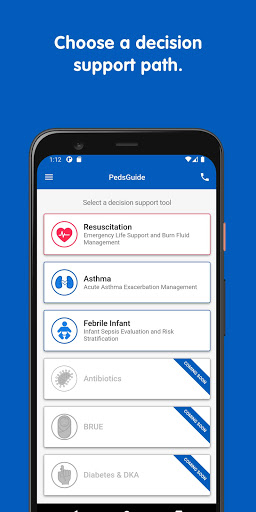
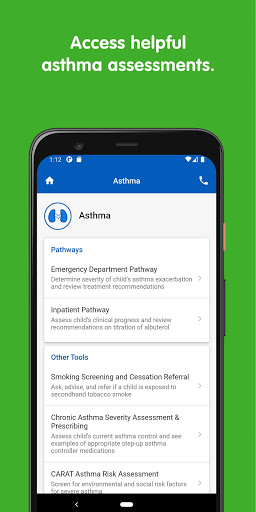
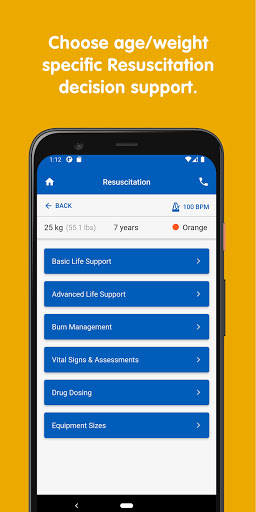
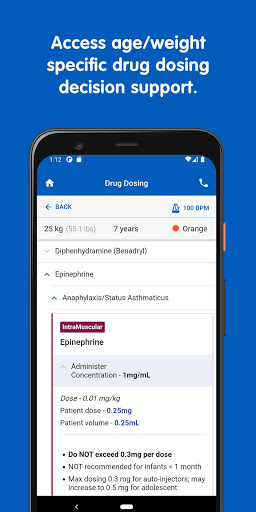
In our commitment to creating a world of well-being for all children, Children’s Mercy Kansas City has created PedsGuide as a means for evidence-based pediatric clinical support guidelines to be available to health care providers.
PedsGuide is a multi-module pediatric clinical decision support tool intended for use only by professional health care providers and emergency personnel for informational and educational purposes. *Each module provides users with a step-by-step interactive clinical decision support process, including reference material and/or contextually relevant information based on evidence-based practice and expert opinion routinely used in clinical practice, to assist in management of various acute illnesses in children.
The modules have been designed and optimized by an interdisciplinary team of clinicians, pharmacists, medical librarians, Human Factors scientists, and innovations professionals. Human Factors methodology was leveraged to guide interfaces that provide rapid access to information and assessment tools, which facilitate an efficient aid for care management while decreasing cognitive load for the user. Additionally, for users who seek care for patients at The Children’s Mercy Hospital, PedsGuide features a quick-call feature to contact the Children’s Mercy Contact Center and Critical Care Transport Team in our service area.
*While PedsGuide is a helpful tool, it is not intended to replace the independent judgment and evaluation of health care providers and emergency personnel. Healthcare providers and emergency personnel should not rely primarily on the tool to make a clinical diagnosis or treatment decision. Children's Mercy is not responsible for the correctness of any action you take based upon your use of PedsGuide.
Resuscitation features:
-Interactive flow algorithms to support advanced pediatric emergencies
-Weight and age-based tools for pediatric resuscitation, emergent medication dosing, cardiovascular drip calculation, rapid sequence intubation, acute burn assessment and fluid resuscitation guidelines, Glascow scoring, and much more!
Febrile Infant features:
-Evaluation and recommendation algorithms based on research and expert opinion for managing febrile infants less than 90 days old
-Easy-to-use checklists for entering basic clinical and medical history information to assess a patient’s risk of severe illness
-Visual aids that provide users an estimation of risk for severe illness
Asthma features:
-Management tools to assist health care providers providing care for acute asthma exacerbation for children 2 years and older
-Nationally recognized scoring systems
-Hour by hour, easy to follow decision support
Diabetes and DKA features:
-DKA diagnosis and initial management recommendations
-Weight and age-based tools for IVF and insulin drip titration using a two-bag system during DKA management
-Routine (non-DKA) diabetes management algorithms and insulin dose calculation guidelines
BRUE features:
-Transformed algorithm for Brief Resolved Unexplained Event assessment and treatment guidelines
Atopic Dermatitis and Infected Atopic Dermatitis Coming Soon
-Assessment and treatment guidelines
Stay tuned as we have multiple new modules in development!
Pokaż więcej

1. Pobierz instalator MEmu i zakończ instalację

2. Uruchom MEmu, a następnie otwórz Google Play na pulpicie

3. Wyszukaj PedsGuide w Google Play
Install
4. Pobierz i zainstaluj PedsGuide
5. Po zakończeniu instalacji kliknij ikonę, aby rozpocząć

6. Użyj MEmu, aby doświadczyć PedsGuide na swoim komputerze
MEmu Play to najlepszy emulator Androida, z którego korzysta ponad 100 milionów użytkowników, ciesząc się wyjątkowym doświadczeniem aplikacji na Androida. Technologia wirtualizacji MEmu pozwala na płynne uruchamianie tysięcy aplikacji Androida na komputerze, nawet tych najbardziej wymagających.
Większy ekran z lepszą grafiką; Długi czas, bez ograniczeń baterii lub danych mobilnych.
Pełna obsługa mapowania klawiszy dla precyzyjnego sterowania klawiaturą i myszą lub gamepadem.
Wiele kont gier lub zadań na jednym komputerze jednocześnie z menedżerem wielu instancji.
Use PedsGuide on PC by following steps: