
PlantNet Plant Identification
Zaktualizowano
Aktualna wersja
3.20.6
Sprzedawca

Przestań martwić się nadmiernymi opłatami podczas korzystania z PlantNet Plant Identification na telefonie komórkowym, uwolnij się od małego ekranu i ciesz się korzystaniem z aplikacji na znacznie większym wyświetlaczu. Od teraz korzystaj z aplikacji na pełnym ekranie za pomocą klawiatury i myszy. MEmu oferuje wszystkie zaskakujące funkcje, których się spodziewałeś: szybką instalację i łatwą konfigurację, intuicyjne sterowanie, koniec z ograniczeniami baterii, danych mobilnych i niepokojących połączeń. Zupełnie nowy MEmu 9 to najlepszy wybór do używania PlantNet Plant Identification na twoim komputerze. Zakodowany przez naszą absorpcję, menedżer wielu instancji umożliwia otwarcie 2 lub więcej kont w tym samym czasie. A co najważniejsze, nasz ekskluzywny emulator może uwolnić pełny potencjał twojego komputera, sprawić, że wszystko będzie płynne i przyjemne.
Pokaż więcej
Ciesz się wspaniałym doświadczeniem podczas grania w PlantNet Plant Identification na komputerze z aplikacją MEMU App Player. Jest to potężny darmowy emulator Androida pozwalający grać w tysiące gier na Androida. Pl@ntNet is an application that allows you to identify plants simply by photographing them with your smartphone.
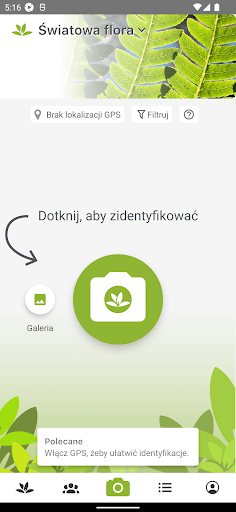
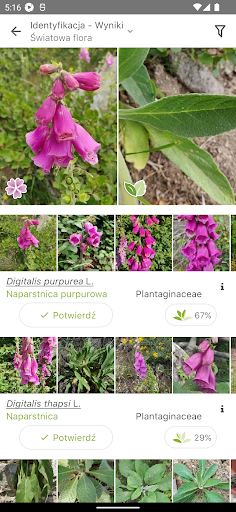
Pl@ntNet is an application that allows you to identify plants simply by photographing them with your smartphone. Very useful when you don't have a botanist on hand! Pl@ntNet is also a great citizen science project: all the plants you photograph are collected and analysed by scientists around the world to better understand the evolution of plant biodiversity and to better preserve it.
Pl@ntNet allows you to identify and better understand all kinds of plants living in nature: flowering plants, trees, grasses, conifers, ferns, vines, wild salads or cacti. Pl@ntNet can also identify a large number of cultivated plants (in parks and gardens) but this is not its primary purpose. We especially need Pl@ntNet’s users to inventory the wild plants, those that you can observe in nature of course but also those that grow on the sidewalks of our cities or in the middle of your vegetable garden!
The more visual information you give to Pl@ntNet about the plant you are observing, the more accurate the identification will be. There are indeed many plants that look alike from afar and it is sometimes small details that distinguish two species of the same genus. Flowers, fruits and leaves are the most characteristic organs of a species and it is them that should be photographed first. But any other detail can be useful, such as thorns, buds or hair on the stem. A photograph of the whole plant (or the tree if it is one!) is also very useful information, but it is often not sufficient to allow a reliable identification.
At present Pl@ntNet makes it possible to recognize about 20,000 species. We are still a long way from the 360,000 species living on earth, but Pl@ntNet is getting richer every day thanks to the contributions of the most experienced users among you. Don't be afraid to contribute yourself! Your observation will be reviewed by the community and may one day join the photo gallery illustrating the species in the application.
The new version of Pl@ntNet released in January 2019 includes many improvements and new features:
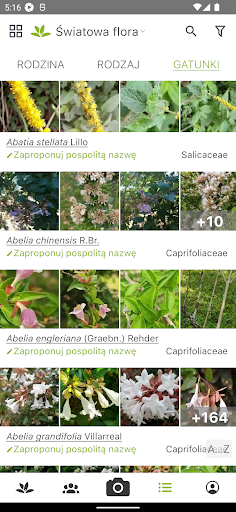
- The ability to filter recognized species by genus or family.
- The differentiated data revision that gives more weight to users who have demonstrated the most skills (in particular the number of species observed, validated by the community).
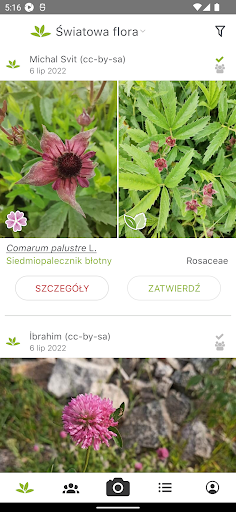
- The re-identification of shared observations, whether yours or those of other users of the application.
- The multi-flora identification that allows you to search for the photographed plant in all the flora of the application and not only in the one you have selected. Very useful when you are not sure what flora to look for.
- The selection of your favorite floras to access them more quickly.
- The navigation at different taxonomic levels in image galleries.
- The mapping of your observations.
- Links to many factsheets.
The web version of the application is also available at the following address: https://identify.plantnet.org/
Pokaż więcej

1. Pobierz instalator MEmu i zakończ instalację

2. Uruchom MEmu, a następnie otwórz Google Play na pulpicie

3. Wyszukaj PlantNet Plant Identification w Google Play
Install
4. Pobierz i zainstaluj PlantNet Plant Identification
5. Po zakończeniu instalacji kliknij ikonę, aby rozpocząć

6. Użyj MEmu, aby doświadczyć PlantNet Plant Identification na swoim komputerze
MEmu Play to najlepszy emulator Androida, z którego korzysta ponad 100 milionów użytkowników, ciesząc się wyjątkowym doświadczeniem aplikacji na Androida. Technologia wirtualizacji MEmu pozwala na płynne uruchamianie tysięcy aplikacji Androida na komputerze, nawet tych najbardziej wymagających.
Większy ekran z lepszą grafiką; Długi czas, bez ograniczeń baterii lub danych mobilnych.
Pełna obsługa mapowania klawiszy dla precyzyjnego sterowania klawiaturą i myszą lub gamepadem.
Wiele kont gier lub zadań na jednym komputerze jednocześnie z menedżerem wielu instancji.
Use PlantNet Plant Identification on PC by following steps: