SeaChat: Live Your Story
Zaktualizowano
Aktualna wersja
1.0.8.1793440887
Sprzedawca

Przestań martwić się nadmiernymi opłatami podczas korzystania z SeaChat: Live Your Story na telefonie komórkowym, uwolnij się od małego ekranu i ciesz się korzystaniem z aplikacji na znacznie większym wyświetlaczu. Od teraz korzystaj z aplikacji na pełnym ekranie za pomocą klawiatury i myszy. MEmu oferuje wszystkie zaskakujące funkcje, których się spodziewałeś: szybką instalację i łatwą konfigurację, intuicyjne sterowanie, koniec z ograniczeniami baterii, danych mobilnych i niepokojących połączeń. Zupełnie nowy MEmu 9 to najlepszy wybór do używania SeaChat: Live Your Story na twoim komputerze. Zakodowany przez naszą absorpcję, menedżer wielu instancji umożliwia otwarcie 2 lub więcej kont w tym samym czasie. A co najważniejsze, nasz ekskluzywny emulator może uwolnić pełny potencjał twojego komputera, sprawić, że wszystko będzie płynne i przyjemne.
Pokaż więcej
Ciesz się wspaniałym doświadczeniem podczas grania w SeaChat: Live Your Story na komputerze z aplikacją MEMU App Player. Jest to potężny darmowy emulator Androida Umożliwia korzystanie z tysięcy aplikacji Androida. Ready to enter a story that follows your lead?
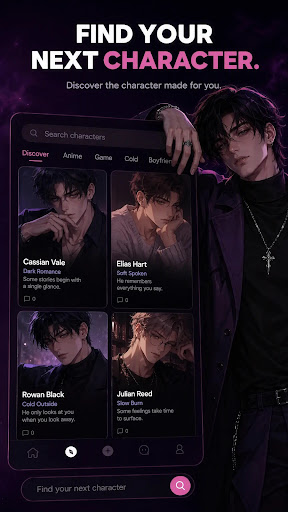
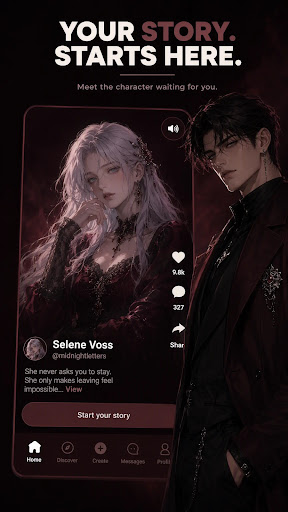
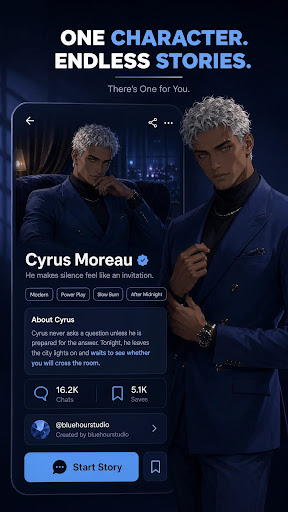
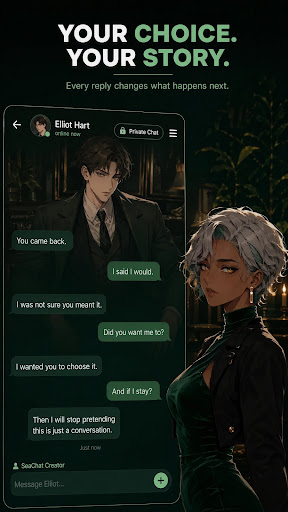
Ready to enter a story that follows your lead? Download SeaChat and meet a character made for your kind of fantasy.
SeaChat is an AI companion and interactive roleplay app where every conversation can become a story, every character has a world of their own, and you decide what happens next.
Meet unforgettable characters, explore romance, fantasy, mystery, drama, and adventure, or create someone who exists exactly as you imagined them. Your choices shape the mood, the relationship, and the direction of every story.
• Find Someone Worth Meeting
Discover characters with distinct personalities, secrets, desires, and backstories. From guarded rivals and dangerous strangers to loyal companions and slow-burn romances, every character offers a different reason to step inside.
No awkward introductions. Choose a character, enter the opening scene, and let the story begin.
• Stories That Follow Your Lead
Your words change what happens next. Move closer, pull away, challenge the character, change the mood, or take the story somewhere unexpected.
There is no single correct path and no predetermined version of who you have to be. The fantasy moves at your pace.
• Relationships That Keep Going
Return to the characters and storylines you care about. SeaChat helps ongoing conversations retain important moments, shared experiences, and evolving relationship context, so your next chapter does not have to start from zero.
• Create the Character You Want
Give your original character a name, appearance, personality, history, secrets, and a world to inhabit. Write the opening scene, keep your creation private, or publish it for others to discover.
Build the character you could never find anywhere else, then bring them to life through conversation.
• Discover Stories From Other Creators
Explore original characters and worlds created by the SeaChat community. Find your type, try a new relationship dynamic, or enter a story you would never have written for yourself.
Your fantasy. Your pace. Your story. Start your next story with SeaChat today!
Terms of Service: https://seachat.ai/terms
Privacy Policy: https://seachat.ai/privacy
Subscription Terms: https://seachat.ai/subscription-terms
Contact us: customer@seachat.ai
Pokaż więcej

1. Pobierz instalator MEmu i zakończ instalację

2. Uruchom MEmu, a następnie otwórz Google Play na pulpicie

3. Wyszukaj SeaChat: Live Your Story w Google Play
Install
4. Pobierz i zainstaluj SeaChat: Live Your Story
5. Po zakończeniu instalacji kliknij ikonę, aby rozpocząć

6. Użyj MEmu, aby doświadczyć SeaChat: Live Your Story na swoim komputerze
MEmu Play to najlepszy emulator Androida, z którego korzysta ponad 100 milionów użytkowników, ciesząc się wyjątkowym doświadczeniem aplikacji na Androida. Technologia wirtualizacji MEmu pozwala na płynne uruchamianie tysięcy aplikacji Androida na komputerze, nawet tych najbardziej wymagających.
Większy ekran z lepszą grafiką; Długi czas, bez ograniczeń baterii lub danych mobilnych.
Pełna obsługa mapowania klawiszy dla precyzyjnego sterowania klawiaturą i myszą lub gamepadem.
Wiele kont gier lub zadań na jednym komputerze jednocześnie z menedżerem wielu instancji.
Use SeaChat: Live Your Story on PC by following steps: