SkyGlass
Zaktualizowano
Aktualna wersja
2.0
Sprzedawca

Przestań martwić się nadmiernymi opłatami podczas korzystania z SkyGlass na telefonie komórkowym, uwolnij się od małego ekranu i ciesz się korzystaniem z aplikacji na znacznie większym wyświetlaczu. Od teraz korzystaj z aplikacji na pełnym ekranie za pomocą klawiatury i myszy. MEmu oferuje wszystkie zaskakujące funkcje, których się spodziewałeś: szybką instalację i łatwą konfigurację, intuicyjne sterowanie, koniec z ograniczeniami baterii, danych mobilnych i niepokojących połączeń. Zupełnie nowy MEmu 9 to najlepszy wybór do używania SkyGlass na twoim komputerze. Zakodowany przez naszą absorpcję, menedżer wielu instancji umożliwia otwarcie 2 lub więcej kont w tym samym czasie. A co najważniejsze, nasz ekskluzywny emulator może uwolnić pełny potencjał twojego komputera, sprawić, że wszystko będzie płynne i przyjemne.
Pokaż więcej
Ciesz się wspaniałym doświadczeniem podczas grania w SkyGlass na komputerze z aplikacją MEMU App Player. Jest to potężny darmowy emulator Androida pozwalający grać w tysiące gier na Androida. SkyGlass is the first live 3D flight tracking application of its kind.
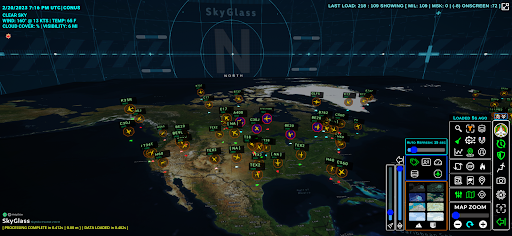
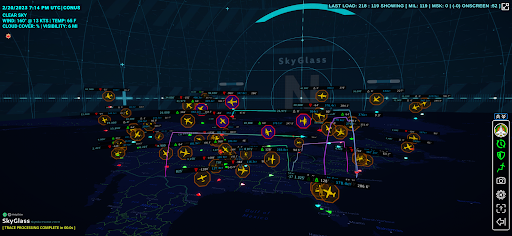
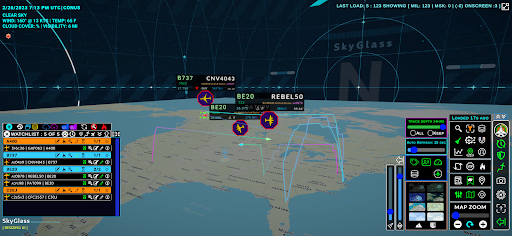
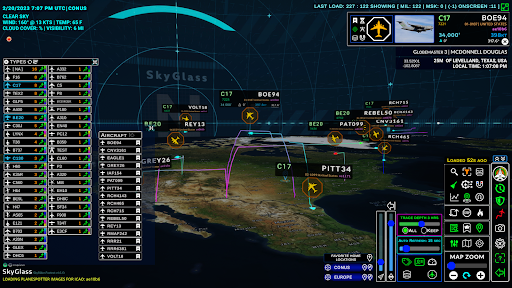
SkyGlass is the first live 3D flight tracking application of its kind. Aviation Intelligence just got an upgrade.
Featuring real time 3D aircraft traffic positions, 3D flight traces, historic flight data, flight history reporting, favorite aircraft watchlists, aircraft registration database, PlaneSpotter images and more using the ADSB Exchange crowdsourced network.
In SkyGlass you can...
• Track your favorite aircraft in an "insanely cool" dynamic 3D interface.
• View 3D flight traces with variable trace depth and custom colors
• View Military flights world wide in Mil-Mode or switch to standard mode to see traffic around a home location.
• Filter your view by aircraft Type or declutter by aircraft class: commercial & private, military, masked or emergency.
• Search flights by callsign, transponder id (ICAO hex code), tail number or transponder squawk code.
• Zoomable flat map with variable height control to create better visual separation.
• Build a watchlist and see who's wheels up or on-ground.
• Run flight history reports to see an aircraft or fleet's historic flight traces.
• Use Time Travel Mode to view historic flight traffic positions.
An amazing aviation intelligence tool for flight trackers, pilots, flight instructors, student pilots, plane spotters and aviation enthusiasts.
Visit the AVIAR Labs website for onboarding instructions, tutorials, community and help getting started.
Pokaż więcej

1. Pobierz instalator MEmu i zakończ instalację

2. Uruchom MEmu, a następnie otwórz Google Play na pulpicie

3. Wyszukaj SkyGlass w Google Play
Install
4. Pobierz i zainstaluj SkyGlass
5. Po zakończeniu instalacji kliknij ikonę, aby rozpocząć

6. Użyj MEmu, aby doświadczyć SkyGlass na swoim komputerze
MEmu Play to najlepszy emulator Androida, z którego korzysta ponad 100 milionów użytkowników, ciesząc się wyjątkowym doświadczeniem aplikacji na Androida. Technologia wirtualizacji MEmu pozwala na płynne uruchamianie tysięcy aplikacji Androida na komputerze, nawet tych najbardziej wymagających.
Większy ekran z lepszą grafiką; Długi czas, bez ograniczeń baterii lub danych mobilnych.
Pełna obsługa mapowania klawiszy dla precyzyjnego sterowania klawiaturą i myszą lub gamepadem.
Wiele kont gier lub zadań na jednym komputerze jednocześnie z menedżerem wielu instancji.
Use SkyGlass on PC by following steps: