Sweet Home 3D: Plan your house
Zaktualizowano
Aktualna wersja
7.5.1
Sprzedawca

Przestań martwić się nadmiernymi opłatami podczas korzystania z Sweet Home 3D: Plan your house na telefonie komórkowym, uwolnij się od małego ekranu i ciesz się korzystaniem z aplikacji na znacznie większym wyświetlaczu. Od teraz korzystaj z aplikacji na pełnym ekranie za pomocą klawiatury i myszy. MEmu oferuje wszystkie zaskakujące funkcje, których się spodziewałeś: szybką instalację i łatwą konfigurację, intuicyjne sterowanie, koniec z ograniczeniami baterii, danych mobilnych i niepokojących połączeń. Zupełnie nowy MEmu 9 to najlepszy wybór do używania Sweet Home 3D: Plan your house na twoim komputerze. Zakodowany przez naszą absorpcję, menedżer wielu instancji umożliwia otwarcie 2 lub więcej kont w tym samym czasie. A co najważniejsze, nasz ekskluzywny emulator może uwolnić pełny potencjał twojego komputera, sprawić, że wszystko będzie płynne i przyjemne.
Pokaż więcej
Ciesz się wspaniałym doświadczeniem podczas grania w Sweet Home 3D: Plan your house na komputerze z aplikacją MEMU App Player. Jest to potężny darmowy emulator Androida pozwalający grać w tysiące gier na Androida. Sweet Home 3D is the ideal house and apartment design planner.
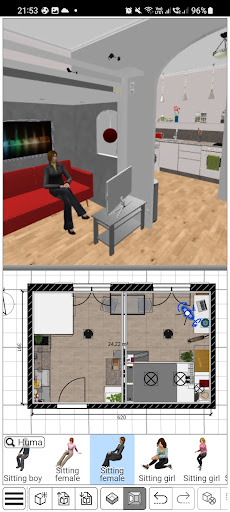
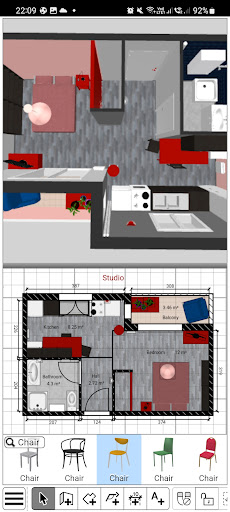
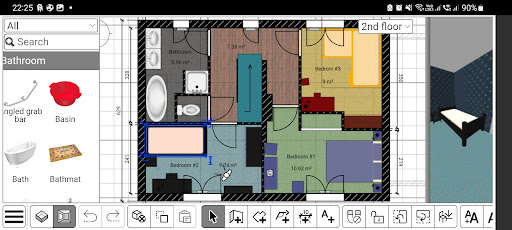
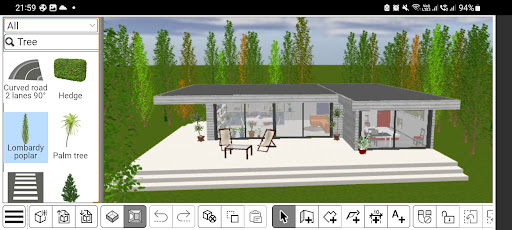
Sweet Home 3D is the ideal house and apartment design planner. Choose from a wide range of furniture and decor, adjust room layout and architecture with precision,
and explore your room designs in real-time in both 2D and 3D for an unparalleled planning experience.
Why Choose Sweet Home 3D?
- Navigate a user-friendly interface: Place furniture and design elements with simple drag-and-drop functionality, making it easy to navigate and customize
- Visualize your design both in 2D and 3D: Simultaneously watch 2D and 3D views to explore your design from different perspectives, giving you a true feel of your envisioned space
- Add furniture to your design: Choose from +800 furniture pieces, lighting options, and decor items with textures to furnish your space exactly as you envision
- Import additional 3D Models: Import custom 3D models to add unique furniture and decor elements, ensuring that your design is as unique as your style
- Be precise: Set precise dimensions and adjust room layouts to ensure accuracy and compatibility with your actual space
- Save your designs: Save your designs and review them later
- Multi-Language Support: Sweet Home 3D is available in multiple languages, making it accessible for users around the globe
Features at a glance:
- Easy-to-use 2D floor plan creation with instant 3D visualization
- +800 items with customizable dimensions and color
- Unlimited number of projects
- Seamless model and textures imports and customizable options for unique designs
- Access to a supportive online community for tips, inspiration, and feedback
Download Sweet Home 3D today and start bringing your dream home to life!
Subscribe to access to premium app features; subscription details are the following:
- Length: Weekly or yearly
- Free trial: Available only on selected subscriptions
- Your payment will be charged to your Google Play account upon confirmation of purchase
- You can manage your subscriptions and turn off auto-renewal in your Google Play Account settings after purchase
- Your subscription will automatically renew unless you cancel it at least 24 hours before the end of the current period
- The cost of renewal will be charged to your Google Play account within 24 hours prior to the end of the current subscription period
- If you cancel a subscription, it will remain active until the end of the current billing period. Auto-renewal will be disabled, but no refunds will be provided for the remaining period
- Any unused portion of a free trial period, if offered, will be forfeited upon purchasing a subscription
Terms & Conditions:
https://www.notion.so/Sweet-Home-3D-Terms-Conditions-13ccf6557a08802b971ec995f00eaf5f
Privacy Policy:
https://www.notion.so/Sweet-Home-3D-Privacy-Policy-138cf6557a08805ea75ad0f6dc7e9508
Pay a visit to our website for more information: https://www.sweethome3d.com
If you have any questions, please contact us at info@sweethome3d.com
Pokaż więcej

1. Pobierz instalator MEmu i zakończ instalację

2. Uruchom MEmu, a następnie otwórz Google Play na pulpicie

3. Wyszukaj Sweet Home 3D: Plan your house w Google Play
Install
4. Pobierz i zainstaluj Sweet Home 3D: Plan your house
5. Po zakończeniu instalacji kliknij ikonę, aby rozpocząć

6. Użyj MEmu, aby doświadczyć Sweet Home 3D: Plan your house na swoim komputerze
MEmu Play to najlepszy emulator Androida, z którego korzysta ponad 100 milionów użytkowników, ciesząc się wyjątkowym doświadczeniem aplikacji na Androida. Technologia wirtualizacji MEmu pozwala na płynne uruchamianie tysięcy aplikacji Androida na komputerze, nawet tych najbardziej wymagających.
Większy ekran z lepszą grafiką; Długi czas, bez ograniczeń baterii lub danych mobilnych.
Pełna obsługa mapowania klawiszy dla precyzyjnego sterowania klawiaturą i myszą lub gamepadem.
Wiele kont gier lub zadań na jednym komputerze jednocześnie z menedżerem wielu instancji.
Use Sweet Home 3D: Plan your house on PC by following steps: