Sweet Home 3D: Plan your house
Updated
Current Version
7.5.1
Offered By

Stop worrying about high battery drain when using Sweet Home 3D: Plan your house on your phone. Free yourself from the tiny screen and enjoy the app on a much larger display. From now on, get a full-screen experience of your app with the convenience of a keyboard and mouse. MEmu offers you all the surprising features you’d expect: quick installation and easy setup, intuitive controls, and no more worries about battery life, mobile data, or unexpected calls. The all-new MEmu 9 is the choice for using Sweet Home 3D: Plan your house on your computer. With the MEmu multi-instance manager, you can run two or more accounts at the same time. Most importantly, our exclusive emulation engine unlocks your PC’s full potential, delivering smooth and enjoyable performance.
Show more
Enjoy superb experience of using Sweet Home 3D: Plan your house on PC with MEMU App Player. It's a powerful free Android emulator which provides you with thousands of android apps for their desktop version. Enjoy connecting with friends and polishing your work with higher efficiency! Sweet Home 3D is the ideal house and apartment design planner.
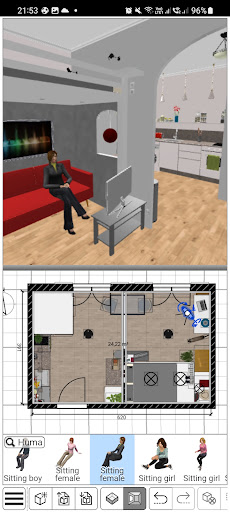
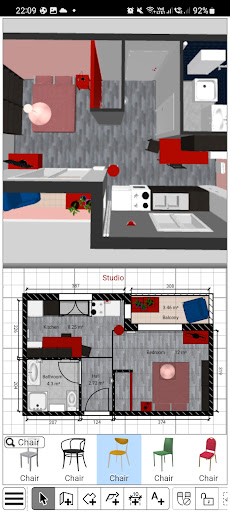
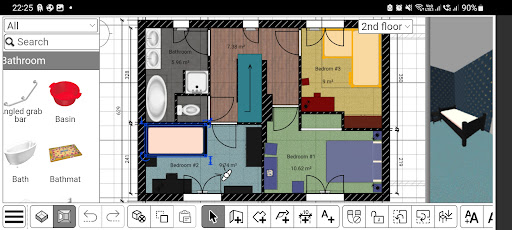
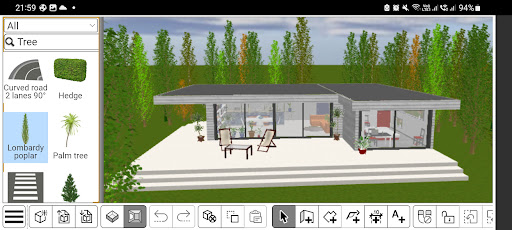
Sweet Home 3D is the ideal house and apartment design planner. Choose from a wide range of furniture and decor, adjust room layout and architecture with precision,
and explore your room designs in real-time in both 2D and 3D for an unparalleled planning experience.
Why Choose Sweet Home 3D?
- Navigate a user-friendly interface: Place furniture and design elements with simple drag-and-drop functionality, making it easy to navigate and customize
- Visualize your design both in 2D and 3D: Simultaneously watch 2D and 3D views to explore your design from different perspectives, giving you a true feel of your envisioned space
- Add furniture to your design: Choose from +800 furniture pieces, lighting options, and decor items with textures to furnish your space exactly as you envision
- Import additional 3D Models: Import custom 3D models to add unique furniture and decor elements, ensuring that your design is as unique as your style
- Be precise: Set precise dimensions and adjust room layouts to ensure accuracy and compatibility with your actual space
- Save your designs: Save your designs and review them later
- Multi-Language Support: Sweet Home 3D is available in multiple languages, making it accessible for users around the globe
Features at a glance:
- Easy-to-use 2D floor plan creation with instant 3D visualization
- +800 items with customizable dimensions and color
- Unlimited number of projects
- Seamless model and textures imports and customizable options for unique designs
- Access to a supportive online community for tips, inspiration, and feedback
Download Sweet Home 3D today and start bringing your dream home to life!
Subscribe to access to premium app features; subscription details are the following:
- Length: Weekly or yearly
- Free trial: Available only on selected subscriptions
- Your payment will be charged to your Google Play account upon confirmation of purchase
- You can manage your subscriptions and turn off auto-renewal in your Google Play Account settings after purchase
- Your subscription will automatically renew unless you cancel it at least 24 hours before the end of the current period
- The cost of renewal will be charged to your Google Play account within 24 hours prior to the end of the current subscription period
- If you cancel a subscription, it will remain active until the end of the current billing period. Auto-renewal will be disabled, but no refunds will be provided for the remaining period
- Any unused portion of a free trial period, if offered, will be forfeited upon purchasing a subscription
Terms & Conditions:
https://www.notion.so/Sweet-Home-3D-Terms-Conditions-13ccf6557a08802b971ec995f00eaf5f
Privacy Policy:
https://www.notion.so/Sweet-Home-3D-Privacy-Policy-138cf6557a08805ea75ad0f6dc7e9508
Pay a visit to our website for more information: https://www.sweethome3d.com
If you have any questions, please contact us at info@sweethome3d.com
Show more

1. Download MEmu installer and finish the setup

2. Start MEmu then open Google Play on the desktop

3. Search Sweet Home 3D: Plan your house in Google Play
Install
4. Download and Install Sweet Home 3D: Plan your house
5. On install completion click the icon to start

6. Enjoy using Sweet Home 3D: Plan your house on PC with MEmu
MEmu Play is the best Android emulator, and 100 million users already enjoy its superb Android app experience. Powered by advanced virtualization technology, it lets you enjoy thousands of Android apps smoothly on your PC—including the most graphics-intensive ones.
Bigger screen with better graphics; Long duration, without limitation of battery or mobile data.
Full Keymapping support for precise control of keyboard and mouse or gamepad.
Multiple game accounts or tasks on single PC at one time with Multi-Instance manager.
Use Sweet Home 3D: Plan your house on PC by following steps: